
Last updated on
Oct 10, 2026

Get the free ReproSource Diagnostic Test Order Form
We are not affiliated with any brand or entity on this form

Fill out
Complete the form online in a simple drag-and-drop editor.

eSign
Add your legally binding signature or send the form for signing.

Share
Share the form via a link, letting anyone fill it out from any device.

Export
Download, print, email, or move the form to your cloud storage.
Why pdfFiller is the best tool for your documents and forms


End-to-end document management
From editing and signing to collaboration and tracking, pdfFiller has everything you need to get your documents done quickly and efficiently.
Accessible from anywhere
pdfFiller is fully cloud-based. This means you can edit, sign, and share documents from anywhere using your computer, smartphone, or tablet.
Secure and compliant
pdfFiller lets you securely manage documents following global laws like ESIGN, CCPA, and GDPR. It's also HIPAA and SOC 2 compliant.
What is Diagnostic Test Order
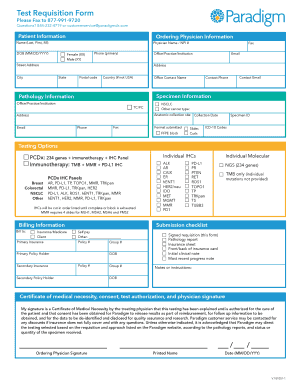
The ReproSource Diagnostic Test Order Form is a medical document used by healthcare providers to order diagnostic tests for patients, primarily focusing on genetic and hormone testing.
pdfFiller scores top ratings on review platforms




Who needs Diagnostic Test Order?
Explore how professionals across industries use pdfFiller.

Diagnostic Test Order is needed by:
-
Healthcare providers ordering diagnostic tests
-
Physicians needing patient consent for testing
-
Patients undergoing genetic or hormone testing
-
Billing departments for insurance information
-
Medical records staff for test documentation
-
Healthcare administrators overseeing consent processes
Comprehensive Guide to Diagnostic Test Order
What is the ReproSource Diagnostic Test Order Form?
The ReproSource Diagnostic Test Order Form serves a crucial role in diagnostic testing. This medical test order form is utilized by healthcare providers to request necessary diagnostic tests for their patients. Required information includes physician details, patient data, and necessary consent. Additionally, the form features a test menu that outlines available genetic and hormone testing options.
Purpose and Benefits of the ReproSource Diagnostic Test Order Form
This form significantly benefits both healthcare providers and patients by streamlining the testing process. Accurate billing and insurance information are essential to ensure timely processing and coverage. The form also emphasizes the importance of patient consent, requiring the provider’s signature to formally validate the form.
Key Features of the ReproSource Diagnostic Test Order Form
The ReproSource Diagnostic Test Order Form includes several distinct features that enhance usability and security. Fillable fields allow for easy completion, while checkboxes simplify the selection of tests. Important areas of the form include signature lines for both the physician and patient. Security measures also ensure that sensitive patient information is handled safely.
Who Needs the ReproSource Diagnostic Test Order Form?
This form is primarily designed for physicians and healthcare providers. While healthcare providers are required to sign the form, patients do not need to provide a signature. The ReproSource Diagnostic Test Order Form is typically required during routine diagnostic testing procedures, highlighting its importance in the healthcare system.
How to Fill Out the ReproSource Diagnostic Test Order Form Online
Filling out the ReproSource Diagnostic Test Order Form online is a straightforward process. Follow these steps for accurate completion:
-
Access the form via pdfFiller.
-
Fill in all mandatory fields, such as “Practice name*” and “Provider signature*.”
-
Double-check all entered information to avoid common errors.
Submitting the ReproSource Diagnostic Test Order Form
Submitting the ReproSource Diagnostic Test Order Form can be done through various methods. Options include both digital and physical submission, allowing flexibility for users. It is recommended to follow best practices for timely submission and to confirm tracking information to ensure receipt.
Security and Compliance Considerations for the ReproSource Diagnostic Test Order Form
When handling the ReproSource Diagnostic Test Order Form, security is paramount. The form incorporates strict security measures, including encryption and compliance with HIPAA regulations. Healthcare providers should implement data protection protocols to safeguard patient information and maintain secure medical records following submission.
How pdfFiller Can Help with the ReproSource Diagnostic Test Order Form
Using pdfFiller offers numerous advantages for completing the ReproSource Diagnostic Test Order Form. Key features include eSigning capabilities, filling out forms easily, and effective document management. By choosing pdfFiller, users can simplify their form-filling experience while ensuring security and compliance throughout the process.
Sample ReproSource Diagnostic Test Order Form
For those needing a visual reference, a sample ReproSource Diagnostic Test Order Form can be valuable. It displays an example of a completed form, highlighting essential sections, such as required signatures and filled-out details. Users can refer to this sample as they complete their individual forms, providing clarity and guidance.
Next Steps After Submission of the ReproSource Diagnostic Test Order Form
After submitting the ReproSource Diagnostic Test Order Form, it’s essential to understand the subsequent steps. Processing times may vary, so checking the status of submission is advisable. If corrections or resubmissions are necessary, knowing the steps to take can ensure a smooth and secure handling of the documentation.
How to fill out the Diagnostic Test Order
-
1.To begin, visit pdfFiller and log in to your account or create one if you don’t have it yet. Use the search function to locate the 'ReproSource Diagnostic Test Order Form.'
-
2.Once you find the form, click on it to open the PDF editor. Familiarize yourself with the available tools to navigate the document smoothly.
-
3.Before you begin filling out the form, gather all necessary information such as the provider's name, practice details, patient information, and insurance coverage details.
-
4.Start filling in the mandatory fields, marked with an asterisk, including 'Practice name,' 'Provider signature,' and 'Patient email.' You can click on each field to enter information directly.
-
5.Use checkboxes to indicate specific tests required from the test menu included in the form. Ensure that all selections reflect the tests discussed with the patient.
-
6.Review the information entered carefully. It's important that all details are accurate to avoid any processing delays.
-
7.Once all sections are completed, take a final look at the form to ensure everything is filled out correctly and the required signatures are included.
-
8.After reviewing, you can save the form by clicking on the save icon or download it directly to your device for submission. You can also submit it electronically if your practice allows.

Who needs to sign the ReproSource Diagnostic Test Order Form?
The form requires a signature from the physician, attesting to patient consent. Patients do not need to sign this form, but their details must be filled in.
What information is required on the form?
You must provide physician information, patient details, billing data, and insurance coverage. Additionally, the required tests from the provided menu need to be indicated.
How can I access the ReproSource Diagnostic Test Order Form?
You can access the form through pdfFiller by searching for its title. Make sure to log in or create an account to use the editing tools.
Is notarization required for this form?
No, the ReproSource Diagnostic Test Order Form does not require notarization. Ensure all signatures are from authorized personnel.
How do I submit the completed form?
The completed form can be submitted electronically via pdfFiller or downloaded and printed for physical submission, depending on your practice's procedures.
What should I do if I make a mistake on the form?
If you notice an error after filling out the form, use the editing tools in pdfFiller to correct it. Always double-check information before finalizing the form.
How long does it take to process the test after submission?
Processing times can vary based on the testing facility and type of tests ordered. It's advisable to check directly with the facility for specific timelines.
Related Forms





Get the latest insights from our blog


If you believe that this page should be taken down, please follow our DMCA take down process
here
.
This form may include fields for payment information. Data entered in these fields is not covered by PCI DSS compliance.