
Last updated on
Oct 10, 2026

Get the free Identity Verification Form
We are not affiliated with any brand or entity on this form

Fill out
Complete the form online in a simple drag-and-drop editor.

eSign
Add your legally binding signature or send the form for signing.

Share
Share the form via a link, letting anyone fill it out from any device.

Export
Download, print, email, or move the form to your cloud storage.
Why pdfFiller is the best tool for your documents and forms


End-to-end document management
From editing and signing to collaboration and tracking, pdfFiller has everything you need to get your documents done quickly and efficiently.
Accessible from anywhere
pdfFiller is fully cloud-based. This means you can edit, sign, and share documents from anywhere using your computer, smartphone, or tablet.
Secure and compliant
pdfFiller lets you securely manage documents following global laws like ESIGN, CCPA, and GDPR. It's also HIPAA and SOC 2 compliant.
What is FLC Identity Form
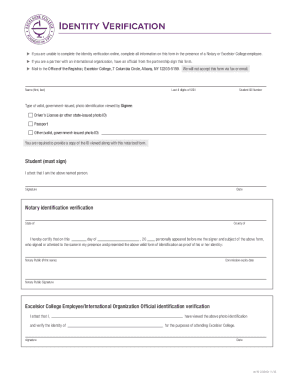
The Identity Verification Form is a document used by Fort Lewis College to confirm students' identities for financial aid purposes.
pdfFiller scores top ratings on review platforms




Who needs FLC Identity Form?
Explore how professionals across industries use pdfFiller.

FLC Identity Form is needed by:
-
Students applying for financial aid at Fort Lewis College
-
FLC verifying officials responsible for authenticating student identities
-
Notaries involved in the notarization process
-
Financial aid advisors assisting with student forms
-
Personnel in charge of student compliance and verification
Comprehensive Guide to FLC Identity Form
What is the Identity Verification Form?
The Identity Verification Form is a critical document for Fort Lewis College students, utilized primarily in financial aid processes. This form serves to authenticate the identity of students seeking financial assistance. To complete the form, students must provide a government-issued photo ID or have the form notarized. Essential elements of the form include the student’s signature, the date of signing, and their student ID number.
Purpose and Benefits of the Identity Verification Form
This form plays a vital role in securing financial aid for students, as it guarantees that the identity verification process is adhered to. A user-friendly platform like pdfFiller simplifies completing this form, providing a seamless experience for users. Security features ensure that sensitive information is adequately protected during the form submission process.
-
Facilitates financial aid eligibility verification
-
Streamlines online form completion
-
Enhances security in handling personal data
Who Needs to Complete the Identity Verification Form?
The Identity Verification Form must be filled out by various individuals involved in the verification process. This includes students who require financial aid, FLC verifying officials who authenticate submissions, and notaries who assist with the notarization process. Colorado students must particularly pay attention to these roles to ensure their eligibility for financial aid.
-
Students seeking financial aid
-
FLC verifying officials responsible for processing the form
-
Notaries providing notarization services
How to Fill Out the Identity Verification Form Online
To successfully complete the Identity Verification Form online, follow these detailed steps for filling in each section:
-
Access the form on pdfFiller and select the appropriate fields.
-
Carefully enter personal information as required.
-
Use fillable fields and checkboxes to indicate necessary preferences.
-
Review your entries and proceed to the integrated editing and signing features for completion.
Key Features of the Identity Verification Form
The Identity Verification Form includes several user-friendly attributes designed to facilitate the filling process. A variety of fillable fields make it easy to enter information based on individual requirements. Notarization compatibility is essential for compliance, while the option for electronic signatures via pdfFiller enhances efficiency.
-
Multiple fillable fields for convenience
-
Compatible with notarization procedures
-
Allows for electronic signatures
How to Sign and Notarize the Identity Verification Form
Understanding how to sign and notarize the Identity Verification Form is crucial. Users can choose between digital and wet signatures. For those unable to sign in person, notarization provides an alternative method to validate the document. Utilizing pdfFiller simplifies the process of handling electronic signatures securely.
-
Digital signatures are accepted for online submissions
-
Wet signatures are required for certain verification methods
-
Guidelines for notarization can be followed easily with assistance
Submission Process for the Identity Verification Form
The submission of the Identity Verification Form can be done through various methods, including online uploads or in-person delivery. It is crucial to remain aware of submission deadlines and procedures for tracking completed forms. Additionally, users should verify receipt of the form to ensure timely processing.
-
Submit forms online through pdfFiller or in person at designated offices
-
Be cognizant of deadlines for submission
-
Confirm receipt and processing timelines with the financial aid office
Common Errors and How to Avoid Them
Filling out the Identity Verification Form can lead to common mistakes that users should be aware of. Missing signatures or providing incorrect information are frequent errors that can complicate the verification process. To ensure accuracy before submission, utilize validation checklists and pdfFiller’s review features.
-
Check for required signatures before submission
-
Verify all personal information is accurate
-
Utilize pdfFiller’s tools to minimize errors
Security and Compliance when Using the Identity Verification Form
Privacy and data protection are paramount when utilizing the Identity Verification Form. pdfFiller employs robust security measures, including encryption, to protect sensitive information. Furthermore, the service is compliant with state and federal regulations, ensuring that users can complete the form safely.
-
256-bit encryption for secure data handling
-
Compliance with HIPAA and GDPR regulations
-
Protection of sensitive documents at all stages
Maximize Your Experience with pdfFiller
Using pdfFiller enhances the experience of completing the Identity Verification Form due to its intuitive features. The platform allows users to edit, sign, and share forms conveniently, increasing efficiency. Additionally, ongoing support and resources are available to assist users in the process.
-
Efficient editing and signing features
-
Access to support resources for user assistance
-
Streamlined identity verification process via pdfFiller
How to fill out the FLC Identity Form
-
1.To begin, access the Identity Verification Form by visiting pdfFiller and searching for the document by name.
-
2.Once located, open the form to view the fillable fields and instructions. Ensure you have your government-issued photo ID ready.
-
3.Start by filling in the required personal information, such as your student ID number, name, and date.
-
4.Be attentive to the sections that require signatures. As a student, you must sign and date the form in the designated areas.
-
5.Next, if you are having the form notarized, ensure you arrange for a notary public to review your identification and sign the document.
-
6.If a FLC verifying official is signing, ensure their presence and coordinate for their signature and date on the form.
-
7.After filling out the form, double-check all fields for accuracy and completeness, ensuring no required information is missing.
-
8.Once satisfied with the form, save your work as a draft or finalize it in pdfFiller.
-
9.Finally, download or submit the completed form as per the submission guidelines provided by Fort Lewis College, ensuring you retain a copy for your records.

Who is eligible to use the Identity Verification Form?
Any student applying for financial aid at Fort Lewis College, as well as FLC verifying officials and notaries involved in the verification process, are eligible to use this form.
Is there a deadline for submitting this form?
Yes, it's crucial to submit the Identity Verification Form as part of your financial aid application by the stated deadlines to ensure timely processing of aid eligibility.
How do I submit the completed Identity Verification Form?
The completed form can be submitted online through pdfFiller if supported, or by following specific submission instructions provided by Fort Lewis College.
What supporting documents do I need to provide with the form?
You must provide a valid government-issued photo ID and any other documentation as specified by Fort Lewis College’s financial aid guidelines.
What common mistakes should I avoid when filling out the form?
Ensure all required fields are filled completely, double-check signatures and dates, and verify that the form is appropriately notarized if required.
What is the processing time for the Identity Verification Form?
Processing times can vary, but it typically takes a few weeks. For specific inquiries, contact the financial aid office at Fort Lewis College.
What should I do if I need help with the form?
If you need assistance, reach out to the Fort Lewis College financial aid office or consult the help section on pdfFiller for guidance.
Related Forms




Get the latest insights from our blog


If you believe that this page should be taken down, please follow our DMCA take down process
here
.
This form may include fields for payment information. Data entered in these fields is not covered by PCI DSS compliance.