
Last updated on
Oct 10, 2026

Get the free Asset Verification Form
We are not affiliated with any brand or entity on this form

Fill out
Complete the form online in a simple drag-and-drop editor.

eSign
Add your legally binding signature or send the form for signing.

Share
Share the form via a link, letting anyone fill it out from any device.

Export
Download, print, email, or move the form to your cloud storage.
Why pdfFiller is the best tool for your documents and forms


End-to-end document management
From editing and signing to collaboration and tracking, pdfFiller has everything you need to get your documents done quickly and efficiently.
Accessible from anywhere
pdfFiller is fully cloud-based. This means you can edit, sign, and share documents from anywhere using your computer, smartphone, or tablet.
Secure and compliant
pdfFiller lets you securely manage documents following global laws like ESIGN, CCPA, and GDPR. It's also HIPAA and SOC 2 compliant.
What is Verification Form
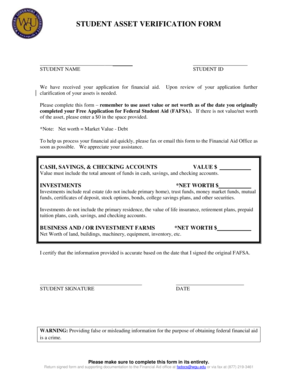
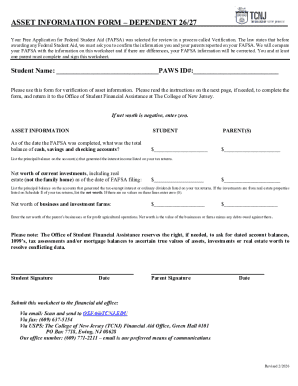
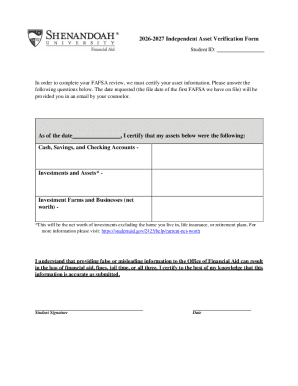
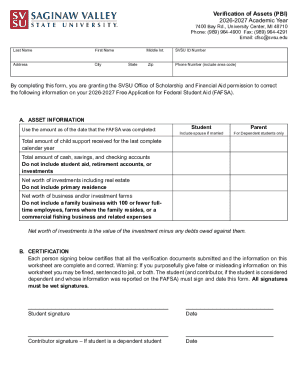
The Asset Verification Form is a financial aid document used by students and parents to verify financial information reported for FAFSA purposes.
pdfFiller scores top ratings on review platforms




Who needs Verification Form?
Explore how professionals across industries use pdfFiller.

Verification Form is needed by:
-
Students applying for federal student aid
-
Parents of students seeking financial assistance
-
Educational institutions processing financial aid
-
Financial aid officers reviewing applications
-
Tax preparers assisting families with financial submissions
Comprehensive Guide to Verification Form
What is the Asset Verification Form?
The Asset Verification Form is a crucial document used in the financial aid process for students seeking funding for their education. This form helps educational institutions verify the financial information provided by applicants on their Free Application for Federal Student Aid (FAFSA). It is essential for both students and parents, as it directly impacts the accuracy of student financial aid eligibility.
In particular, the form is required by colleges and universities to ensure that the financial details related to student assets, such as savings and investments, are accurate. This verification process supports the integrity of student financial aid distributions.
Purpose and Benefits of the Asset Verification Form
Educational institutions need the Asset Verification Form to ascertain the financial status of students applying for college financial aid. Accurate information provided on this form is integral to determining financial aid eligibility, as it influences the type and amount of aid a student may receive.
Students and parents benefit from this process by avoiding potential delays in aid processing and ensuring they receive the financial assistance they qualify for. Transparent financial disclosures reinforce the fairness and accuracy of financial aid distributions, which can alleviate stress during the aid application process.
Who Needs the Asset Verification Form?
The primary users of the Asset Verification Form are students and their parents. Both parties must complete the form to provide accurate financial information that aligns with the student aid verification requirements set by educational institutions.
The eligibility criteria for completing this form include being enrolled or planning to enroll in an eligible educational program. Understanding these requirements is vital for ensuring compliance during the financial aid application process.
How to Fill Out the Asset Verification Form Online (Step-by-Step)
Completing the Asset Verification Form online through pdfFiller is straightforward. Follow these steps to ensure accuracy:
-
Log into your pdfFiller account or create a new one.
-
Locate the Asset Verification Form in the document library.
-
Fill in all required fields with accurate financial data, including assets like cash and investments.
-
Double-check your entries for correctness.
-
Sign the form electronically and submit it as instructed.
Accuracy is critical, as errors can lead to processing delays in the financial aid application.
Common Errors and How to Avoid Them
When filling out the Asset Verification Form, users often make common mistakes that can negatively impact their financial aid processing. Frequent errors include incorrect data entry, failing to include all necessary financial sources, and misunderstanding the signature requirements.
To avoid these pitfalls, users should:
-
Review all information for accuracy before submission.
-
Refer to the instructions provided with the form to ensure compliance.
-
Seek assistance from financial aid advisors if uncertain about any fields.
Submission Methods and Delivery
Once the Asset Verification Form is completed, it is important to submit it correctly to ensure timely processing. Users can typically submit the form via mail, in person at the financial aid office, or electronically based on the institution's preference.
Acceptable methods of delivery may also vary by school, and it is essential to verify any potential fees associated with the submission, especially for mailed documents. Always check your institution's guidelines for the preferred submission methods.
Tracking Your Submission and Confirmation
After submitting the Asset Verification Form, it is crucial to confirm that it has been received. Users should track their submission status by following the procedures outlined by their institution.
Not checking or confirming submission can lead to unnecessary delays in financial aid processing. Institutions often provide online portals where students can verify the status of their submitted forms.
Security and Compliance in Using the Asset Verification Form
Security is paramount when handling the Asset Verification Form, as it contains sensitive financial information. Users should understand the importance of protecting their documents from unauthorized access.
pdfFiller offers various security features, including 256-bit encryption and compliance with regulations like HIPAA and GDPR, ensuring that user data is handled securely throughout the financial aid application process.
How pdfFiller Helps You with the Asset Verification Form
pdfFiller provides a range of features that assist users in effectively completing the Asset Verification Form. The platform allows for editing, eSigning, and easy document management, which minimizes errors and enhances the overall efficiency during the financial aid application process.
Users can benefit from the clear and user-friendly interface that simplifies the task of filling out the form, making it easier to navigate through complex financial information.
Getting Started with pdfFiller for Your Asset Verification Form
To begin filling out your Asset Verification Form, users are encouraged to access pdfFiller's comprehensive tools and resources. The platform is designed for ease of use, ensuring that all users, regardless of their experience level, can complete the form seamlessly.
In addition, support is readily available for any questions that arise during the completion of the form, reinforcing a smooth and efficient process for financial aid applicants.
How to fill out the Verification Form
-
1.Access pdfFiller and search for the Asset Verification Form using the search bar.
-
2.Open the form in the editor to begin completing it electronically.
-
3.Before starting, gather all necessary financial documentation regarding assets such as bank statements, investment summaries, and business records.
-
4.Navigate the form fields using your mouse or keyboard; click on each section to fill in the required details accurately.
-
5.Provide information about cash, savings, investments, and business net worth as instructed in the blank fields.
-
6.Read any written instructions carefully to ensure you fill out the form correctly and provide the necessary details.
-
7.After completing all fields, carefully review the form for accuracy and completeness to avoid mistakes.
-
8.Utilize the 'Save' option within pdfFiller to keep your progress saved electronically.
-
9.Once satisfied, download the completed form or use the 'Submit' option to send directly through pdfFiller as instructed.

What are the eligibility requirements for submitting the Asset Verification Form?
To submit the Asset Verification Form, students must be applying for federal student aid and have completed the FAFSA. Both students and parents need to provide accurate financial information for verification.
What is the deadline for submitting the Asset Verification Form?
Deadlines for submitting the Asset Verification Form may vary by institution, so it is crucial to check the specific requirements of your educational institution and submit the form as soon as possible to avoid delays in financial aid processing.
How can I submit the completed Asset Verification Form?
The completed Asset Verification Form can be submitted electronically through pdfFiller or printed and mailed to your educational institution's financial aid office depending on the submission methods they accept.
What supporting documents are required with the Asset Verification Form?
You typically need to submit financial documentation for cash, savings, investments, and possibly business records. Always check with your institution for their specific supporting document requirements.
What common mistakes should be avoided when filling out the form?
To avoid common mistakes, ensure that all fields are completed accurately, double-check numbers for correctness, and provide all required supporting documents to avoid delays in processing.
How long does processing take for the Asset Verification Form?
Processing times can vary, but it typically takes 4-6 weeks after submission for institutions to verify the information provided. For the most accurate timeline, check with your financial aid office.
Are there any fees associated with submitting the Asset Verification Form?
Generally, there are no fees to complete or submit the Asset Verification Form itself. However, there may be costs associated with obtaining supporting documents or submitting via mail.
Related Forms





Get the latest insights from our blog


If you believe that this page should be taken down, please follow our DMCA take down process
here
.
This form may include fields for payment information. Data entered in these fields is not covered by PCI DSS compliance.