
Last updated on
Oct 10, 2026

Get the free HOA General Proxy Form
We are not affiliated with any brand or entity on this form

Fill out
Complete the form online in a simple drag-and-drop editor.

eSign
Add your legally binding signature or send the form for signing.

Share
Share the form via a link, letting anyone fill it out from any device.

Export
Download, print, email, or move the form to your cloud storage.
Why pdfFiller is the best tool for your documents and forms


End-to-end document management
From editing and signing to collaboration and tracking, pdfFiller has everything you need to get your documents done quickly and efficiently.
Accessible from anywhere
pdfFiller is fully cloud-based. This means you can edit, sign, and share documents from anywhere using your computer, smartphone, or tablet.
Secure and compliant
pdfFiller lets you securely manage documents following global laws like ESIGN, CCPA, and GDPR. It's also HIPAA and SOC 2 compliant.
What is HOA Proxy
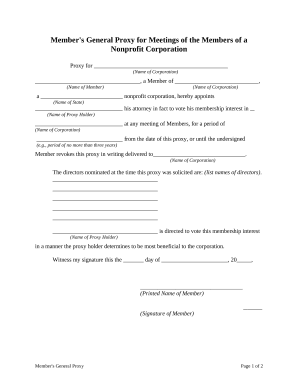
The HOA General Proxy Form is a business document used by homeowners' association (HOA) members to appoint a proxy holder to vote on their behalf at HOA meetings.
pdfFiller scores top ratings on review platforms




Who needs HOA Proxy?
Explore how professionals across industries use pdfFiller.

HOA Proxy is needed by:
-
Homeowners in an HOA who cannot attend meetings
-
Property owners looking to designate a representative
-
Individuals voting on matters affecting their community
-
Board members needing to confirm proxy voting procedures
-
Real estate agents assisting clients with HOA matters
Comprehensive Guide to HOA Proxy
What is the HOA General Proxy Form?
The HOA General Proxy Form is a crucial document for homeowners' associations that allows a property owner to appoint a representative, or proxy, to vote on their behalf during HOA meetings. This form facilitates effective communication and representation between the homeowner and the association, ensuring that absentee owners can still have their voices heard. For instance, a homeowner may decide to use a proxy during a meeting when they are out of town for work, or if they face mobility issues that prevent them from attending.
This form's primary purpose is to empower homeowners to participate in their community’s governance, even when they cannot be present. Examples include voting on budget approvals or board member elections, where a designated proxy can express the owner's preferences based on their wishes.
Purpose and Benefits of the HOA General Proxy Form
Using the HOA General Proxy Form presents numerous advantages for homeowners. The form simplifies participation in HOA meetings, particularly for those who cannot be on-site, thus increasing overall engagement within the community. By appointing a trusted proxy, homeowners can ensure that their interests are represented effectively, preserving their rights and involvement in HOA decisions.
Key benefits include improved community engagement, the ability to communicate preferences regarding critical issues, and maintaining a sense of ownership among absentee members, all while facilitating timely decision-making processes.
Key Features of the HOA General Proxy Form
The HOA General Proxy Form includes essential fields that homeowners must complete for it to be valid. Key sections of the form consist of:
-
Owner Name: The individual's name who holds the property.
-
Property Address: The specific address of the property within the HOA.
-
Signature: The owner's signature is required to authenticate the form.
-
Printed Name: This section ensures clarity regarding the owner’s identity.
-
Date: When the form is signed, providing a timeline for submission.
This fillable form is designed to be user-friendly, enabling homeowners to complete it accurately, which is essential for ensuring validity in the voting process.
Who Needs the HOA General Proxy Form?
The HOA General Proxy Form is typically needed by homeowners who are unable to attend meetings in person—this can include residents on vacation, those with health constraints, or anyone with scheduling conflicts. Within the context of an HOA, property ownership comes with responsibilities, including active participation in community governance.
Situations that necessitate the use of the proxy form may include business travel that overlaps with a crucial HOA meeting or family emergencies that prevent attendance. Ensuring that a qualified proxy is appointed is critical to maintaining the property's interests within the association.
How to Fill Out the HOA General Proxy Form Online (Step-by-Step)
To fill out the HOA General Proxy Form online using pdfFiller, follow these steps:
-
Log into your pdfFiller account and locate the HOA General Proxy Form.
-
Gather all necessary information, including your name, property details, and the proxy’s information.
-
Fill in the required fields accurately, ensuring that the owner’s signature is included.
-
Review the form for completeness and ensure all required fields are filled.
-
Submit the form, either electronically or by choosing your preferred submission method.
By adhering to these steps, homeowners can streamline the process, minimizing common errors and ensuring a valid proxy appointment.
Submission Methods for the HOA General Proxy Form
Homeowners have several options for submitting the completed HOA General Proxy Form. Common methods include:
-
In-Person: Submitting the form directly at an HOA meeting.
-
Email: Sending the form electronically to the designated HOA representative.
-
Regular Mail: Mailing the completed form to the HOA office if they accept postal submissions.
Along with submission methods, it's vital to be aware of any specific requirements, such as additional documents required when submitting the form. Homeowners should also familiarize themselves with state-specific rules regarding proxy submissions to ensure compliance.
Common Errors and How to Avoid Them
When completing the HOA General Proxy Form, homeowners often encounter errors that can invalidate their proxy appointment. Common mistakes include failing to sign the form, omitting the date, or incorrectly filling out the proxy’s details. To ensure accuracy, homeowners should:
-
Double-check that all required fields are completed.
-
Validate the proxy’s name and contact details for correctness.
-
Use a checklist to review the form before submission, ensuring all conditions are met.
By following these practices, homeowners can avoid inadvertent errors that could affect their representation.
Security and Compliance in Handling the HOA General Proxy Form
When dealing with sensitive documents such as the HOA General Proxy Form, security is paramount. pdfFiller prioritizes user safety by employing advanced security measures, including 256-bit encryption, to protect data integrity. Homeowners can confidently process their HOA General Proxy Form knowing that their information is safeguarded against unauthorized access.
pdfFiller's commitment to security also ensures compliance with regulations such as HIPAA and GDPR, providing users peace of mind while managing their important documents.
Final Steps After Submitting the HOA General Proxy Form
After submitting the HOA General Proxy Form, homeowners should take specific actions to ensure everything is in order. First, confirm the submission has been received by following up with the HOA. Keeping a record of any communications is important for tracking the status of appointments as the meeting date approaches.
Additionally, homeowners should prepare for the HOA meeting by reviewing agenda items and understanding what their proxy will be voting on. This preparation ensures that the proxy can effectively represent the homeowner's interests and preferences during the meeting.
Maximize your Experience with pdfFiller for the HOA General Proxy Form
To simplify the form-filling process for the HOA General Proxy Form, homeowners can leverage pdfFiller's robust features, including eSigning and secure form storage. These tools enhance user experience by making it easy to complete and manage documents online.
Testimonials from satisfied users emphasize the value of pdfFiller in streamlining document management, providing confidence and efficiency to homeowners as they navigate their HOA responsibilities.
How to fill out the HOA Proxy
-
1.To start, access pdfFiller and search for the 'HOA General Proxy Form' in the templates section.
-
2.Open the form by clicking on it; the editing interface will load automatically.
-
3.Gather necessary information such as the owner's name, property address, and details about the upcoming HOA meeting before filling out the form.
-
4.In the provided fields, enter the owner's name in 'OWNER NAME', fill in the 'PROPERTY ADDRESS / UNIT', and proceed to sign in the 'OWNER SIGNATURE' field with a digital signature.
-
5.Next, add the printed name of the owner in the 'PRINTED NAME' field and indicate the date of signing in the 'DATE' field.
-
6.Review the entire form for accuracy to ensure all required fields are completed correctly.
-
7.Once satisfied, save your work by clicking the 'Save' button, or download the completed form to your device.
-
8.To submit the form, choose the 'Submit' option if your HOA requires electronic filing, or download and print it for manual submission.

Who is eligible to use the HOA General Proxy Form?
Homeowners who are members of a homeowners association (HOA) and wish to appoint a proxy to vote on their behalf are eligible to use this form.
Is there a deadline for submitting the proxy form?
Typically, the proxy form should be submitted prior to the HOA meeting. It’s advisable to check the specific deadline set by your HOA.
How should I submit the HOA General Proxy Form?
You can submit the form electronically through pdfFiller, or print it out and submit it manually, depending on your HOA's submission procedures.
Are there any supporting documents required with the proxy form?
Generally, no additional documents are required; however, your HOA may have specific requirements, so verify with them.
What are some common mistakes to avoid when filling out the form?
Ensure all fields are filled in completely, check that the owner’s signature is present, and confirm that the date is correct to avoid issues.
How long does it take to process the submitted proxy form?
Processing times vary but expect confirmation of your proxy appointment before the scheduled meeting; check with your HOA for specifics.
Can I make changes to the proxy form after submitting?
If changes are needed, it's best to contact your HOA immediately to understand their procedure for updating submitted proxy forms.
Related Forms





Get the latest insights from our blog


If you believe that this page should be taken down, please follow our DMCA take down process
here
.
This form may include fields for payment information. Data entered in these fields is not covered by PCI DSS compliance.