
Last updated on
Oct 10, 2026

Get the free NextGen 529 Client Connect Series Gift Form
We are not affiliated with any brand or entity on this form

Fill out
Complete the form online in a simple drag-and-drop editor.

eSign
Add your legally binding signature or send the form for signing.

Share
Share the form via a link, letting anyone fill it out from any device.

Export
Download, print, email, or move the form to your cloud storage.
Why pdfFiller is the best tool for your documents and forms


End-to-end document management
From editing and signing to collaboration and tracking, pdfFiller has everything you need to get your documents done quickly and efficiently.
Accessible from anywhere
pdfFiller is fully cloud-based. This means you can edit, sign, and share documents from anywhere using your computer, smartphone, or tablet.
Secure and compliant
pdfFiller lets you securely manage documents following global laws like ESIGN, CCPA, and GDPR. It's also HIPAA and SOC 2 compliant.
What is 529 Gift Form
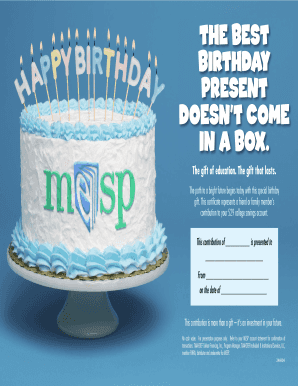
The NextGen 529 Client Connect Series Gift Form is a personal finance document used by contributors to make gift contributions to a loved one's NextGen 529 college savings account.
pdfFiller scores top ratings on review platforms




Who needs 529 Gift Form?
Explore how professionals across industries use pdfFiller.

529 Gift Form is needed by:
-
Parents looking to save for their child's college education
-
Family members wishing to contribute to a 529 savings plan
-
Friends who want to support a loved one's educational goals
-
Financial advisors guiding clients in educational savings
-
Educational institutions encouraging contributions to 529 plans
Comprehensive Guide to 529 Gift Form
What is the NextGen 529 Client Connect Series Gift Form?
The NextGen 529 Client Connect Series Gift Form allows contributors to make a gift contribution to a loved one's NextGen 529 account, specifically within Maine's college savings plan. This form is essential for individuals looking to support education savings efficiently. It requires specific information, including the contributor's and beneficiary's details, to ensure accurate processing. Completing this form can significantly impact a child’s ability to afford college expenses, laying a solid foundation for their future.
Purpose and Benefits of the NextGen 529 Gift Form
This gift form serves multiple purposes, primarily enabling users to contribute funds towards college savings. By completing the form, contributors can help loved ones accumulate funds for educational expenses. The financial benefits of early contributions include potential growth over time, making a significant difference when saving for college. Additionally, with no minimum contribution amounts or associated fees, this form is accessible to everyone, promoting a culture of gifting towards education.
Key Features of the NextGen 529 Gift Form
-
Fillable fields for essential information such as contributor's name and gift amount.
-
A straightforward submission process allows users to send the form via mail or fax to NextGen 529.
-
Clear instructions included in the form enhance user experience and clarity during completion.
Who Needs the NextGen 529 Gift Form?
The form is specifically designed for contributors such as grandparents, relatives, and friends who wish to make financial contributions to a 529 account. Beneficiaries of this form are typically children or friends who are saving for college. The NextGen 529 savings plan is available for anyone interested in participating, effectively giving users an opportunity to contribute towards higher education.
How to Fill Out the NextGen 529 Gift Form Online
-
Access the form using pdfFiller for editing.
-
Fill in each field, ensuring you include accurate information such as contributor and beneficiary details.
-
Double-check entries for accuracy before submission.
Using pdfFiller simplifies the form-filling process, allowing for efficient completion of the NextGen 529 gift form, promoting education savings.
Submission Methods for the NextGen 529 Gift Form
Users can submit the completed form by mailing or faxing it to NextGen 529, located in Pittsburgh, PA. It’s important to adhere to any contribution deadlines if applicable, although users should note that there are no fees for making gift contributions. This ensures the process remains straightforward and accessible for everyone.
Security and Compliance When Using the NextGen 529 Gift Form
Security is crucial when handling sensitive information, and pdfFiller implements robust measures such as 256-bit encryption and HIPAA compliance to protect users' data. Maintaining data privacy during online submissions is essential, providing peace of mind for users when storing or sharing completed forms on the pdfFiller platform.
What Happens After You Submit the Gift Form?
After submitting the gift form, users can expect a typical processing time for contributions along with a confirmation of receipt. To ensure everything progresses smoothly, you can check the status of your submission if needed. It's also helpful to be aware of common reasons for submission rejections, so you can address possible issues proactively.
Maximize Your Experience with pdfFiller
Utilizing pdfFiller enhances your document management experience, enabling you to create, edit, and securely save your NextGen 529 gift forms effortlessly. The platform offers user-friendly features that simplify the entire form-filling process while maintaining high-security standards to protect your data effectively.
How to fill out the 529 Gift Form
-
1.Start by accessing the pdfFiller website and log in to your account.
-
2.Use the search bar to find the 'NextGen 529 Client Connect Series Gift Form.'
-
3.Once located, click on the form to open it in the pdfFiller interface.
-
4.Before filling out the form, gather necessary information such as the contributor’s name, address, phone number, and desired gift amount.
-
5.Begin completing the form by clicking on each fillable field within the document.
-
6.Input your information accurately. Ensure spelling is correct and all numbers are clear.
-
7.After filling out all required fields, review the information for accuracy and completeness.
-
8.Look for options to navigate the document efficiently, using the toolbar to help you move between fields.
-
9.Once you have confirmed that all information is correct, proceed to finalize the form.
-
10.Choose the option to save your progress, download the filled form, or submit it directly through the platform.
-
11.If submitting, follow any prompts for submission methods, ensuring all necessary documentation is included as attachments or notes.

Who is eligible to use the NextGen 529 Client Connect Series Gift Form?
Any individual wishing to contribute to a NextGen 529 college savings account can use this form, including parents, family members, and friends. There are no specific eligibility requirements beyond the intention to support a designated beneficiary.
Is there a minimum contribution amount for using this form?
No, the NextGen 529 Gift Form does not stipulate a minimum gift amount for contributions. You can contribute any amount you feel comfortable with to support a loved one's college savings.
How do I submit the completed gift form?
To submit the completed form, you can either mail it along with your check to NextGen 529 in Pittsburgh, PA, or you can fax it if preferred. Ensure all information is accurate before submission.
What common mistakes should I avoid when filling out the form?
Common mistakes to avoid include incorrect spelling of names, overlooking required fields, and failing to review the information before submission. Double-check all entries to ensure there are no errors.
What processing time should I expect after submitting the gift form?
Processing times may vary, but typically, submissions are processed within a few weeks. Check with NextGen 529 for specific timeframes related to contributions.
Are there any fees associated with submitting this form?
There are no fees associated with making a contribution via the NextGen 529 Gift Form. It's designed to facilitate contributions without additional costs.
What information do I need to gather before filling out the form?
Before filling out the form, gather the contributor’s full name, address, phone number, and the amount you wish to contribute. This ensures a smooth completion of the form.
Related Forms




Get the latest insights from our blog


If you believe that this page should be taken down, please follow our DMCA take down process
here
.
This form may include fields for payment information. Data entered in these fields is not covered by PCI DSS compliance.