
Last updated on
Oct 10, 2026

Get the free Medicare Part B Drug Request Form
We are not affiliated with any brand or entity on this form

Fill out
Complete the form online in a simple drag-and-drop editor.

eSign
Add your legally binding signature or send the form for signing.

Share
Share the form via a link, letting anyone fill it out from any device.

Export
Download, print, email, or move the form to your cloud storage.
Why pdfFiller is the best tool for your documents and forms


End-to-end document management
From editing and signing to collaboration and tracking, pdfFiller has everything you need to get your documents done quickly and efficiently.
Accessible from anywhere
pdfFiller is fully cloud-based. This means you can edit, sign, and share documents from anywhere using your computer, smartphone, or tablet.
Secure and compliant
pdfFiller lets you securely manage documents following global laws like ESIGN, CCPA, and GDPR. It's also HIPAA and SOC 2 compliant.
What is Medicare Drug Request
The Medicare Part B Drug Request Form is a medical authorization document used by healthcare providers in Pennsylvania to request outpatient drug services under Medicare.
pdfFiller scores top ratings on review platforms




Who needs Medicare Drug Request?
Explore how professionals across industries use pdfFiller.

Medicare Drug Request is needed by:
-
Healthcare providers in Pennsylvania
-
Prescribers authorized to sign the form
-
Patients requiring Medicare Part B outpatient drug services
-
Medical administrative staff handling authorizations
-
Pharmacies processing outpatient drug requests
Comprehensive Guide to Medicare Drug Request
What is the Medicare Part B Drug Request Form?
The Medicare Part B Drug Request Form is a crucial document used by healthcare providers to obtain authorization for outpatient drug services under Medicare. This form facilitates the timely approval of necessary medications, ensuring that patients receive the treatments they require without unnecessary delays.
It requires comprehensive information, including member details, prescriber information, and specifics about the prescribed drug and diagnosis. The prescriber plays a pivotal role, as they must accurately complete and sign the form before submission.
Purpose and Benefits of the Medicare Part B Drug Request Form
The Medicare Part B Drug Request Form holds significant value for both prescribers and patients. By streamlining the authorization process for outpatient medications, this form enhances operational efficiency within healthcare practices and leads to faster access to medication for patients.
Patients benefit from receiving timely medications and treatments, ensuring compliance with Medicare regulations. This process not only supports healthcare providers but also reinforces the commitment to high-quality patient care.
Key Features of the Medicare Part B Drug Request Form
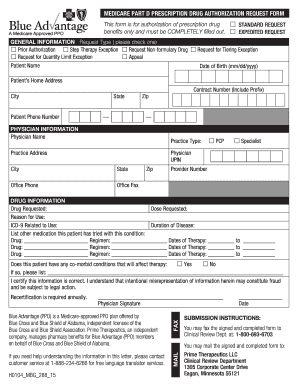
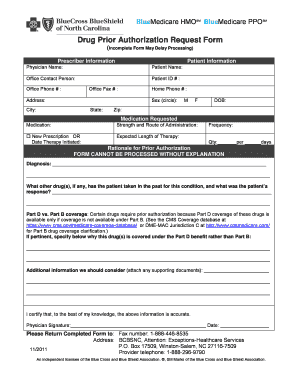
The form incorporates various essential elements that users should be aware of. It includes fillable fields, checkboxes, and clear instructions to aid prescribers in accurately completing the document.
-
Specific fax numbers are provided for different types of requests, enhancing submission accuracy.
-
The form is designed with security features to handle sensitive information safely.
Who Needs the Medicare Part B Drug Request Form?
This form is primarily necessary for healthcare providers who prescribe medications covered under Medicare. Patients enrolled in Medicare who require authorization for outpatient drugs also need to utilize this form.
Authorization becomes essential when prescribed treatments are not automatically covered, ensuring both compliance and timely access to medications.
How to Fill Out the Medicare Part B Drug Request Form Online (Step-by-Step)
Filling out the Medicare Part B Drug Request Form online can be done in a few simple steps using pdfFiller. Here’s a breakdown of the process:
-
Access the form through pdfFiller.
-
Accurately complete each fillable field—double-check for required information.
-
Review the entries to avoid common mistakes.
-
Submit the form following the correct submission method.
Submission Methods for the Medicare Part B Drug Request Form
There are several methods to submit the completed Medicare Part B Drug Request Form. Users can choose from the following options:
-
Fax the form to specified numbers depending on the type of request.
-
Submit online through platforms like pdfFiller, ensuring timely processing.
-
Mail the form to designated addresses based on request requirements.
Each method has its own processing timelines, so it's vital to choose the one that aligns with urgency and needs.
Common Errors and How to Avoid Them
Completing and submitting the Medicare Part B Drug Request Form comes with common pitfalls. Being aware of these can save time and prevent rejections:
-
Incomplete sections often lead to delays—ensure all fields are filled accurately.
-
Failure to provide necessary documentation can also cause issues, so check the requirements.
-
Validate all information before submission to mitigate errors.
What Happens After You Submit the Medicare Part B Drug Request Form?
Once the form is submitted, it undergoes a review process, which may take some time. Providers can track the status of their requests through the appropriate channels.
After review, prescribers will receive information regarding whether authorization is granted or denied, allowing them to proceed with patient treatment accordingly.
Security and Compliance Measures for the Medicare Part B Drug Request Form
When handling the Medicare Part B Drug Request Form, security is paramount. pdfFiller employs robust security measures, including 256-bit encryption and compliance with HIPAA regulations, to ensure that sensitive healthcare information is handled safely.
Prescribers must prioritize the secure submission of the form and take caution while filling it out to protect patient data effectively.
Start Using pdfFiller for Your Medicare Part B Drug Request Form Today!
Utilizing pdfFiller for your Medicare Part B Drug Request Form simplifies the entire process. With features that include easy editing and eSigning, prescribers can efficiently manage their forms while ensuring compliance with necessary regulations.
Embrace the ease of use and security that pdfFiller provides as you navigate the funding process for vital medications.
How to fill out the Medicare Drug Request
-
1.To access the Medicare Part B Drug Request Form on pdfFiller, visit the pdfFiller website and use the search bar to enter the form name.
-
2.Once you locate the form, click to open it. The interface will display the form with fillable fields, checkboxes, and instructions.
-
3.Before filling out the form, gather all necessary information, including detailed member and prescriber information, diagnosis information, and specifics about the drug required.
-
4.Navigate through the form's fields by clicking on each section. Use the cursor to input information as required by each field and check the relevant boxes.
-
5.Refer to any instructions provided within the document to ensure you complete all necessary sections accurately.
-
6.After filling out the form, take time to review all provided information for accuracy and completeness to avoid errors.
-
7.Finalize the form by ensuring that the prescriber has signed in the designated area. This is crucial for the authorization request.
-
8.Once completed, save the document within pdfFiller by selecting the save option in the toolbar. You can also download a copy for your records.
-
9.To submit the form, follow the submission instructions provided within the form itself or send the completed form to the specific fax numbers provided for different request types.

Who is eligible to complete the Medicare Part B Drug Request Form?
Eligible individuals include licensed prescribers who provide outpatient drug services under Medicare in Pennsylvania. They must complete and sign the form to request authorization.
What information is required to complete the form?
You will need detailed member information, prescriber and diagnosis details, information about the drug requested, and justification for the request. Gather this information before starting.
How should I submit the completed form?
The completed form should be submitted via fax to the designated numbers specified for different types of requests in the document. Ensure you send it to the correct number for prompt processing.
What common mistakes should be avoided when filling out this form?
Common mistakes include leaving required fields blank, providing incorrect member or drug information, and forgetting to obtain the prescriber's signature. Double-check all entries before submission.
What is the processing time for the Medicare Part B Drug Request Form?
Processing times can vary, but typically, you can expect a response within a few days to a week after submitting the request. Contact the processing party if you do not receive confirmation.
Are there any fees associated with submitting this form?
Typically, there are no fees directly associated with submitting the Medicare Part B Drug Request Form. However, please verify with your healthcare provider or institution for any specific administrative costs.
Where can I find additional support if needed while filling out the form?
For additional support, refer to the instructions included within the form or contact your healthcare provider’s administrative staff for guidance in completing the Medicare Part B Drug Request Form.
Related Forms






Get the latest insights from our blog


If you believe that this page should be taken down, please follow our DMCA take down process
here
.
This form may include fields for payment information. Data entered in these fields is not covered by PCI DSS compliance.