
Last updated on
Oct 19, 2026

Get the free South Africa Municipal Budget Report Form
We are not affiliated with any brand or entity on this form

Fill out
Complete the form online in a simple drag-and-drop editor.

eSign
Add your legally binding signature or send the form for signing.

Share
Share the form via a link, letting anyone fill it out from any device.

Export
Download, print, email, or move the form to your cloud storage.
Why pdfFiller is the best tool for your documents and forms


End-to-end document management
From editing and signing to collaboration and tracking, pdfFiller has everything you need to get your documents done quickly and efficiently.
Accessible from anywhere
pdfFiller is fully cloud-based. This means you can edit, sign, and share documents from anywhere using your computer, smartphone, or tablet.
Secure and compliant
pdfFiller lets you securely manage documents following global laws like ESIGN, CCPA, and GDPR. It's also HIPAA and SOC 2 compliant.
What is Municipal Budget Form
The South Africa Municipal Budget Report Form is a budget template used by municipalities in South Africa to report their budget details effectively.
pdfFiller scores top ratings on review platforms




Who needs Municipal Budget Form?
Explore how professionals across industries use pdfFiller.

Municipal Budget Form is needed by:
-
Chief Financial Officers (CFOs) of municipalities
-
Local government officials involved in budget planning
-
Municipal auditors and compliance officers
-
Financial analysts reviewing municipal budgets
-
Residents interested in municipal budget transparency
Comprehensive Guide to Municipal Budget Form
What is the South Africa Municipal Budget Report Form?
The South Africa Municipal Budget Report Form is essential for municipalities to report their budget details accurately. This form serves as a standardized municipal budget report template that helps ensure compliance and transparency in financial matters. It is crucial for budget reporting as it includes specific requirements, such as the necessity of the Chief Financial Officer's signature.
The document is specifically designed to aid municipalities in South Africa, emphasizing the importance of responsible financial governance.
Purpose and Benefits of the South Africa Municipal Budget Report Form
This form is vital for municipalities in managing their budgets effectively. By utilizing the South Africa budget template, municipalities can streamline budget planning and enhance accountability. It provides numerous benefits, including:
-
Aiding in accurate budget planning.
-
Ensuring compliance with regulations through an official template.
-
Promoting transparent financial governance.
Key Features of the South Africa Municipal Budget Report Form
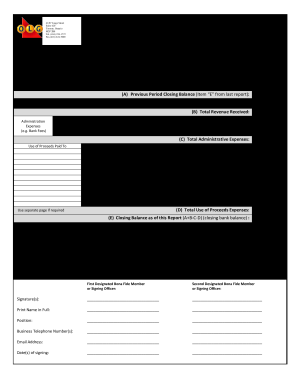
The South Africa Municipal Budget Report Form encompasses several key elements critical for completing a comprehensive budget report. Notable features of the form include:
-
Fields for essential details like 'Municipality Name' and 'CFO Name'.
-
Identification of reporting periods for accurate budget tracking.
-
Sections delineating different votes and sub-votes for various departments.
-
An essential signature field for the CFO, reinforcing accountability.
Who Needs the South Africa Municipal Budget Report Form?
The target audience for this form includes municipalities across South Africa, particularly those located in Limpopo. It is especially relevant for the CFOs tasked with completing and signing the document, as well as accounting and budget planning departments that rely on accurate financial documentation.
How to Fill Out the South Africa Municipal Budget Report Form Online
Filling out the South Africa Municipal Budget Report Form online is straightforward. Follow these detailed steps to ensure accuracy:
-
Navigate to the form on the pdfFiller platform.
-
Review each field, including 'Municipality Name', and 'CFO Name', ensuring you enter the correct information.
-
Use examples provided in the guidelines to complete sections accurately.
-
Double-check all entered data for accuracy and completeness before submitting.
Submission Methods for the South Africa Municipal Budget Report Form
Once completed, the South Africa Municipal Budget Report Form can be submitted through various accepted methods. Consider the following submission options:
-
Online submission via the pdfFiller platform.
-
Traditional paper submission methods.
-
Ensure timely submission to meet deadlines.
Be aware of any filing fees that may apply to your submission process.
Common Errors and How to Avoid Them
While filling out the form, some common mistakes can lead to rejection. To minimize errors, be mindful of the following points:
-
Ensure that all required fields, such as signatures, are completed.
-
Double-check all details before you finalize the submission to prevent errors.
-
Utilize available resources or tools for review and validation of your form.
Security and Compliance for the South Africa Municipal Budget Report Form
Data security and compliance are paramount when handling the South Africa Municipal Budget Report Form. pdfFiller implements robust security measures, including:
-
256-bit encryption for protecting sensitive information.
-
Compliance with regulations such as SOC 2 Type II, HIPAA, and GDPR.
This ensures that CFOs can have confidence that their municipal budget reports are handled with the utmost confidentiality.
Using pdfFiller for the South Africa Municipal Budget Report Form
Utilizing pdfFiller offers numerous advantages for managing the South Africa Municipal Budget Report Form. Key features include:
-
eSigning capabilities for quick approval.
-
Easy form filling with guided prompts.
-
Options for sharing completed documents efficiently.
Accessing the form through pdfFiller simplifies the process and minimizes potential errors.
Get Started with Your South Africa Municipal Budget Report Form Today!
Start filling out the South Africa Municipal Budget Report Form using the user-friendly tools available on the pdfFiller platform. With support and resources at your disposal, you can streamline the process and ensure accuracy in your budget reporting.
How to fill out the Municipal Budget Form
-
1.To access the South Africa Municipal Budget Report Form on pdfFiller, visit the website and search for the form by its name or upload it if you have a copy.
-
2.Open the form to view the fillable fields, which may include 'Municipality Name', 'CFO Name', and 'Reporting Period'. Click on each field to activate it.
-
3.Before starting, gather all necessary information related to the budget, including department votes, previous year’s budgets, and the current fiscal data.
-
4.Navigate through the form's sections, filling out each field accurately. Use the pdfFiller tools to check for any required signatures, especially from the CFO.
-
5.Review the completed form carefully for consistency and completeness, ensuring that all necessary fields are filled and signatures are secured.
-
6.Once you have reviewed the form, save your progress regularly to avoid losing information. Use the download button to save a copy or submit directly through pdfFiller.

Who needs to sign the South Africa Municipal Budget Report Form?
The form requires the signature of the Chief Financial Officer (CFO) of the municipality to validate the budget report. Ensure the CFO reviews the form before signing.
What is the purpose of the South Africa Municipal Budget Report Form?
This form is designed for municipalities to report their budget details, helping in transparency and proper budget planning across various departments.
Are there deadlines for submitting the Municipal Budget Report Form?
While specific deadlines can vary by municipality, it is generally advisable to submit the form well before budget hearings or fiscal year-end deadlines to comply with local regulations.
What supporting documents are needed when submitting this form?
Typically, you may need last year's budget reports, supporting financial documents, and any necessary approvals from local government bodies. Always check with your municipality for specific requirements.
What common mistakes should be avoided when filling out the form?
Ensure that all fields are completed accurately, double-check CFO signatures, and verify that all financial data is consistent. Also, avoid submitting the form without thorough review.
How can I submit the South Africa Municipal Budget Report Form?
You can submit the form directly through pdfFiller if submitting electronically or print it for mail submission. Check your municipality's submission guidelines for specifics.
What happens after I submit the form?
After submission, the form is typically reviewed by local government officials, and you may receive feedback or requests for additional information if necessary.
Related Forms




Get the latest insights from our blog


If you believe that this page should be taken down, please follow our DMCA take down process
here
.
This form may include fields for payment information. Data entered in these fields is not covered by PCI DSS compliance.