
Last updated on
Oct 13, 2026

Get the free 2026-2027 Citizenship Certification Form
We are not affiliated with any brand or entity on this form

Fill out
Complete the form online in a simple drag-and-drop editor.

eSign
Add your legally binding signature or send the form for signing.

Share
Share the form via a link, letting anyone fill it out from any device.

Export
Download, print, email, or move the form to your cloud storage.
Why pdfFiller is the best tool for your documents and forms


End-to-end document management
From editing and signing to collaboration and tracking, pdfFiller has everything you need to get your documents done quickly and efficiently.
Accessible from anywhere
pdfFiller is fully cloud-based. This means you can edit, sign, and share documents from anywhere using your computer, smartphone, or tablet.
Secure and compliant
pdfFiller lets you securely manage documents following global laws like ESIGN, CCPA, and GDPR. It's also HIPAA and SOC 2 compliant.
What is Citizenship Certification
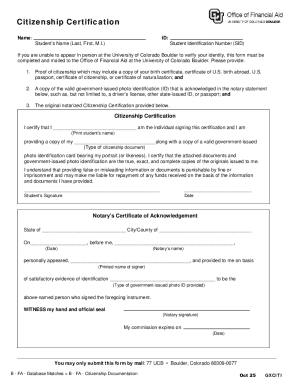
The 2026-2027 Citizenship Certification Form is an education document used by Florida State University to verify students' citizenship status for financial aid and enrollment.
pdfFiller scores top ratings on review platforms




Who needs Citizenship Certification?
Explore how professionals across industries use pdfFiller.

Citizenship Certification is needed by:
-
Students needing financial aid verification
-
International students establishing citizenship status
-
University admissions and enrollment officers
-
Notaries for signing and notarizing
-
Financial aid advisors
-
Compliance officers
Comprehensive Guide to Citizenship Certification
What is the 2 Citizenship Certification Form?
The 2 Citizenship Certification Form is essential for Florida State University students who need to verify their citizenship status. This form plays a critical role in confirming eligibility for various university processes, especially for those whose citizenship status cannot be verified through the Social Security Administration or the Department of Homeland Security. It is typically required for first-time applicants or students whose citizenship status needs confirmation.
Understanding the significance of this form is crucial for students as it ensures their access to financial aid and adherence to legal documentation requirements within the university system.
Purpose and Benefits of the 2 Citizenship Certification Form
The primary purpose of the 2 Citizenship Certification Form is to facilitate citizenship verification. This is particularly necessary to qualify for financial aid, as many financial programs require confirmation of citizenship status. Moreover, the form streamlines the process for students, allowing them to confirm their status efficiently without unnecessary delays.
Benefits of using this citizenship verification form include expedited processing of financial aid applications and reducing the risk of legal complications due to incomplete documentation.
Who Needs to Complete the 2 Citizenship Certification Form?
Typically, students who have not been verified for citizenship will need to complete the 2 Citizenship Certification Form. This includes demographics such as first-time university applicants and those who have changed their legal status but have not provided updated verification. Ensuring you are categorized correctly can prevent delays.
Specific groups may necessitate using this form to satisfy eligibility for financial aid or local resident classification. Recognizing these groups helps streamline the process for those needing to verify their citizenship status.
Required Documents and Supporting Materials
To successfully complete the 2 Citizenship Certification Form, students must provide specific documents that prove their citizenship or eligible non-citizen status. Required documentation typically includes:
-
U.S. Passport
-
Birth Certificate
-
Certificate of Naturalization
-
Permanent Resident Card
The importance of these documents cannot be overstated, as they form the foundation of the verification process required by Florida State University.
Step-by-Step Guide to Filling Out the 2 Citizenship Certification Form Online
Completing the 2 Citizenship Certification Form online via pdfFiller is straightforward. Follow these steps to ensure a smooth submission:
-
Access the form on pdfFiller’s platform.
-
Fill in all required fields, ensuring accuracy.
-
Review the information provided, checking for any errors.
-
Sign the form as required; electronic signatures are not accepted, so ensure you print and physically sign it.
-
Notarize the document per the form’s instructions.
-
Submit the completed form as directed.
Paying attention to details, especially regarding signature and notarization requirements, will ensure that your submission is processed without issues.
Common Errors and How to Avoid Them When Submitting the Citizenship Certification Form
Applicants often make specific mistakes when completing the 2 Citizenship Certification Form. Common errors include:
-
Omitting required signatures
-
Providing incorrect or outdated documentation
-
Failing to complete mandatory fields
To avoid these mistakes, thoroughly review the form before submission, ensuring all information is accurate and up-to-date. Double-checking each section will help minimize potential delays.
How to Notarize the 2 Citizenship Certification Form
Notarization is a necessary step in finalizing the 2 Citizenship Certification Form. This process involves a notary public verifying the identity of the signer and witnessing the signing of the document. Students can expect the following steps during notarization:
-
Present valid ID to the notary.
-
Sign the form in the presence of the notary.
-
Receive the notary's seal and signature on the document.
Completing this step correctly is vital to ensure the form is accepted by the university.
Submission Methods and Processing Time for the 2 Citizenship Certification Form
Once the 2 Citizenship Certification Form is completed and notarized, students can submit the form through various methods, including in-person delivery or postal service. Processing times may vary, but students should allow for adequate time for verification. Typically, the university advises checking the processing timeline upon submission to manage expectations effectively.
Tracking submissions may also be available through the university’s system, providing students with peace of mind regarding their application status.
What Happens After You Submit the Citizenship Certification Form?
After submitting the 2 Citizenship Certification Form, students should anticipate receiving confirmation from the university regarding their application status. It is advisable to stay proactive by checking for any follow-up actions required on their part.
Understanding the typical timelines for processing this form will help manage expectations and prepare students for any additional documentation that may be requested.
Enhance Your Experience with pdfFiller for the 2 Citizenship Certification Form
Leveraging pdfFiller's tools can significantly enhance the experience of filling out the 2 Citizenship Certification Form. With its robust document management features, users can edit, eSign, and securely submit documents with ease.
Using pdfFiller ensures that students manage their citizenship form securely, benefiting from 256-bit encryption and compliance with industry standards like HIPAA and GDPR, keeping sensitive information safe throughout the process.
How to fill out the Citizenship Certification
-
1.Access the 2026-2027 Citizenship Certification Form on pdfFiller by visiting the website and searching for the form name in the search bar.
-
2.Open the form and familiarize yourself with the layout, noting the fillable areas that require your input.
-
3.Before starting, gather necessary documents such as your U.S. Passport, Birth Certificate, or other proof of citizenship.
-
4.In the first field, enter your full name exactly as it appears on your proof of citizenship.
-
5.Proceed through the form by filling out required fields, making sure to answer all questions accurately to avoid delays.
-
6.If you need assistance, use pdfFiller’s help resources or tips available on the interface.
-
7.After completing all sections, review the form thoroughly to ensure all information is accurate and correct.
-
8.Ensure you sign the document where indicated, as electronic signatures are not accepted.
-
9.Navigate to the notarization section and arrange for a notary public to sign it alongside you.
-
10.Once reviewed and signed, save your work frequently to avoid losing your progress.
-
11.Finally, download the form or submit it directly through pdfFiller following the prompts to ensure it reaches the appropriate department.

Who is eligible to complete the 2026-2027 Citizenship Certification Form?
Students enrolled at Florida State University who need to verify their citizenship status for financial aid or enrollment purposes are eligible to complete this form.
What supporting documents are required for this form?
You must provide documentation such as a U.S. Passport, Birth Certificate, or evidence proving U.S. citizenship or eligible non-citizen status when submitting the form.
Are there any specific deadlines for submitting this form?
While specific deadlines can vary, it’s crucial to submit the 2026-2027 Citizenship Certification Form as early as possible to avoid delays in financial aid processing.
What are common mistakes to avoid when completing this form?
Ensure all fields are completed accurately, particularly your full name and signature. Also, remember that electronic signatures are not accepted, and all signatures must be notarized.
How can I submit the completed form?
You can submit the completed 2026-2027 Citizenship Certification Form by downloading it after completion and submitting it directly to the appropriate office at Florida State University, as per their specified submission guidelines.
How long does processing take once the form is submitted?
Processing times can vary, but students should expect several weeks for their citizenship certification to be reviewed and verified by the university.
Can I fill out the form without a notary present?
No, the form requires notarization; it must be signed in the presence of a notary public to be considered valid.
Related Forms


Get the latest insights from our blog


If you believe that this page should be taken down, please follow our DMCA take down process
here
.
This form may include fields for payment information. Data entered in these fields is not covered by PCI DSS compliance.