
Last updated on
Oct 13, 2026

Get the free Standard Form 1199A Direct Deposit Sign-Up
We are not affiliated with any brand or entity on this form

Fill out
Complete the form online in a simple drag-and-drop editor.

eSign
Add your legally binding signature or send the form for signing.

Share
Share the form via a link, letting anyone fill it out from any device.

Export
Download, print, email, or move the form to your cloud storage.
Why pdfFiller is the best tool for your documents and forms


End-to-end document management
From editing and signing to collaboration and tracking, pdfFiller has everything you need to get your documents done quickly and efficiently.
Accessible from anywhere
pdfFiller is fully cloud-based. This means you can edit, sign, and share documents from anywhere using your computer, smartphone, or tablet.
Secure and compliant
pdfFiller lets you securely manage documents following global laws like ESIGN, CCPA, and GDPR. It's also HIPAA and SOC 2 compliant.
What is SF 1199A
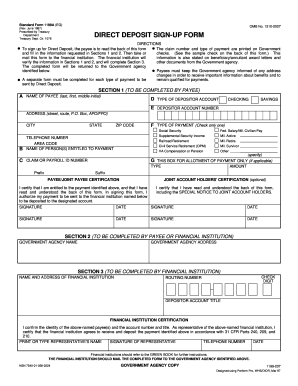
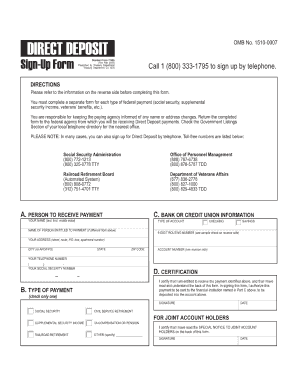
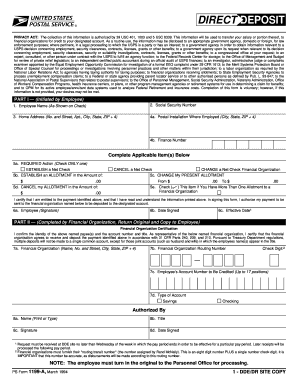
The Standard Form 1199A Direct Deposit Sign-Up is a government document used by individuals to enroll in Direct Deposit for federal payments and benefits.
pdfFiller scores top ratings on review platforms




Who needs SF 1199A?
Explore how professionals across industries use pdfFiller.

SF 1199A is needed by:
-
Individuals receiving Social Security benefits
-
Federal employees looking for direct salary deposits
-
Veterans receiving pensions and allowances
-
Individuals applying for federal assistance programs
-
Financial institution representatives verifying banking information
Comprehensive Guide to SF 1199A
What is the Standard Form 1199A Direct Deposit Sign-Up?
The Standard Form 1199A (SF 1199A) is a vital U.S. government document used for Direct Deposit enrollment. This form is essential for recipients of federal benefits, as it facilitates the direct deposit of various payments, including Social Security benefits and federal salaries. Its primary purpose is to ensure timely and secure delivery of funds to those eligible for government payment deposits.
Through the SF 1199A, individuals can streamline the process of receiving payments, bypassing the need for physical checks. This shift towards direct deposit is particularly crucial in today’s fast-paced economy, where efficiency is paramount.
Purpose and Benefits of the Standard Form 1199A Direct Deposit Sign-Up
The Standard Form 1199A serves multiple purposes, primarily aimed at simplifying how recipients receive their federal payments. By using this direct deposit authorization, individuals can enjoy a seamless transition of funds into their bank accounts.
-
Direct deposit eliminates the risks associated with lost or delayed checks, ensuring faster access to funds.
-
Increased security is a significant advantage, as sensitive banking information is submitted securely.
Overall, utilizing the SF 1199A provides an efficient solution for managing federal benefits direct deposit.
Who Needs to Complete the Standard Form 1199A Direct Deposit Sign-Up?
The target audience for the SF 1199A includes any individual eligible to receive federal payments. This form is particularly necessary for new recipients of benefits, ensuring they can seamlessly initiate direct deposit.
-
Individuals receiving Social Security benefits.
-
Federal employees or retirees transitioning to direct deposit for their salaries.
Any payee who aims to streamline their payment process should consider filling out this form to take advantage of direct deposit.
How to Fill Out the Standard Form 1199A Direct Deposit Sign-Up Online (Step-by-Step)
Completing the Standard Form 1199A digitally is straightforward. Follow these instructions to accurately fill out the form:
-
Start by accessing the form through a secure platform like pdfFiller.
-
Provide your personal information in the designated fields, which include your name, address, and other identifying details.
-
Input your banking details, ensuring accuracy to avoid delays in processing.
-
Review all completed sections for correctness before submission.
Make sure to double-check your entries to ensure all information is complete and accurate, facilitating a smooth submission process.
Common Errors and How to Avoid Them
When completing the SF 1199A, several common mistakes can result in delayed processing. Here are some errors to watch for:
-
Incorrect banking information, such as wrong account numbers or routing numbers.
-
Omitting required signatures from either the payee or financial institution representative.
To mitigate these errors, always double-check your entries and consult the form guidelines to ensure all necessary information is provided.
Submitting the Standard Form 1199A Direct Deposit Sign-Up
Once the form is completed, proper submission is crucial. There are several methods available for submitting the SF 1199A:
-
Mail the completed form to the specified government agency address.
-
Fax the document to the designated number if optioned.
Ensure you are aware of the processing timeframes and follow-up actions after submission to track the status of your application.
What to Expect After Submitting the Standard Form 1199A
After submitting the SF 1199A, the next steps include receiving confirmation of your application. Here’s what to expect:
-
Monitor for notifications confirming receipt of your submission.
-
Expect direct deposits to begin within the stated timeline set by the agency.
If the application were to be rejected, understanding the reasons could help in making necessary adjustments for resubmission.
How pdfFiller Simplifies the Standard Form 1199A Process
pdfFiller plays a crucial role in streamlining the SF 1199A process. This platform offers essential features designed to simplify filling out and eSigning this form.
-
Users can securely edit and fill their form online without downloading additional software.
-
The ability to track and manage documents enhances organizational efficiency.
For individuals looking to expedite their direct deposit enrollment, pdfFiller provides a user-friendly interface.
Security and Compliance When Using the Standard Form 1199A
When dealing with the SF 1199A, security and compliance are paramount to protect sensitive banking information. pdfFiller employs rigorous security measures, including:
-
256-bit encryption to safeguard your data.
-
Compliance with regulations such as HIPAA and GDPR, ensuring user data protection.
Keeping personal information secure while completing this form is critical, and leveraging a secure platform like pdfFiller helps achieve that.
Get Started with the Standard Form 1199A Today!
If you are ready to complete your Standard Form 1199A, consider using pdfFiller for an efficient experience. This platform simplifies the form-filling process, ensuring secure handling of your sensitive information.
By choosing pdfFiller, you can effortlessly navigate the complexities of direct deposit sign-up and focus on receiving your benefits promptly.
How to fill out the SF 1199A
-
1.Access pdfFiller and search for 'Standard Form 1199A Direct Deposit Sign-Up'. Click to open the form in the editor.
-
2.Navigate through the editable fields. Begin by entering your personal information, including your name and address in the designated sections.
-
3.Gather necessary documents, such as your Social Security number and banking details, before starting the form. This ensures you have all required information.
-
4.Carefully fill out banking information precisely, as accuracy is crucial to avoid delays in processing your Direct Deposit setup.
-
5.Utilize pdfFiller's features to highlight or annotate sections to ensure all required fields are completed accurately.
-
6.Review your completed form thoroughly, checking for any typos or missing information before finalizing the document.
-
7.Once satisfied, use the provided options in pdfFiller to save, download, or print your filled-out SF 1199A form.
-
8.Submit your completed form to the relevant government agency, ensuring you follow any specific submission instructions provided.

Who is eligible to use the Standard Form 1199A?
Individuals eligible to use the Standard Form 1199A include those receiving federal payments, such as Social Security benefits, federal salaries, Veterans pensions, and more. It's essential to verify your eligibility based on your specific circumstances.
What documents are needed to fill out the form?
To complete the Standard Form 1199A, you'll need personal information such as your Social Security number, as well as banking information including your account number and routing number. Prepare these details beforehand for a smooth process.
How do I submit the completed form?
After completing the Standard Form 1199A, you can submit it to the relevant government agency as instructed on the form. Proper submission methods may include mailing it to the agency's address or submitting it electronically, if applicable.
Are there any common mistakes to avoid when filling out the form?
Common mistakes include entering incorrect banking information, failing to sign the form, or leaving required fields blank. Always double-check your entries and ensure all sections are complete to avoid delays.
How long does it take to process my Direct Deposit request?
Processing times for Direct Deposit setup using Form 1199A can vary, but generally, it may take several weeks for the bank and government agency to verify information and activate your payments. Be sure to check with them for specific time frames.
Is notarization required for the Standard Form 1199A?
No, notarization is not required for the Standard Form 1199A. However, ensure all signatures are provided where necessary to validate the form.
Can I make changes to my Direct Deposit details later?
Yes, if you need to make changes to your Direct Deposit details, you will need to fill out a new Standard Form 1199A and submit it for processing. Keep a record of your submissions and confirm changes have been made.
Related Forms



Get the latest insights from our blog


If you believe that this page should be taken down, please follow our DMCA take down process
here
.
This form may include fields for payment information. Data entered in these fields is not covered by PCI DSS compliance.