
Last updated on
Oct 19, 2026

Get the free Speech Sound Screen Record Form
We are not affiliated with any brand or entity on this form

Fill out
Complete the form online in a simple drag-and-drop editor.

eSign
Add your legally binding signature or send the form for signing.

Share
Share the form via a link, letting anyone fill it out from any device.

Export
Download, print, email, or move the form to your cloud storage.
Why pdfFiller is the best tool for your documents and forms


End-to-end document management
From editing and signing to collaboration and tracking, pdfFiller has everything you need to get your documents done quickly and efficiently.
Accessible from anywhere
pdfFiller is fully cloud-based. This means you can edit, sign, and share documents from anywhere using your computer, smartphone, or tablet.
Secure and compliant
pdfFiller lets you securely manage documents following global laws like ESIGN, CCPA, and GDPR. It's also HIPAA and SOC 2 compliant.
What is Speech Screen Form
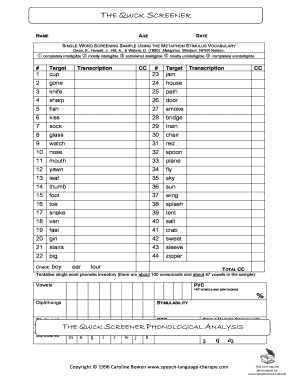
The Speech Sound Screen Record Form is a healthcare document used by professionals to assess and record a child's speech sound production and syllable awareness.
pdfFiller scores top ratings on review platforms




Who needs Speech Screen Form?
Explore how professionals across industries use pdfFiller.

Speech Screen Form is needed by:
-
Speech therapists providing assessments for children.
-
Pediatricians referring children for speech and language services.
-
Parents seeking evaluations of their child's speech development.
-
Early childhood educators supporting speech therapy referrals.
-
School psychologists assessing speech issues in students.
Comprehensive Guide to Speech Screen Form
What is the Speech Sound Screen Record Form?
The Speech Sound Screen Record Form is a specialized tool used in child speech assessment to evaluate speech sound production and syllable awareness in children aged 3 years and older. This form plays a pivotal role in tracking speech sound development, providing a structured approach for capturing essential assessments needed for pediatric evaluations.
Designed specifically for young children, it helps clinicians and educators assess a child's articulation and phonemic awareness effectively.
Purpose and Benefits of the Speech Sound Screen Record Form
The Speech Sound Screen Record Form is essential for pediatric speech evaluations, allowing for the diligent tracking of speech sound development. Utilizing this form can significantly enhance the identification of children who may require referrals for further speech and language services, ensuring timely interventions.
By providing objective data, this form aids practitioners in making informed decisions regarding the necessity and type of speech interventions needed, thus promoting better outcomes for children.
Key Features of the Speech Sound Screen Record Form
The Speech Sound Screen Record Form includes critical sections dedicated to sound production and syllable awareness tests. Each section features fillable fields and checkbox options, facilitating accurate record keeping during assessments.
-
Sound production assessments with target words
-
Syllable awareness tests for comprehensive evaluation
-
Specific sounds that need to be tested
These features are fundamental in ensuring accurate documentation and monitoring of a child's speech progress.
Who Needs the Speech Sound Screen Record Form?
This form is primarily used by parents and speech therapists who require a thorough speech therapy referral for children facing speech challenges. Educators also find it valuable as a healthcare screening tool to assess and identify speech issues within classroom settings.
By utilizing the Speech Sound Screen Record Form, professionals can foster early detection and intervention for speech-related difficulties, addressing potential concerns swiftly.
How to Fill Out the Speech Sound Screen Record Form Online
Filling out the Speech Sound Screen Record Form using pdfFiller is straightforward. Follow this step-by-step guide to ensure accuracy:
-
Access the form on pdfFiller.
-
Complete essential fields, paying special attention to sound production and syllable awareness sections.
-
Utilize the fillable fields for precise data input.
-
Save and share the completed form easily.
The digital format offers conveniences such as easy sharing and secure saving of sensitive information.
Common Errors When Completing the Speech Sound Screen Record Form and How to Avoid Them
Some frequent mistakes include inaccuracies in data entry and overlooking specific assessment criteria. To avoid these errors:
-
Double-check all filled fields for accuracy.
-
Review referral criteria against completed assessments.
Accurate data collection is vital for effective evaluations and future interventions in speech sound development.
Submission Methods for the Speech Sound Screen Record Form
There are multiple submission methods for the completed Speech Sound Screen Record Form. Options include online submission through pdfFiller and traditional mailing methods.
-
Ensure submissions are directed to appropriate speech and language services.
-
Review any state-specific submission guidelines that may apply.
Security and Compliance for the Speech Sound Screen Record Form
Using pdfFiller, users can rest assured about the privacy and security of their information. This platform adheres to HIPAA and GDPR compliance, ensuring that sensitive data is handled responsibly.
Moreover, pdfFiller employs 256-bit encryption standards to protect the integrity of documents throughout the assessment and submission process.
Getting Started with pdfFiller for the Speech Sound Screen Record Form
pdfFiller offers a user-friendly platform for editing and managing healthcare forms. Notable features include eSigning and seamless form sharing capabilities, which enhance the user experience:
-
Effortless document management
-
Accessible form filling from any device
This efficiency supports a smooth process from form completion to submission.
Experience the Benefits of Efficient Document Management with pdfFiller
Users are encouraged to leverage pdfFiller to complete the Speech Sound Screen Record Form, simplifying the form management process. The platform enhances user experience by making document editing and sharing fast and efficient.
Explore additional related forms and features available on pdfFiller to maximize your document management capabilities.
How to fill out the Speech Screen Form
-
1.To access the Speech Sound Screen Record Form on pdfFiller, navigate to the pdfFiller website and use the search function to find the form by its official name.
-
2.Once the form is located, click on it to open, allowing pdfFiller's editing features to be activated.
-
3.Before filling in the form, gather all necessary information about the child's speech production, including target sounds and any past assessments.
-
4.Using pdfFiller's interface, click on each fillable field to enter information directly. Ensure accuracy when inputting data, particularly in sections dealing with sound production and syllable awareness.
-
5.For any response that requires checking a box, simply click on the checkbox to indicate the appropriate selection.
-
6.Review your entries carefully; utilize pdfFiller's zoom and pan features to ensure all sections are visible and completed.
-
7.Once satisfied with the information entered, finalize the form by clicking on the 'Save' option to store your changes.
-
8.You may download the completed form or submit it directly through pdfFiller, following on-screen prompts for submission methods.

What are the eligibility requirements for using the Speech Sound Screen Record Form?
The Speech Sound Screen Record Form is designed for children aged 3 years and older. Parents or guardians should fill it out in consultation with a licensed speech professional.
Is there a deadline for submitting the Speech Sound Screen Record Form?
Typically, there is no strict deadline for submission, but timely completion is encouraged to ensure that any necessary referrals for speech services are made promptly.
How can I submit the completed Speech Sound Screen Record Form?
You can submit the completed form through pdfFiller by saving it and then emailing it directly to the speech service provider or downloading it to print and deliver by hand.
What supporting documents are needed when submitting this form?
Generally, no additional documents are required to submit the Speech Sound Screen Record Form. However, if the child has previous assessments, including those can support the referral process.
What are common mistakes to avoid when filling out this form?
Common mistakes include omitting required fields, providing inaccurate information regarding the child's speech sound abilities, and forgetting to save the completed form.
How long does it take to process the Speech Sound Screen Record Form after submission?
Processing times can vary depending on the speech service provider's workload. Generally, you should expect a response within a week of submission.
What specific concerns should I be aware of when using this form?
Ensure you are familiar with the referral criteria mentioned in the form. It's also important to verify if the specific speech sounds assessed align with the child's known speech issues.
Related Forms





Get the latest insights from our blog


If you believe that this page should be taken down, please follow our DMCA take down process
here
.
This form may include fields for payment information. Data entered in these fields is not covered by PCI DSS compliance.