
Last updated on
Oct 13, 2026

Get the free Indiana Reciprocal Nonresident Income Tax Return
We are not affiliated with any brand or entity on this form

Fill out
Complete the form online in a simple drag-and-drop editor.

eSign
Add your legally binding signature or send the form for signing.

Share
Share the form via a link, letting anyone fill it out from any device.

Export
Download, print, email, or move the form to your cloud storage.
Why pdfFiller is the best tool for your documents and forms


End-to-end document management
From editing and signing to collaboration and tracking, pdfFiller has everything you need to get your documents done quickly and efficiently.
Accessible from anywhere
pdfFiller is fully cloud-based. This means you can edit, sign, and share documents from anywhere using your computer, smartphone, or tablet.
Secure and compliant
pdfFiller lets you securely manage documents following global laws like ESIGN, CCPA, and GDPR. It's also HIPAA and SOC 2 compliant.
What is Indiana IT-40RNR
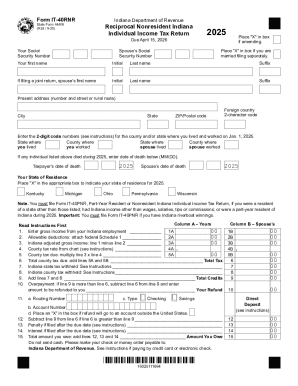
The Indiana Reciprocal Nonresident Income Tax Return is a state tax form used by full-year nonresidents from reciprocal states to report and pay Indiana state and county income taxes.
pdfFiller scores top ratings on review platforms




Who needs Indiana IT-40RNR?
Explore how professionals across industries use pdfFiller.

Indiana IT-40RNR is needed by:
-
Residents of reciprocal states like Illinois, Kentucky, Michigan, Ohio, Pennsylvania, or Wisconsin.
-
Taxpayers filing a nonresident return for Indiana.
-
Individuals requiring to report Indiana income for the year 1997.
-
Spouses filing jointly with nonresident taxpayers.
-
Accountants assisting clients with Indiana tax obligations.
-
Tax professionals offering services in multistate taxation.
Comprehensive Guide to Indiana IT-40RNR
What is the Indiana Reciprocal Nonresident Income Tax Return?
The Indiana Reciprocal Nonresident Income Tax Return is essential for nonresidents of Indiana who earn income in the state. This form is required to ensure compliance with state income tax laws for residents of states with reciprocal agreements, such as Illinois, Kentucky, Michigan, Ohio, Pennsylvania, and Wisconsin. Understanding this tax return is crucial for navigating the Indiana state income tax return process effectively.
Designed specifically for individuals from reciprocal states, this form simplifies the tax filing process by preventing double taxation on income earned in Indiana.
Key Benefits of Filing the Indiana Reciprocal Nonresident Income Tax Return
Filing the Indiana tax return for nonresidents offers several advantages. Firstly, completing the Indiana Reciprocal Nonresident Income Tax Return allows you to avoid potential penalties associated with noncompliance. By understanding your tax obligations, you can make informed decisions that align with state regulations.
Ensuring compliance not only protects you from fines but also maintains your good standing with the Indiana Department of Revenue.
Who Needs to Complete the Indiana IT-40RNR Form?
The Indiana IT-40RNR form must be completed by nonresidents from states with reciprocal agreements. Those who meet specific eligibility criteria, including residency verification, are required to file this form. Not filing when required can lead to significant repercussions, such as fines or interest on unpaid taxes.
-
Nonresidents earning income in Indiana
-
Residents of Illinois, Kentucky, Michigan, Ohio, Pennsylvania, or Wisconsin
Understanding the Indiana Reciprocal Nonresident Income Tax Return Form Structure
The structure of the Indiana Reciprocal Nonresident Income Tax Return includes several key sections that must be completed accurately. Essential fields include personal information, income details, and tax withholdings. Mandatory fields such as your Social Security Number and signature are crucial for processing your return.
Accurate representation of your data is necessary to avoid delays or issues with your tax filing.
How to Fill Out the Indiana Reciprocal Nonresident Income Tax Return Online
Filling out the form using pdfFiller requires following a step-by-step process. Start with entering personal information, followed by details about your income and any deductions.
Common pitfalls include:
-
Inaccurate personal information
-
Missing mandatory fields
-
Inappropriate deductions
To ensure a smooth filing process, double-check all entries before submission.
How to Submit the Indiana Reciprocal Nonresident Income Tax Return
Submission methods for the Indiana Reciprocal Nonresident Income Tax Return include electronic and paper filing. It's vital to adhere to deadlines, specifically by April 15, 1998, to avoid late submission penalties. After submitting your return, tracking its status and confirming receipt should be a priority.
-
Electronic submission via state tax portal
-
Mailing a paper copy to the Indiana Department of Revenue
Security and Compliance When Filing the Indiana Reciprocal Nonresident Income Tax Return
When filing your Indiana Reciprocal Nonresident Income Tax Return, secure document handling and data protection are paramount. Utilizing platforms like pdfFiller ensures compliance with laws like HIPAA and GDPR, safeguarding your personal information throughout the form-filling process.
Data protection measures, including 256-bit encryption, bolster the safety of your sensitive documents.
What to Do After Submitting the Indiana IT-40RNR Form
After submitting the Indiana IT-40RNR form, it's essential to await feedback and understand how to check the status of your submission. In cases where amendments are necessary, knowing how to correct the Indiana reciprocal nonresident income tax return is critical. Be aware of common rejection reasons that may arise following your filing.
-
Awaiting feedback from the Indiana Department of Revenue
-
Understanding amendment procedures
Leverage pdfFiller for Your Indiana Reciprocal Nonresident Income Tax Return
pdfFiller is an excellent resource for creating, filling out, and submitting your Indiana Reciprocal Nonresident Income Tax Return with ease. Key features such as eSigning, document editing, and sharing capabilities provide a comprehensive solution for managing your tax forms efficiently.
With over 100 million users, pdfFiller has established itself as a reliable platform within the airSlate suite, making it a trusted choice for your tax document needs.
How to fill out the Indiana IT-40RNR
-
1.Access pdfFiller and search for 'Indiana Reciprocal Nonresident Income Tax Return' in the template library.
-
2.Open the form, and familiarize yourself with the layout and sections provided.
-
3.Gather necessary documents, including your Social Security number, personal identification, and income details to streamline filling out the form.
-
4.Use the fillable fields to enter required personal information, income details, and tax withholdings accurately.
-
5.Utilize the checkboxes for any applicable statuses or declarations, ensuring clarity in your selections.
-
6.Review each section thoroughly before finalizing the form, checking for any errors or missing information.
-
7.Once satisfied with your entry, finalize the form on pdfFiller and proceed to save it.
-
8.You can download the completed form for your records or submit it directly to the Indiana Department of Revenue through pdfFiller's submission options.

Who is eligible to file the Indiana Reciprocal Nonresident Income Tax Return?
Eligibility to file this return includes full-year nonresidents of Indiana residing in reciprocal states such as Illinois, Kentucky, Michigan, Ohio, Pennsylvania, or Wisconsin during the tax year.
What is the deadline for submitting the Indiana IT-40RNR form?
The Indiana Reciprocal Nonresident Income Tax Return must be submitted by April 15, 1998. Ensure to meet this deadline to avoid any penalties.
How do I submit the Indiana IT-40RNR form?
You can submit the completed form to the Indiana Department of Revenue by mail. If using pdfFiller, you can also submit it electronically if the option is available.
What supporting documents are required for this form?
When filing the Indiana IT-40RNR, include any relevant income documents, proof of tax withholdings, and supporting forms from your home state to substantiate your claims.
What are common mistakes to avoid when filling out the Indiana IT-40RNR?
Common mistakes include misreporting income amounts, failing to sign the form, and omitting required personal information. Always double-check your entries before submission.
How long does it take for the Indiana Department of Revenue to process the form?
Processing times can vary, typically ranging from 4 to 6 weeks for nonresident return forms. Check with the Department of Revenue for updates on your application status.
Can I file this form electronically?
Filing electronically may be possible through platforms like pdfFiller. Ensure to check Indiana Department of Revenue's guidelines for online submission options.
Related Forms





Get the latest insights from our blog


If you believe that this page should be taken down, please follow our DMCA take down process
here
.
This form may include fields for payment information. Data entered in these fields is not covered by PCI DSS compliance.