
Last updated on
Oct 19, 2026

Get the free Backflow Test Report
We are not affiliated with any brand or entity on this form

Fill out
Complete the form online in a simple drag-and-drop editor.

eSign
Add your legally binding signature or send the form for signing.

Share
Share the form via a link, letting anyone fill it out from any device.

Export
Download, print, email, or move the form to your cloud storage.
Why pdfFiller is the best tool for your documents and forms


End-to-end document management
From editing and signing to collaboration and tracking, pdfFiller has everything you need to get your documents done quickly and efficiently.
Accessible from anywhere
pdfFiller is fully cloud-based. This means you can edit, sign, and share documents from anywhere using your computer, smartphone, or tablet.
Secure and compliant
pdfFiller lets you securely manage documents following global laws like ESIGN, CCPA, and GDPR. It's also HIPAA and SOC 2 compliant.
What is Backflow Report
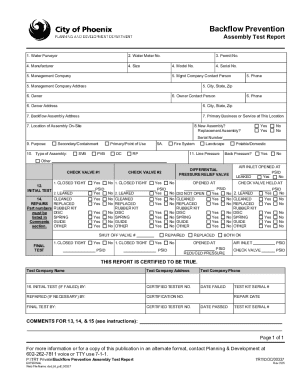
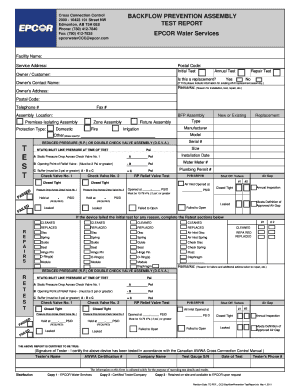
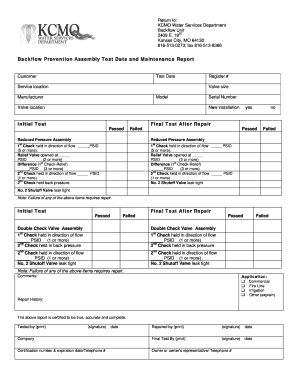
The Backflow Test Report is a business form used by certified testers to document the testing of backflow prevention assemblies.
pdfFiller scores top ratings on review platforms




Who needs Backflow Report?
Explore how professionals across industries use pdfFiller.

Backflow Report is needed by:
-
Certified backflow testers
-
Plumbing contractors
-
Property managers
-
Commercial building owners
-
Municipal water authorities
-
Health department officials
Comprehensive Guide to Backflow Report
What is the Backflow Test Report?
The Backflow Test Report is a vital document that records the results of tests conducted on backflow prevention assemblies. Its primary purpose is to provide an official account of backflow testing, ensuring the safety and compliance of water systems across Ohio. This report plays a crucial role in documenting test results and verifying that backflow prevention measures meet safety standards, which is essential for public health. Adherence to regulations supporting compliance and safety in Ohio underscores the importance of this report.
Purpose and Benefits of the Backflow Test Report
Backflow testing has both legal and operational significance. The completion of the Backflow Test Report not only supports the maintenance of safe water systems but also helps in preventing backflow contamination. Compliance with local regulations, which require documented evidence of testing, protects public health and aids in achieving operational safety. Key benefits include safeguarding consumers from contaminated water and ensuring that businesses comply with local water safety laws.
Key Features of the Backflow Test Report
The Backflow Test Report includes essential sections that facilitate a comprehensive understanding of the testing process. Key features typically found in the report are as follows:
-
Site information, including addresses and contact details.
-
Details of the backflow prevention assembly being tested.
-
Results of the conducted tests, which are critical for certification.
-
Certification details of the tester who performed the test.
-
Fillable form aspects that streamline data entry.
Who Needs the Backflow Test Report?
The target audience for the Backflow Test Report includes testers, businesses, and property owners in Ohio. Various circumstances necessitate the collection and submission of this report, particularly during installations or routine compliance checks. Certified testers are responsible for accurately completing the document, ensuring that each entry reflects the test's integrity and results.
How to Fill Out the Backflow Test Report Online (Step-by-Step)
Filling out the Backflow Test Report online is straightforward when using a platform like pdfFiller. Here is a step-by-step guide to assist users:
-
Log in to your pdfFiller account or create a new one if necessary.
-
Locate the Backflow Test Report form within the document library.
-
Gather all necessary information, including site details and test results.
-
Enter data into the appropriate fields on the form.
-
Review the completed report for accuracy before submission.
-
Sign the document electronically to certify the test results.
Common Errors and How to Avoid Them
When completing the Backflow Test Report, several common mistakes can occur. These include providing inaccurate site information, omitting test results, or failing to include the tester's credentials. To avoid these pitfalls, users should carefully review all entries and confirm the accuracy of the provided data. Ensuring correctness in this report is critical for meeting compliance standards and maintaining safety.
Submission Methods and Delivery of the Backflow Test Report
There are multiple methods available for submitting the completed Backflow Test Report. Timely submission is vital, as delays can result in penalties or compliance issues. Users can submit the report electronically through pdfFiller, via mail, or in person at designated offices. It is essential to be aware of any associated fees or processing times to avoid unnecessary complications.
Security and Compliance for the Backflow Test Report
When handling sensitive information, security measures are crucial. pdfFiller employs robust security protocols, including 256-bit encryption and compliance with regulations like HIPAA and GDPR. These features ensure that backflow test documentation remains secure and confidential. Users can trust that their data is handled with the highest security standards, safeguarding against unauthorized access.
Sample or Example of a Completed Backflow Test Report
Providing a sample of a filled-out Backflow Test Report can help users better understand expectations. Each section of the report includes details such as site information, test results, and tester credentials. Reviewing this example encourages users to refer to it while preparing their own documentation, enhancing the accuracy of their submissions.
Create Your Backflow Test Report with Confidence
Leveraging the pdfFiller platform simplifies the process of filling out the Backflow Test Report. Features such as e-signing and secure document sharing enhance user experience, making it easy to manage forms online. Users can take advantage of this efficient solution for their backflow testing documentation, ensuring they fulfill all requirements with confidence.
How to fill out the Backflow Report
-
1.To access the Backflow Test Report on pdfFiller, go to the website and log in or create an account if you don't have one.
-
2.Use the search bar to find the 'Backflow Test Report' form and open it by clicking on the appropriate link.
-
3.Gather necessary information such as site details, assembly specifics, test results, and your certification information.
-
4.Begin filling in the blank fields on the form, ensuring to provide accurate and detailed data as required.
-
5.Utilize pdfFiller's interface to check the boxes and complete all required sections carefully.
-
6.Once all fields are filled in, review the information to ensure completeness and accuracy.
-
7.If needed, use the instruction prompts available on pdfFiller to assist you in completing any complex sections.
-
8.After validating that all information is correct, navigate to the signing section and apply your signature as required.
-
9.Finally, save the completed form by selecting the 'Save' option, and you can also download it as a PDF or submit it through pdfFiller directly.

Who is eligible to use the Backflow Test Report?
The Backflow Test Report is intended for certified backflow testers and plumbing professionals who perform inspections on backflow prevention assemblies.
What is the deadline for submitting the Backflow Test Report?
Deadlines vary by jurisdiction, so check local regulations. However, it is typically required to be submitted within weeks of the testing date.
How can I submit the completed Backflow Test Report?
You can submit the completed report electronically through pdfFiller or print it out for physical submission to your local water authority or relevant agency.
Are there any supporting documents required with the Backflow Test Report?
Typically, no additional documents are needed; however, some jurisdictions might request copies of test results or the tester's certification.
What common mistakes should I avoid when filling out the Backflow Test Report?
Ensure all fields are filled correctly, avoid leaving blanks in required areas, and double-check your signature for accuracy to prevent processing delays.
How long does it take to process the Backflow Test Report?
Processing times can vary; expect a review period of several days to a few weeks, depending on your local authority's workload.
What should I do if I encounter issues while filling out the form on pdfFiller?
If you face difficulties using pdfFiller, consult their help section for troubleshooting tips, or reach out to their support team for assistance.
Related Forms



Get the latest insights from our blog



If you believe that this page should be taken down, please follow our DMCA take down process
here
.
This form may include fields for payment information. Data entered in these fields is not covered by PCI DSS compliance.