
Last updated on
Oct 19, 2026

Get the free Parental Permission Form
We are not affiliated with any brand or entity on this form

Fill out
Complete the form online in a simple drag-and-drop editor.

eSign
Add your legally binding signature or send the form for signing.

Share
Share the form via a link, letting anyone fill it out from any device.

Export
Download, print, email, or move the form to your cloud storage.
Why pdfFiller is the best tool for your documents and forms


End-to-end document management
From editing and signing to collaboration and tracking, pdfFiller has everything you need to get your documents done quickly and efficiently.
Accessible from anywhere
pdfFiller is fully cloud-based. This means you can edit, sign, and share documents from anywhere using your computer, smartphone, or tablet.
Secure and compliant
pdfFiller lets you securely manage documents following global laws like ESIGN, CCPA, and GDPR. It's also HIPAA and SOC 2 compliant.
What is Permission Form
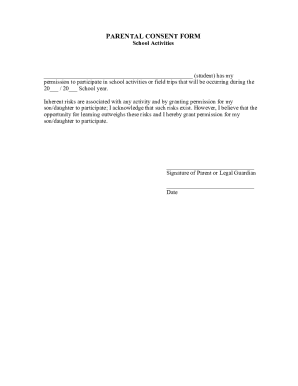
The Parental Permission Form is an education form used by schools to obtain consent from parents or legal guardians for their child to participate in extracurricular activities.
pdfFiller scores top ratings on review platforms




Who needs Permission Form?
Explore how professionals across industries use pdfFiller.

Permission Form is needed by:
-
Parents or legal guardians of students
-
School administrators managing student clubs
-
Teachers overseeing field trips or activities
-
Educational institutions requiring parental consent forms
-
Coaches or sponsors of school clubs
Comprehensive Guide to Permission Form
What is the Parental Permission Form?
The Parental Permission Form is an essential document used in educational settings to obtain necessary consent from parents or legal guardians. This form is critical for allowing students to participate in various activities, such as school clubs or field trips. It serves as a formal agreement that outlines the responsibilities and permissions granted by parents, ensuring that students can engage in extracurricular activities safely.
This form is utilized by schools, parents, and guardians, making it a vital part of the communication process regarding student participation. Obtaining parental consent through this form helps maintain a clear line of communication about students' involvement in school-related activities.
Purpose and Benefits of the Parental Permission Form
The Parental Permission Form provides several benefits that contribute to the overall safety and well-being of students. Firstly, it ensures that parents are informed about their child's participation in school activities, which is crucial for student safety. By obtaining this consent, schools can uphold communication with parents or guardians, fostering trust and collaboration.
Additionally, this form acts as a protective legal document, safeguarding schools against potential liabilities associated with student activities. Its primary purpose is to authoritatively delineate parental consent, making it a fundamental tool in school administration.
Who Needs the Parental Permission Form?
Typically, the Parental Permission Form must be filled out by parents or guardians before their child can participate in certain school activities. It is applicable in various school settings, particularly those involving before or after school clubs and essential field trip outings.
In essence, any student engagement outside the standard curriculum that involves additional supervision or risk necessitates this form. Parents and guardians are responsible for signing the document, thereby acknowledging their awareness and approval of their child’s participation.
Key Features of the Parental Permission Form
The Parental Permission Form contains several key features designed to facilitate easy completion by parents or guardians. It includes fillable fields requiring critical information such as the student's name, grade, and the signature of the parent or legal guardian.
-
Emergency contact information fields
-
Checkboxes to specify club details including the sponsor and meeting day/time/location
-
Clear outlines of required signatures and dates
These features ensure that the form collects all necessary information to guarantee student's safety during activities.
How to Fill Out the Parental Permission Form Online (Step-by-Step)
Filling out the Parental Permission Form online can be accomplished effectively by following these steps:
-
Access the form through the designated online platform.
-
Complete the fillable fields, ensuring accuracy in the student's name and grade.
-
Provide the parent or guardian's signature digitally.
-
Input emergency contact details in the specified section.
-
Review all information for completeness before submission.
By adhering to these steps, parents can ensure that the form is filled out correctly, which is essential for facilitating their child's participation in school activities.
Common Errors and How to Avoid Them While Filling Out the Parental Permission Form
When filling out the Parental Permission Form, common errors can lead to complications in submission. Some frequent mistakes include missing signatures and incorrect or incomplete information. To mitigate these issues:
-
Double-check all fields for accuracy before submission.
-
Ensure that the required signatures are present—this is often critical for acceptance.
-
Follow up with the school for confirmation after submitting the form.
Taking these steps can help ensure that the form is completed correctly, preventing delays in participation.
Where to Submit the Parental Permission Form
The submission of the Parental Permission Form typically depends on the school or district's specific requirements. Parents can submit the form in the following ways:
-
Directly to school administrative offices
-
Through designated online submission portals
-
Via email if permitted by the school
It is advisable to adhere to the recommended submission timelines to ensure that students can participate in upcoming activities without delay.
Security and Compliance in Handling the Parental Permission Form
Handling the Parental Permission Form with care is vital due to the sensitive nature of the information it contains. pdfFiller takes necessary measures to ensure this form's security through features like 256-bit encryption and compliance with regulations such as HIPAA and GDPR.
By securely managing sensitive information, including emergency contacts, schools can protect students and their families. Users are encouraged to store or share completed forms in a secure manner to further enhance data protection.
User Experience with pdfFiller for Completing the Parental Permission Form
Utilizing pdfFiller streamlines the process of filling out the Parental Permission Form. The platform offers capabilities such as editing, signing, and sharing forms without the need for physical paper.
Users benefit from an online solution that simplifies document handling compared to traditional paper forms. Testimonials from satisfied users often highlight efficiency and user-friendliness as notable advantages of using pdfFiller for this purpose.
Next Steps After Completing the Parental Permission Form
Once the Parental Permission Form has been submitted, parents can expect several possible follow-up actions. Schools may provide confirmation of receipt or additional information regarding the next steps.
Parents are advised to monitor the status of their submission to ensure participation in activities. If corrections are needed or further assistance is required, reaching out through pdfFiller can facilitate resolution.
How to fill out the Permission Form
-
1.To access the Parental Permission Form on pdfFiller, go to the pdfFiller website and search for 'Parental Permission Form' in the search bar.
-
2.Once you find the form, click on it to open the document in the editor interface.
-
3.Before completing the form, gather the required information, including your child's name, grade, and emergency contact details.
-
4.Locate the 'Student' field and enter your child's name, then proceed to the 'Grade' field and fill in the appropriate grade level.
-
5.Next, find the section that requires your signature as a parent or legal guardian. Use the signature field to sign the form electronically.
-
6.Add the date in the specified field so that the form is current and valid.
-
7.If applicable, complete any checkboxes related to your consent and fill out the emergency contact information field correctly.
-
8.After filling in all required fields, review the entire document to ensure accuracy and completeness.
-
9.Once you are satisfied with the information provided, save your changes by clicking on the 'Save' button.
-
10.You can download a copy for your records by selecting the 'Download' option or submit the form directly through pdfFiller by selecting the 'Submit' option.

Who is eligible to submit the Parental Permission Form?
The Parental Permission Form must be submitted by a parent or legal guardian of the student participating in school activities.
Is there a deadline for submitting the Parental Permission Form?
Deadlines for submitting the form typically depend on the specific activity. It's recommended to check with the school for exact submission dates.
How should I submit the filled Parental Permission Form?
You can submit the completed Parental Permission Form electronically through pdfFiller or print it for manual submission to your child's school.
What information is required to complete the Parental Permission Form?
You need your child’s name, grade, emergency contact details, and your signature as a parent or legal guardian to complete the form.
What are common mistakes to avoid when filling out this form?
Ensure all required fields are completed and double-check for spelling errors, especially in your child's information and your signature.
How long does it take to process the form once submitted?
Processing times vary, but schools usually review submitted forms within a few days. Contact the school for specific timelines.
Are there any fees associated with submitting the Parental Permission Form?
Typically, there are no fees for submitting a Parental Permission Form, but it’s best to check with your school for any specific requirements.
Related Forms



Get the latest insights from our blog



If you believe that this page should be taken down, please follow our DMCA take down process
here
.
This form may include fields for payment information. Data entered in these fields is not covered by PCI DSS compliance.