
Last updated on
Oct 15, 2026

Get the free West Virginia Breast and Cervical Cancer Screening Medical History Form
We are not affiliated with any brand or entity on this form

Fill out
Complete the form online in a simple drag-and-drop editor.

eSign
Add your legally binding signature or send the form for signing.

Share
Share the form via a link, letting anyone fill it out from any device.

Export
Download, print, email, or move the form to your cloud storage.
Why pdfFiller is the best tool for your documents and forms


End-to-end document management
From editing and signing to collaboration and tracking, pdfFiller has everything you need to get your documents done quickly and efficiently.
Accessible from anywhere
pdfFiller is fully cloud-based. This means you can edit, sign, and share documents from anywhere using your computer, smartphone, or tablet.
Secure and compliant
pdfFiller lets you securely manage documents following global laws like ESIGN, CCPA, and GDPR. It's also HIPAA and SOC 2 compliant.
What is WV Cancer Screening Form
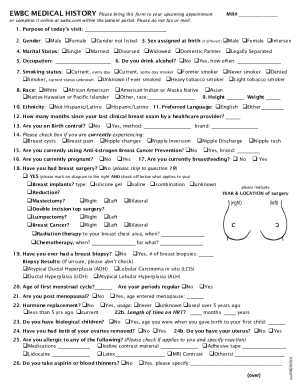
The West Virginia Breast and Cervical Cancer Screening Medical History Form is a medical document used by patients to provide crucial personal and health history information for cancer screening programs.
pdfFiller scores top ratings on review platforms




Who needs WV Cancer Screening Form?
Explore how professionals across industries use pdfFiller.

WV Cancer Screening Form is needed by:
-
Patients participating in cancer screening programs
-
Healthcare providers conducting screenings
-
Public health organizations in West Virginia
-
Medical historians studying cancer trends
-
Research institutions focused on women's health
Comprehensive Guide to WV Cancer Screening Form
What is the West Virginia Breast and Cervical Cancer Screening Medical History Form?
The West Virginia Breast and Cervical Cancer Screening Medical History Form is a crucial document designed to collect comprehensive medical history and personal details from patients participating in the screening program. This form is pivotal in the assessment and early detection of breast and cervical cancers in West Virginia.
This patient medical history form gathers essential information including medical history, personal details, and family history related to cancer. Patients play an integral role by completing and signing this form, thereby ensuring that healthcare providers have the necessary data to facilitate accurate screenings and diagnoses.
Purpose and Benefits of the West Virginia Breast and Cervical Cancer Screening Medical History Form
The primary purpose of the West Virginia Breast and Cervical Cancer Screening Medical History Form is to provide healthcare providers with a detailed overview of each patient's medical history. This thorough documentation significantly enhances the efficacy of cancer screening processes.
Benefits of using this form include streamlined patient care and diagnosis, which can lead to improved health outcomes through more efficient screenings. By capturing detailed medical histories, this form plays a vital role in ensuring that patients receive the most appropriate care and timely detection.
Key Features of the West Virginia Breast and Cervical Cancer Screening Medical History Form
Key components of the West Virginia Breast and Cervical Cancer Screening Medical History Form include various sections that focus on personal information, medical history, current health status, and specifics regarding past screenings.
-
Sections for personal information and family medical history
-
Details related to gynecologic and obstetric history
-
Information about current health concerns, medications, and allergies
-
Reporting areas for Pap tests and mammogram results
-
A mandatory signature field for patient validation
When filling out the form, patients should also follow specific instructions regarding the completion of each section.
Who Needs to Complete the West Virginia Breast and Cervical Cancer Screening Medical History Form?
This form is essential for women in West Virginia who qualify for the breast and cervical cancer screening program. Eligibility criteria are typically based on age, health status, and potentially income levels, which may affect access to preventive care.
Completing this form is crucial for all eligible individuals as it significantly impacts healthcare access and the ability to undergo necessary screenings. The collection of accurate and comprehensive information ensures that patients can receive appropriate care and diagnostics.
How to Fill Out the West Virginia Breast and Cervical Cancer Screening Medical History Form Online
Filling out the West Virginia Breast and Cervical Cancer Screening Medical History Form online is a straightforward process when using pdfFiller. Follow these step-by-step instructions:
-
Access the form through the pdfFiller platform.
-
Carefully enter personal information in the designated fields.
-
Provide comprehensive details regarding medications, allergies, and medical history.
-
Ensure all sections are complete before submission.
-
Check the form for accuracy to avoid common mistakes.
By following these instructions, patients can ensure that their submissions are thorough and accurate.
Submission Methods for the West Virginia Breast and Cervical Cancer Screening Medical History Form
Once the form is completed, patients have several options for submission. Understanding these methods is essential for ensuring a timely and secure process.
-
Online submission through pdfFiller
-
Mailing the form to the appropriate healthcare center
-
In-person delivery at designated facilities
Patients should follow specific guidelines to ensure their submissions are received safely and promptly, considering legal aspects related to the handling of sensitive health information.
Security and Compliance for the West Virginia Breast and Cervical Cancer Screening Medical History Form
Security is a paramount concern when dealing with personal health information. The West Virginia Breast and Cervical Cancer Screening Medical History Form adheres to stringent security measures to protect patient data.
-
Data is encrypted using 256-bit standards to safeguard against unauthorized access.
-
Compliance with HIPAA regulations ensures that patient information is handled with utmost confidentiality.
-
Secure platforms like pdfFiller are utilized to foster a safe environment for users.
These measures provide assurance to patients regarding the privacy and protection of their sensitive information throughout the process.
How pdfFiller Can Help with the West Virginia Breast and Cervical Cancer Screening Medical History Form
pdfFiller enhances the process of completing the West Virginia Breast and Cervical Cancer Screening Medical History Form through several key features.
-
eSigning capabilities streamline the process for both patients and healthcare providers.
-
Cloud-based access allows for convenient form completion without downloads.
-
User testimonials highlight the benefits experienced by individuals using pdfFiller for this form.
This ease of use and versatility ensures that patients can effectively manage their healthcare documentation with confidence.
Final Steps and What Happens After You Submit the Form
After submitting the West Virginia Breast and Cervical Cancer Screening Medical History Form, patients can expect a specific timeline for processing their submissions. Typically, healthcare providers will contact patients regarding the next steps.
-
Patients will receive notifications about the status of their submission.
-
If issues arise, clear guidance will be provided on how to resolve them.
-
Instruction for re-submission or amending submitted forms will be available as needed.
Understanding these steps ensures that patients remain informed and can take action as necessary following their submission.
Your Next Steps with pdfFiller
Utilizing pdfFiller for the completion of the West Virginia Breast and Cervical Cancer Screening Medical History Form offers multiple advantages for patients. The platform facilitates an easy and secure way to manage healthcare forms effectively.
Engage with pdfFiller to experience the convenience of online features designed to simplify form completion, ensuring confidence in managing sensitive documents consistently.
How to fill out the WV Cancer Screening Form
-
1.To access the West Virginia Breast and Cervical Cancer Screening Medical History Form, visit pdfFiller and use the search function to locate the form by its name.
-
2.Once you have found the form, open it to begin filling it out directly in the pdfFiller interface.
-
3.Before starting, gather any necessary information including your personal details, family history, and information on your current health status.
-
4.Navigate through the form by clicking on the blank fields and use the text tool to enter your responses in the designated areas.
-
5.Make sure to detail medications, allergies, previous surgeries, and lifestyle factors as required in the form sections.
-
6.Review your responses thoroughly to ensure that all essential fields are completed accurately, including sections for Pap test and mammogram results.
-
7.After ensuring all information is correct, you will need to provide your signature in the specified field.
-
8.To save your completed form, click on the save button or choose to download a copy for your records.
-
9.If you need to submit the form, follow the prompts on pdfFiller for submission options which may include emailing or printing the form.

Who is eligible to submit the Breast and Cervical Cancer Screening Medical History Form?
Eligibility includes any patient participating in the West Virginia Breast and Cervical Cancer Screening Program. Be sure to provide accurate health history information.
Are there any deadlines for submitting this medical history form?
While specific deadlines may vary, it is generally advisable to submit the form prior to your scheduled screening appointment. Check with your healthcare provider for any specific timelines.
What are the methods for submitting this form?
This form can typically be submitted electronically through pdfFiller, emailed, or printed to submit in person. Ensure you follow the specific instructions provided by your healthcare facility.
What supporting documents are required along with the form?
While the form primarily requires personal and health information, you may need to provide additional documentation based on your specific health history or your provider’s requirements.
What common mistakes should I avoid when filling out the form?
Common mistakes include incomplete fields, failing to provide a signature, and not including accurate or updated health information. Always double-check all entries before submitting.
How long does it take to process this form?
Processing times can vary, but typically your submitted form should be reviewed within a few business days. Check with your healthcare provider for the most accurate timeframe.
Can I request a copy of the medical history form after submission?
Yes, you can request a copy by reaching out to your healthcare provider or by saving your own copy using the download option in pdfFiller once you've completed the form.
Related Forms





Get the latest insights from our blog


If you believe that this page should be taken down, please follow our DMCA take down process
here
.
This form may include fields for payment information. Data entered in these fields is not covered by PCI DSS compliance.