
Last updated on
Oct 15, 2026

Get the free Patient Mammography Form
We are not affiliated with any brand or entity on this form

Fill out
Complete the form online in a simple drag-and-drop editor.

eSign
Add your legally binding signature or send the form for signing.

Share
Share the form via a link, letting anyone fill it out from any device.

Export
Download, print, email, or move the form to your cloud storage.
Why pdfFiller is the best tool for your documents and forms


End-to-end document management
From editing and signing to collaboration and tracking, pdfFiller has everything you need to get your documents done quickly and efficiently.
Accessible from anywhere
pdfFiller is fully cloud-based. This means you can edit, sign, and share documents from anywhere using your computer, smartphone, or tablet.
Secure and compliant
pdfFiller lets you securely manage documents following global laws like ESIGN, CCPA, and GDPR. It's also HIPAA and SOC 2 compliant.
What is Mammography Form
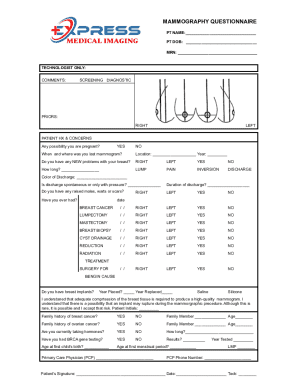
The Patient Mammography Form is a medical history document used by patients and technologists to collect essential health information prior to a mammography exam.
pdfFiller scores top ratings on review platforms




Who needs Mammography Form?
Explore how professionals across industries use pdfFiller.

Mammography Form is needed by:
-
Patients undergoing mammography procedures
-
Healthcare providers conducting breast cancer screenings
-
Technologists involved in mammography
-
Medical offices and clinics offering mammography services
-
Insurance companies processing claims related to mammography
Comprehensive Guide to Mammography Form
What is the Patient Mammography Form?
The Patient Mammography Form is a crucial document used to gather detailed medical and personal history from patients prior to undergoing mammography. This form plays a significant role in the breast cancer screening process, ensuring that healthcare providers have the necessary information to conduct accurate assessments. It requires signatures from both the patient and the technologist, emphasizing its importance in maintaining a standard of care.
Purpose and Benefits of the Patient Mammography Form
The Patient Mammography Form serves multiple purposes, enriching the patient's experience and enhancing the screening process. Primarily, it facilitates a thorough assessment of the patient's medical history, enabling providers to tailor screenings based on individual risk factors. Benefits include:
-
Ensuring accurate mammography results based on comprehensive medical histories
-
Enhancing communication between patients and healthcare providers
-
Promoting patient safety through informed consent practices
Key Features of the Patient Mammography Form
This form includes several critical functionalities that streamline the information gathering process. Users will find fillable sections designed for:
-
Documenting family health history relevant to breast cancer
-
Noting personal symptoms that may require further evaluation
Additionally, the requirement for signatures enhances the form’s validity, ensuring that both the patient and the technologist acknowledge the information provided. The document falls under the category of Medical History Forms and does not require notarization.
Who Needs the Patient Mammography Form?
The primary users of the Patient Mammography Form are individuals preparing for a mammography screening and the technologists conducting the screenings. This form becomes essential in various scenarios, including:
-
Initial consultations with healthcare providers
-
Preventive mammography screenings
Understanding the eligibility criteria ensures that the right individuals complete the form, aligning with best practices in healthcare delivery.
How to Fill Out the Patient Mammography Form Online (Step-by-Step Guide)
Filling out the Patient Mammography Form online is straightforward. Follow these steps to complete the process effectively:
-
Access the form through your healthcare provider’s portal or pdfFiller.
-
Begin with personal information, ensuring accuracy in your name and contact details.
-
Proceed to the family health history section, discussing any relevant conditions with family members.
-
Fill in personal symptoms and any previous breast health issues.
-
Review the entire form for completeness before submitting.
Gathering necessary information ahead of time can help avoid common errors, such as overlooked symptoms or typos.
How to Sign the Patient Mammography Form
Signing the Patient Mammography Form can be done through either digital or traditional wet signatures, each with specific requirements. Understanding these processes is essential:
-
Digital signatures provide streamlined efficiency, particularly through platforms like pdfFiller.
-
Wet signatures remain valid but may delay the submission process.
Employing a convenient eSigning process through pdfFiller not only ensures legal compliance but enhances security for sensitive medical documents.
Submitting the Patient Mammography Form
Once the Patient Mammography Form has been filled out, the next step is submission. There are several submission methods available:
-
In-person delivery to your healthcare provider’s office
-
Mailing the form to the designated address
-
Electronic submission via pdfFiller for immediate processing
It is important to check with your healthcare provider regarding submission locations, any associated fees, and deadlines that may apply to ensure timely processing of the form.
Security and Compliance for the Patient Mammography Form
When handling sensitive health information, security is paramount. pdfFiller employs stringent security measures, including:
-
256-bit encryption to protect user data
-
Compliance with HIPAA regulations to ensure patient privacy
Users can be reassured about the confidentiality of their data when utilizing pdfFiller tools for this form.
Engage with pdfFiller for Handling the Patient Mammography Form
Utilizing pdfFiller can significantly enhance your experience when working with the Patient Mammography Form. This platform simplifies the filling, signing, and submission processes through its cloud-based solution. Key benefits include:
-
Accessibility from any device without the need for downloads
-
Mobile functionality that allows for form management on the go
Users report time savings and improved efficiency in managing essential healthcare documentation when leveraging pdfFiller capabilities.
How to fill out the Mammography Form
-
1.To access the Patient Mammography Form on pdfFiller, go to the pdfFiller website and use the search bar to locate the form.
-
2.Once you find the form, click on it to open in the pdfFiller editor where you can start filling it out.
-
3.Before you begin, make sure you have your personal medical history including any family history related to breast health, symptoms, and current medications.
-
4.In the form, navigate through the fillable fields. Click on each field to enter the required information. Use checkboxes where applicable to indicate responses.
-
5.If you miss any fields, pdfFiller will usually highlight them, so pay attention to those prompts.
-
6.Once you have completed all sections, review your entries thoroughly to ensure accuracy and completeness of the information provided.
-
7.Finalizing the form is simple; click the save icon to store your progress, and download the document if needed.
-
8.When ready, you can submit the form directly through pdfFiller, or you can download it for print. Follow the instructions on the screen to finalize any submissions.

Who is eligible to fill out the Patient Mammography Form?
The Patient Mammography Form is designed for patients undergoing mammography, along with technologists required to sign off on the provided information.
Are there any deadlines for submitting this form?
Generally, the Patient Mammography Form should be completed prior to your scheduled mammography appointment to ensure timely processing and care.
How can I submit the completed Patient Mammography Form?
You can submit the completed form through pdfFiller directly or download it for printing and bring it to your healthcare provider on the day of the appointment.
What supporting documents should I provide with this form?
While the form itself may not require additional documents, bringing any relevant medical records or personal health history would be beneficial for comprehensive screening.
What common mistakes should I avoid when filling out the form?
Be sure to double-check all fields for accuracy, especially personal health history and family medical histories, to avoid potential errors that could delay processing.
How long does it take to process the Patient Mammography Form?
Processing times for the form typically align with your appointment schedule; completing it in advance helps ensure your information is reviewed on the same day.
What should I do if I have questions about the form while filling it out?
If you have questions, consider contacting your healthcare provider for guidance, or consult pdfFiller's help resources for assistance with the filling process.
Related Forms




Get the latest insights from our blog


If you believe that this page should be taken down, please follow our DMCA take down process
here
.
This form may include fields for payment information. Data entered in these fields is not covered by PCI DSS compliance.