
Last updated on
Oct 15, 2026

Get the free Third Party Verification of Results Application
We are not affiliated with any brand or entity on this form

Fill out
Complete the form online in a simple drag-and-drop editor.

eSign
Add your legally binding signature or send the form for signing.

Share
Share the form via a link, letting anyone fill it out from any device.

Export
Download, print, email, or move the form to your cloud storage.
Why pdfFiller is the best tool for your documents and forms


End-to-end document management
From editing and signing to collaboration and tracking, pdfFiller has everything you need to get your documents done quickly and efficiently.
Accessible from anywhere
pdfFiller is fully cloud-based. This means you can edit, sign, and share documents from anywhere using your computer, smartphone, or tablet.
Secure and compliant
pdfFiller lets you securely manage documents following global laws like ESIGN, CCPA, and GDPR. It's also HIPAA and SOC 2 compliant.
What is Form 8
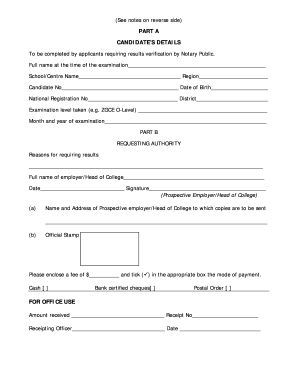
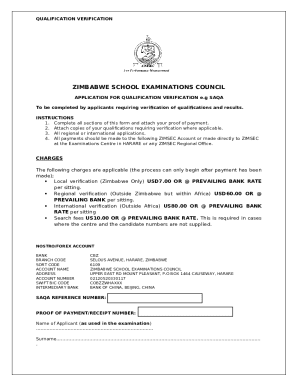
The Third Party Verification of Results Application is a form used by third parties to verify a candidate's results from submitted documents.
pdfFiller scores top ratings on review platforms




Who needs Form 8?
Explore how professionals across industries use pdfFiller.

Form 8 is needed by:
-
Third-party verification agencies seeking to confirm academic results
-
Employers needing to verify candidate qualifications
-
Educational institutions conducting record audits
-
Candidates wishing to authorize result checks
-
Recruiters requiring verification for hiring processes
Comprehensive Guide to Form 8
What is the Third Party Verification of Results Application?
The Third Party Verification of Results Application, commonly known as Form 8, is essential for verifying academic results for candidates. This form plays a pivotal role in confirming the authenticity of results for various stakeholders, including educational institutions, employers, and verification agencies. To ensure a smooth verification process, candidates must provide specific identification and relevant documentation.
Third parties rely on this application to gain trustworthy insights into a candidate's results, establishing confidence in academic qualifications. Proper documentation is vital, as it ensures that the verification process is accurate and efficient. Important keywords associated with this process include third party verification, results verification, and candidate results.
Purpose and Benefits of the Third Party Verification of Results Application
This application is crucial for both candidates and third parties, serving a variety of purposes. Firstly, the form facilitates quick and reliable results verification, which significantly benefits all involved parties. By utilizing the verification application, third parties gain assurance regarding the authenticity of results presented by candidates.
Moreover, having verifiable academic records enhances a candidate's prospects, making them more appealing to potential employers or educational institutions. The advantages of this verification process contribute greatly to the confidence within the education verification landscape, solidifying its importance for all users.
Who Needs the Third Party Verification of Results Application?
Several audiences require the Third Party Verification of Results Application, making it a crucial resource. Third parties, such as universities, employers, and verification agencies, often seek to verify candidates' results to uphold trust and accountability in educational credentials.
Additionally, candidates themselves must consent to the verification process by submitting this application. This is especially true in cases where their academic records are requested for further educational pursuits or employment opportunities. Understanding the roles of these users emphasizes the importance of academic records in various professional and educational contexts.
How to Fill Out the Third Party Verification of Results Application Online (Step-by-Step)
Completing the Third Party Verification of Results Application online is a straightforward process when following these steps:
-
Begin by accessing the application through the pdfFiller platform.
-
Fill in the critical fields which include the Candidate’s name, email address, signature, and date.
-
Double-check that all information is entered accurately to prevent common errors.
-
Upload the necessary documents as required.
-
Review the application for completeness before final submission.
By adhering to these instructions, candidates can streamline their verification request and promote efficiency in the results verification process.
Required Documents and Supporting Materials
To successfully complete the Third Party Verification of Results Application, candidates must prepare specific documentation. Required documents typically include:
-
Candidate’s ID for identification purposes.
-
The results document that requires verification.
Providing clear and legible copies of these documents is essential for effective verification. Additionally, candidates may consider submitting other supporting materials to further enhance the verification process, bolstering the overall authenticity of their academic records.
Payment Methods and Fees Associated with the Application
There are various costs associated with the Third Party Verification of Results Application that candidates should be aware of. The fees for applying can vary, but candidates should familiarize themselves with available payment methods, which might include credit card and online payment options.
Moreover, some candidates may be eligible for fee waivers or reductions based on specific circumstances. Timely payment is critical to avoid delays in processing the verification application, ensuring that results are verified without unnecessary hold-ups.
Submission Methods and What Happens After You Submit
Candidates can submit the Third Party Verification of Results Application through multiple channels. The most common submission methods include:
-
Online submission via the pdfFiller platform.
-
Email submission as an alternative option.
Upon submission, candidates can expect verification results within a specified timeline, allowing them to track their submission status conveniently. This transparency is crucial in the verification process, ensuring all parties remain informed throughout.
Security and Compliance for the Third Party Verification of Results Application
Security is of utmost importance when handling sensitive documents through the Third Party Verification of Results Application. To protect candidates' information, robust security measures are implemented, including 256-bit encryption and compliance with privacy regulations like GDPR and HIPAA.
These security protocols play a significant role in building trust with users, ensuring that both candidates and third parties can navigate the verification process with confidence in the protection of their personal information.
Get Started with the Third Party Verification of Results Application Using pdfFiller
pdfFiller offers a seamless experience for completing the Third Party Verification of Results Application, enhancing ease of use. Users can quickly access the platform to utilize features such as electronic signatures, editing capabilities, and efficient document management.
The combination of security measures and user-friendly tools on pdfFiller makes filling out the form online straightforward, while ensuring that sensitive information is managed properly during the verification process.
How to fill out the Form 8
-
1.Access the Third Party Verification of Results Application by visiting pdfFiller's website and searching for the form name in the search bar.
-
2.Click on the form link to open it in pdfFiller's interface where you can start filling it out.
-
3.Before starting, gather necessary information including the candidate's name, email address, signature, ID copies, and the results document to be verified.
-
4.In the form, locate fillable fields for the Candidate's name, email, signature, and today's date; fill these in clearly and accurately.
-
5.Ensure you have the third party's contact information ready to insert into the designated field for communication regarding verification outcomes.
-
6.Review all filled fields for accuracy and completeness, ensuring that all required information is provided and documents are attached.
-
7.After finalizing the form, use pdfFiller's save feature to keep a copy for your records, then download it or use the submission option to send it directly to the third party.

Who is eligible to use the Third Party Verification of Results Application?
Any candidate who wishes to have their academic results verified by a third party can use this form. Additionally, third parties such as employers or educational institutions can also request verification on behalf of the candidate.
What documents are required to submit with the application?
You must include a copy of the candidate's ID and the results document that needs verification when submitting the Third Party Verification of Results Application.
Is there a fee associated with this application?
Yes, there is a fee that must be paid when submitting the Third Party Verification of Results Application. Make sure to check payment methods accepted on the platform.
How long does it take to process the verification after submission?
Processing times can vary. Typically, you should expect to receive the verification outcomes via email within a few business days; however, specific time frames may depend on the institution involved.
Can the candidate withdraw their consent for verification after submitting the form?
Once the Third Party Verification of Results Application is submitted, it may be challenging to withdraw consent. It is best to contact the issuing organization directly for assistance.
What are some common mistakes to avoid when completing the form?
Ensure all fields are filled out completely and accurately. Common mistakes include missing signatures, wrong candidate information, and failing to attach necessary documents.
How do I submit the completed form?
After filling out the form on pdfFiller, you can either download it and send it manually or submit it directly through the pdfFiller platform using their submission option.
Related Forms





Get the latest insights from our blog


If you believe that this page should be taken down, please follow our DMCA take down process
here
.
This form may include fields for payment information. Data entered in these fields is not covered by PCI DSS compliance.