
Last updated on
Oct 15, 2026

Get the free University of Toronto Immunization Form
We are not affiliated with any brand or entity on this form

Fill out
Complete the form online in a simple drag-and-drop editor.

eSign
Add your legally binding signature or send the form for signing.

Share
Share the form via a link, letting anyone fill it out from any device.

Export
Download, print, email, or move the form to your cloud storage.
Why pdfFiller is the best tool for your documents and forms


End-to-end document management
From editing and signing to collaboration and tracking, pdfFiller has everything you need to get your documents done quickly and efficiently.
Accessible from anywhere
pdfFiller is fully cloud-based. This means you can edit, sign, and share documents from anywhere using your computer, smartphone, or tablet.
Secure and compliant
pdfFiller lets you securely manage documents following global laws like ESIGN, CCPA, and GDPR. It's also HIPAA and SOC 2 compliant.
What is Immunization Form
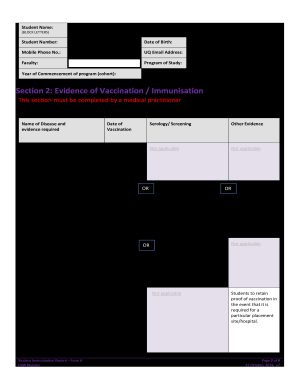
The University of Toronto Immunization Form is a medical consent document used by students to provide proof of vaccinations required for clinical placements.
pdfFiller scores top ratings on review platforms




Who needs Immunization Form?
Explore how professionals across industries use pdfFiller.

Immunization Form is needed by:
-
Students in Rehabilitation Sciences
-
Healthcare Providers completing the form
-
University of Toronto Admissions Office
-
Clinical Coordinators overseeing placements
-
International Students fulfilling vaccination requirements
Comprehensive Guide to Immunization Form
What is the University of Toronto Immunization Form?
The University of Toronto Immunization Form is a vital document aimed at verifying student vaccinations, particularly for those enrolled in the Rehabilitation Sciences Sector. This form is generated by healthcare providers to ensure that students comply with health regulations. Key components include sections for specific immunizations such as Hepatitis B and COVID-19, alongside requirements for signatures from both the student and the provider.
Purpose and Benefits of the University of Toronto Immunization Form
Providing proof of immunizations is crucial for students in the Rehabilitation Sciences Sector as it guarantees their readiness for clinical placements. This form serves dual purposes; it not only helps students fulfill university health requirements but also assists healthcare providers in maintaining public health standards. Benefits include streamlined verification processes for student health, ensuring that all necessary vaccinations have been completed prior to clinical participation.
Key Features of the University of Toronto Immunization Form
-
Details required vaccinations, such as Hepatitis B, COVID-19, and others.
-
Requires completion verification from healthcare providers.
-
Facilitates the collection of students' immunization history for compliance tracking.
Who Needs to Complete the University of Toronto Immunization Form?
All students enrolled in programs that require clinical placements must complete the University of Toronto Immunization Form. Specific groups include those in the Rehabilitation Sciences Sector, who must ensure their immunization records are up to date. Healthcare providers play a crucial role in this process by verifying completed vaccinations and endorsing the form.
When to Submit the University of Toronto Immunization Form
Submission of the University of Toronto Immunization Form is guided by strict deadlines that vary across different departments within the university. Failing to submit the form on time can result in serious consequences, including delays in registration or inability to participate in clinical placements.
How to Fill Out the University of Toronto Immunization Form Online
To fill out the form online, students should use pdfFiller. The process involves several actionable steps:
-
Access the form through the provided link.
-
Fill in required fields such as dates of vaccination and student details.
-
Ensure both student and healthcare provider signatures are included.
Review and Validation Checklist for the University of Toronto Immunization Form
Before finalizing the form submission, students and healthcare providers should double-check the following:
-
Ensure all immunizations are documented accurately.
-
Confirm that signatures are present from both parties.
-
Review the completion dates for accuracy.
How to Submit the University of Toronto Immunization Form
The University of Toronto Immunization Form can be submitted through various methods, including online and in-person options. After submission, tracking the status of the form is vital for ensuring it has been received and processed correctly, providing peace of mind to students.
Ensuring Security and Compliance with the University of Toronto Immunization Form
Maintaining data protection is critical when dealing with sensitive health information. Security features provided by pdfFiller ensure that personal data remains confidential and secure. Compliance with health regulations is essential, and utilizing secure forms handling helps safeguard personal information.
Streamline Your Submission with pdfFiller
Utilizing pdfFiller allows for an efficient and secure form-filling process. Users can easily edit, eSign, and submit their forms online, ensuring streamlined submissions. The platform's capabilities, such as secure document handling and ease of use, further enhance the experience.
How to fill out the Immunization Form
-
1.Access pdfFiller and log in to your account. If you don’t have one, create an account for free.
-
2.In the search bar, type 'University of Toronto Immunization Form' and select it from the results.
-
3.Once the form is loaded, read through all instructions carefully to understand the requirements.
-
4.Start filling in your personal information in the designated fields, including your name and relevant contact details.
-
5.Gather your vaccination history or evidence such as dates of immunizations and any required lab proof.
-
6.Navigate to the section requiring healthcare provider input. Ensure your provider fills in their information and signs the document as per requirements.
-
7.Review your completion of the form thoroughly, ensuring no field is left blank, including any required dates and signatures.
-
8.Use pdfFiller’s review feature to check for completeness and accuracy before finalizing your document.
-
9.Once everything is correct, click on the 'Save' button to keep a copy of your completed form on your account.
-
10.Finally, download the form for submission, or choose submit options provided within pdfFiller for direct online submission to the University.

What are the eligibility requirements for filling out the University of Toronto Immunization Form?
The form is required for students in the Rehabilitation Sciences program at the University of Toronto. Students must meet university health requirements and have their vaccinations verified by a healthcare provider.
Are there deadlines for submitting the immunization form?
Yes, submission deadlines vary by department within the University. It’s crucial to check with your specific program for exact due dates.
How do I submit the University of Toronto Immunization Form?
You can submit the completed form via pdfFiller by following the submission instructions provided in the platform, or by downloading and sending it to the designated university office.
What supporting documents do I need to provide with the form?
You need to include proof of your vaccinations, which may consist of dates of administered vaccines and lab evidence when required. Ensure your healthcare provider signs the form.
What common mistakes should I avoid while completing the form?
Common mistakes include leaving fields blank, not obtaining required signatures from both the student and healthcare provider, and missing submission deadlines. Thoroughly check the form before submitting.
How long will it take for the immunization form to be processed?
Processing times may vary depending on the volume of submissions. Typically, it is advisable to allow several weeks before inquiring about the status of your form.
What should I do if I encounter issues while using pdfFiller?
If you encounter issues, check pdfFiller’s help section for guidance, or contact their customer support for assistance with navigating the platform or filling out the form.
Related Forms





Get the latest insights from our blog



If you believe that this page should be taken down, please follow our DMCA take down process
here
.
This form may include fields for payment information. Data entered in these fields is not covered by PCI DSS compliance.