
Last updated on
Oct 19, 2026

Get the free 2027 World Holidays Tour Booking Form
We are not affiliated with any brand or entity on this form

Fill out
Complete the form online in a simple drag-and-drop editor.

eSign
Add your legally binding signature or send the form for signing.

Share
Share the form via a link, letting anyone fill it out from any device.

Export
Download, print, email, or move the form to your cloud storage.
Why pdfFiller is the best tool for your documents and forms


End-to-end document management
From editing and signing to collaboration and tracking, pdfFiller has everything you need to get your documents done quickly and efficiently.
Accessible from anywhere
pdfFiller is fully cloud-based. This means you can edit, sign, and share documents from anywhere using your computer, smartphone, or tablet.
Secure and compliant
pdfFiller lets you securely manage documents following global laws like ESIGN, CCPA, and GDPR. It's also HIPAA and SOC 2 compliant.
What is Tour Form
The 2027 World Holidays Tour Booking Form is a personal document used by travelers to reserve spots on international tours.
pdfFiller scores top ratings on review platforms




Who needs Tour Form?
Explore how professionals across industries use pdfFiller.

Tour Form is needed by:
-
Individuals planning international travel.
-
Groups organizing trips through Mayflower Cruises & Tours.
-
Travelers requiring emergency contacts for tours.
-
Vacation planners looking for structured booking options.
-
Anyone interested in booking holiday packages or tours.
Comprehensive Guide to Tour Form
What is the 2027 World Holidays Tour Booking Form?
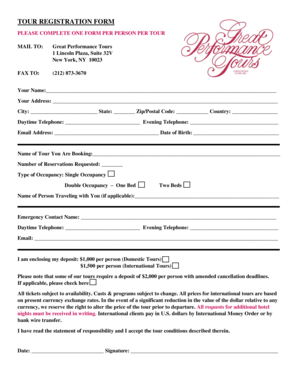
The 2027 World Holidays Tour Booking Form is crucial for travelers planning their trips. This form streamlines the reservation process by collecting essential information such as the traveler’s name, address, and passport details. Issued by Mayflower Cruises & Tours, Inc., the form ensures that travelers have the necessary information to secure their bookings effectively.
Purpose and Benefits of the 2027 World Holidays Tour Booking Form
This form provides various advantages, making it an essential tool for anyone looking to travel. It allows for secure reservations, ensuring that all travel arrangements are organized and confirmed ahead of time. Additionally, the booking form simplifies the payment process, giving travelers peace of mind.
-
Secures travel reservations efficiently.
-
Facilitates organized travel planning.
-
Simplifies booking and payment processes.
Key Features of the 2027 World Holidays Tour Booking Form
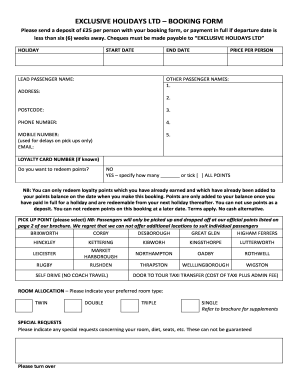
The 2027 World Holidays Tour Booking Form includes multiple specific fields that facilitate thorough travel planning. These fields cover personal details, travel preferences, and payment options.
-
Name, address, and passport details.
-
Flight options and payment schedules.
-
Cancellation and refund conditions.
Who Needs the 2027 World Holidays Tour Booking Form?
The target audience for this form includes both travelers and their emergency contacts. It is crucial that individuals who wish to book a tour or assist in the booking process complete this form. Certain prerequisites may apply, such as having valid identification and travel documents.
How to Fill Out the 2027 World Holidays Tour Booking Form Online
To fill out the form efficiently, follow these steps using pdfFiller:
-
Access the 2027 World Holidays Tour Booking Form through pdfFiller.
-
Carefully fill in the 'Tour', 'Departure Date', and 'Group Name' fields.
-
Double-check all entries for accuracy and completeness.
Common Errors and How to Avoid Them When Completing the Form
Travelers should be aware of typical mistakes when completing the form. Common errors include incomplete fields and incorrect information. It is advisable to review all sections before submission to prevent these issues.
-
Ensure all fields are filled in completely.
-
Verify that personal information matches travel documents.
-
Look out for any spelling errors.
How to Submit the 2027 World Holidays Tour Booking Form
After completing the form, travelers can choose from several submission methods. You can submit the form online or send it via mail. It is crucial to pay attention to any associated fees and submission deadlines to ensure timely processing.
-
Online submission through pdfFiller.
-
Mail submission to Mayflower Cruises & Tours, Inc.
-
Check processing times and fees involved.
Security and Compliance for the 2027 World Holidays Tour Booking Form
Security measures are in place to protect sensitive user information when completing the booking form. Compliance with regulations such as HIPAA and GDPR ensures that users’ data is handled securely. Therefore, using pdfFiller for this task provides an extra layer of protection for users.
The Role of pdfFiller in Completing the 2027 World Holidays Tour Booking Form
pdfFiller enhances the experience of filling out the 2027 World Holidays Tour Booking Form by offering various features. This platform allows for easy editing, e-signing, and document management, making the process hassle-free for users.
-
Fillable capabilities for streamlined entry.
-
User-friendly document management tools.
-
Secure e-signing options to confirm submissions.
Next Steps After Submission
Once the 2027 World Holidays Tour Booking Form is submitted, travelers can track their application status through the provided channels. There may be further actions required based on the submission, and any necessary corrections can be made if needed through assistance available.
How to fill out the Tour Form
-
1.To access the 2027 World Holidays Tour Booking Form on pdfFiller, go to the pdfFiller website and sign in with your account.
-
2.Use the search bar to locate the form by entering its name or relevant keywords.
-
3.Once you find the form, click on it to open in the editing interface of pdfFiller.
-
4.Before filling the form, gather all necessary information like your personal details, passport information, and emergency contact.
-
5.Begin by filling in your name and address in the top section of the form, ensuring it matches your official documents.
-
6.Next, complete the passport information fields with accurate details that correspond to your travel documents.
-
7.Specify your travel preferences by selecting the appropriate options for your departure date, group name, and travel arrangements.
-
8.Make sure to complete all required fields marked by asterisks to ensure your form is valid.
-
9.Review your entries to confirm all information is correct and matches the documentation you are providing.
-
10.Once you are satisfied with the information entered, check for any additional notes or instructions on the form that may need your attention.
-
11.Save your progress regularly to avoid losing any information, using the save button provided in the interface.
-
12.After filling out the form completely, you can download a copy to your device or submit it directly through pdfFiller.
-
13.If submitting online, follow the prompts to finalize your submission and ensure you receive a confirmation of your booking request.

What are the eligibility requirements for using the 2027 World Holidays Tour Booking Form?
Anyone wishing to book a tour through Mayflower Cruises & Tours is eligible to use this form, provided they have valid travel documentation and the necessary information for booking.
Are there deadlines for submitting the booking form?
It’s crucial to submit the 2027 World Holidays Tour Booking Form well in advance of your tour departure date to ensure availability and processing of your reservation.
How do I submit the form once completed?
You can submit the form through pdfFiller by following the prompts after filling out the document. Alternatively, download it and send it via email to Mayflower Cruises & Tours.
What supporting documents are required with the booking form?
Typically, you will need to include a copy of your passport and any additional identification as specified by Mayflower Cruises & Tours. Ensure all documents are current.
What common mistakes should I avoid when filling out this form?
Avoid leaving any required fields blank, using incorrect personal information, and failing to double-check your submissions or payment details before sending.
How long does it take to process the booking after submission?
Processing times can vary, but expect confirmations to be sent within a few business days after submitting the form, barring any complications.
What should I know about cancellation policies associated with this form?
The 2027 World Holidays Tour Booking Form outlines specific cancellation and refund terms. It’s important to carefully review these before submissions to understand any fees involved.






Get the latest insights from our blog


If you believe that this page should be taken down, please follow our DMCA take down process
here
.
This form may include fields for payment information. Data entered in these fields is not covered by PCI DSS compliance.