
Last updated on
Oct 17, 2026

Get the free CFPS Annual Renewal Fee Form
We are not affiliated with any brand or entity on this form

Fill out
Complete the form online in a simple drag-and-drop editor.

eSign
Add your legally binding signature or send the form for signing.

Share
Share the form via a link, letting anyone fill it out from any device.

Export
Download, print, email, or move the form to your cloud storage.
Why pdfFiller is the best tool for your documents and forms


End-to-end document management
From editing and signing to collaboration and tracking, pdfFiller has everything you need to get your documents done quickly and efficiently.
Accessible from anywhere
pdfFiller is fully cloud-based. This means you can edit, sign, and share documents from anywhere using your computer, smartphone, or tablet.
Secure and compliant
pdfFiller lets you securely manage documents following global laws like ESIGN, CCPA, and GDPR. It's also HIPAA and SOC 2 compliant.
What is CFPS Renewal Form
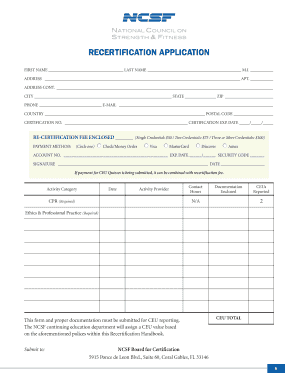
The CFPS Annual Renewal Fee Form is a personal form used by CFPS certificate holders to renew their certification by submitting payment and an attestment.
pdfFiller scores top ratings on review platforms




Who needs CFPS Renewal Form?
Explore how professionals across industries use pdfFiller.

CFPS Renewal Form is needed by:
-
CFPS certification holders
-
Individuals seeking to maintain certification
-
Professionals in fire protection services
-
Candidates returning for re-certification
-
HR departments managing certification records
Comprehensive Guide to CFPS Renewal Form
What is the CFPS Annual Renewal Fee Form?
The CFPS Annual Renewal Fee Form is specifically designed for CFPS Certificate Holders to renew their certification efficiently. This form serves to maintain the validity of the certification, ensuring that professionals remain compliant with industry standards. Understanding the definition and purpose of the CFPS annual renewal form is crucial for successful renewal.
Purpose and Benefits of the CFPS Annual Renewal Fee Form
Renewing your CFPS certification on an annual basis is essential for continuing your professional standing and credibility. By completing the CFPS renewal fee process, you demonstrate your commitment to upholding the standards of your profession. This renewal not only enables you to practice but also reinforces your expertise in the field.
Efficiently completing this process offers several benefits:
-
Maintaining a valid certification reflects your qualifications.
-
Enhancing marketability to potential employers.
-
Demonstrating commitment to ongoing education and professional development.
Who Needs the CFPS Annual Renewal Fee Form?
The CFPS certification renewal form is mandatory for all individuals holding a CFPS certificate. Certificate holders are responsible for submitting this form annually to retain their credentials. To be eligible, one must meet specific criteria set forth by the certification body.
How to Fill Out the CFPS Annual Renewal Fee Form Online (Step-by-Step)
Filling out the CFPS Annual Renewal Fee Form online involves several clear steps:
-
Access the form through pdfFiller's platform.
-
Gather necessary information and documents, such as your certification number.
-
Complete all required fields accurately, including personal and payment information.
-
Review the form for any errors before submission.
-
Submit the form through the secure portal provided.
Using pdfFiller simplifies this process, helping users navigate through each specific field.
Payment Methods and Fees for the CFPS Annual Renewal Fee Form
When renewing your CFPS certification, various payment methods are available via the secure payment portal. The fee structure typically includes:
-
Standard renewal fees.
-
Options for fee waivers based on eligibility.
-
Guidance on securely entering payment information to protect personal data.
Submission Methods and Delivery for the CFPS Annual Renewal Fee Form
Upon completing the CFPS Annual Renewal Fee Form, users can submit it online. The process includes an expected timeline for processing and a confirmation step to ensure that submissions are accurately received. This efficiency is crucial for maintaining your certification status.
Common Errors and How to Avoid Them While Completing the CFPS Annual Renewal Fee Form
Filling out the CFPS annual renewal form can often lead to common mistakes. To help avoid these pitfalls:
-
Double-check all entries for accuracy.
-
Ensure that all necessary documents are included.
-
Follow submission guidelines carefully to comply with requirements.
What Happens After You Submit the CFPS Annual Renewal Fee Form?
After submission, it is important to understand the follow-up process. Users will typically receive confirmation of their submission and should know how to track the status. Ensuring the submission was successful is vital for maintaining certification.
Security and Compliance for the CFPS Annual Renewal Fee Form
pdfFiller ensures the safety of sensitive information through advanced security features, including 256-bit encryption. Compliance with regulations such as HIPAA and GDPR is also a priority, providing peace of mind while completing the CFPS attestment form.
Experience the Convenience of pdfFiller for Your CFPS Annual Renewal Fee Form
Utilizing pdfFiller for your CFPS form offers numerous advantages. The platform's features are designed for ease of use, making it accessible for all users. The combination of security benefits and straightforward navigation ensures that you can complete your form efficiently and confidently.
How to fill out the CFPS Renewal Form
-
1.Access the CFPS Annual Renewal Fee Form by visiting pdfFiller and searching for the form by name.
-
2.Once located, click on the file to open it in the pdfFiller editor interface.
-
3.Before filling out the form, gather necessary information including payment details and your CFPS certificate number.
-
4.Navigate through the document using the scroll function, and click on each fillable field to enter the required information.
-
5.Ensure all required fields are filled accurately, including payment information and confirmation of reviewing the CFPS Candidate Handbook.
-
6.After completing all sections, review your entries for accuracy and completeness to avoid potential processing delays.
-
7.Once satisfied, save your progress in pdfFiller to avoid losing any information entered.
-
8.To submit the form, go to the submit option within pdfFiller and follow prompts to send your completed form through the secure payment portal.

Who is eligible to use the CFPS Annual Renewal Fee Form?
The CFPS Annual Renewal Fee Form is intended for individuals who currently hold a CFPS certification and need to renew it by submitting the required fee and attestment.
What is the deadline for submitting this renewal form?
While specific deadlines are not provided in the metadata, it is recommended to submit the CFPS Annual Renewal Fee Form well in advance of your certification expiration date to ensure uninterrupted certification.
How should I submit the completed form?
You can submit the completed CFPS Annual Renewal Fee Form securely through pdfFiller's online portal, following the submission instructions after filling out the form.
Are there any required supporting documents for this form?
The primary requirement includes completion of the form itself and payment information; however, be sure to review the CFPS Candidate Handbook as indicated in the instructions to ensure compliance.
What common mistakes should I avoid when completing this form?
Common mistakes include missing required fields, inaccuracies in payment details, and failing to sign the attestment. Double-check all entries before submission.
How long does processing take once I submit my renewal form?
Processing times can vary, but typically you can expect to receive confirmation of your renewal within a few business days. Monitor your email for status updates.
What happens if I miss the renewal deadline?
If you miss the renewal deadline for the CFPS certification, you may need to apply for re-certification, which typically involves more rigorous procedures than simple renewal.
Related Forms



Get the latest insights from our blog


If you believe that this page should be taken down, please follow our DMCA take down process
here
.
This form may include fields for payment information. Data entered in these fields is not covered by PCI DSS compliance.