
Last updated on
Oct 17, 2026

Get the free Contractor Pay Stub
We are not affiliated with any brand or entity on this form

Fill out
Complete the form online in a simple drag-and-drop editor.

eSign
Add your legally binding signature or send the form for signing.

Share
Share the form via a link, letting anyone fill it out from any device.

Export
Download, print, email, or move the form to your cloud storage.
Why pdfFiller is the best tool for your documents and forms


End-to-end document management
From editing and signing to collaboration and tracking, pdfFiller has everything you need to get your documents done quickly and efficiently.
Accessible from anywhere
pdfFiller is fully cloud-based. This means you can edit, sign, and share documents from anywhere using your computer, smartphone, or tablet.
Secure and compliant
pdfFiller lets you securely manage documents following global laws like ESIGN, CCPA, and GDPR. It's also HIPAA and SOC 2 compliant.
What is Pay Stub
The Contractor Pay Stub is a financial document used by businesses to record payments made to independent contractors.
pdfFiller scores top ratings on review platforms




Who needs Pay Stub?
Explore how professionals across industries use pdfFiller.

Pay Stub is needed by:
-
Independent contractors requiring payment documentation
-
Businesses hiring contractors for project-based work
-
Accounting professionals needing to track contractor payments
-
Freelancers wanting to maintain a record of earnings
-
Tax professionals assisting clients with financial records
-
Payroll services managing contractor payments
Comprehensive Guide to Pay Stub
What is a Contractor Pay Stub?
A contractor pay stub is a financial record detailing payments made to independent contractors. This document plays a critical role in documenting contractor payments, providing a transparent overview of financial transactions between contractors and businesses. For both parties, a contractor pay stub serves as an essential financial record that aids in tracking earnings and maintaining accurate financial documentation.
Purpose and Benefits of Using a Contractor Pay Stub
Utilizing a contractor pay stub offers numerous advantages. It enhances financial organization by allowing contractors to track their payments methodically. This clarity supports compliance, particularly for independent contractors managing varying income streams. By maintaining this document, contractors ensure they have a reliable resource for budgeting and tax preparation, ultimately leading to better financial health.
Key Features of the Contractor Pay Stub
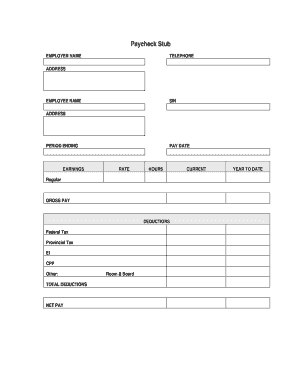
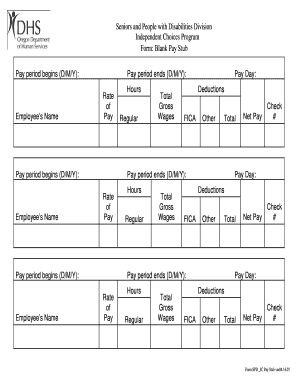
A typical contractor pay stub includes several essential fields that facilitate clear communication of payment details. These fields typically contain the company name, payment period, total net pay, and year-to-date earnings. By ensuring that such critical information is well-documented, the pay stub template becomes an invaluable tool for both contractors and businesses.
Who Needs a Contractor Pay Stub?
The primary users of a contractor pay stub include independent contractors, freelancers, and small business owners. Various scenarios necessitate the use of this document for payment documentation, such as securing loans, verifying income for rental applications, or filing taxes. Understanding the importance of this document is vital for those operating within or alongside contractual agreements.
How to Fill Out the Contractor Pay Stub Step-by-Step
Filling out a contractor pay stub involves a systematic process. Follow these steps:
-
Provide the company name and address.
-
Specify the payment period and issue date.
-
Detail the project name and service description.
-
Input the rate, hours or units worked, and total amount earned.
-
Calculate the subtotal and any necessary adjustments.
-
Sum up the total net pay and year-to-date earnings if applicable.
Ensuring all fields are accurately filled will prevent any discrepancies in future financial tracking.
Reviewing Your Contractor Pay Stub for Accuracy
Before finalizing a contractor pay stub, use a comprehensive checklist to review for common errors. Pay attention to details such as payment amounts and periods, ensuring they match the contractual agreement. Accuracy is essential for both the contractor and the client to avoid any potential disputes regarding payment terms.
Digital Solutions for Completing a Contractor Pay Stub
pdfFiller provides an ideal solution for creating and managing contractor pay stubs online. Security features include 256-bit encryption and compliance with applicable regulations, ensuring that your documents remain safe and secure. By utilizing pdfFiller, users can enjoy a streamlined process in managing their financial documents effectively.
How to Download and Share Your Contractor Pay Stub
After completing your contractor pay stub, downloading it as a PDF is straightforward. Simply select the download option, and your document will be saved securely. For sharing, consider using secure options to send the document to clients or financial institutions, ensuring the confidentiality of sensitive information is maintained.
Storing and Retaining Your Contractor Pay Stub
It's essential to know how long to retain contractor pay stubs for accurate personal and business accounting records. Generally, maintaining these documents for a minimum of three to seven years is recommended, depending on local regulations. A solid record-keeping system aids in efficient financial management and ensures compliance with tax requirements.
Maximizing the Use of Your Contractor Pay Stub with pdfFiller
pdfFiller offers additional features that enhance the management of contractor pay stubs. Users can edit, eSign, and convert their documents with ease, thereby streamlining the entire process. Embracing these capabilities today can significantly improve the efficiency of your contractor pay stub management.
How to fill out the Pay Stub
-
1.To access the Contractor Pay Stub on pdfFiller, visit the pdfFiller website and log into your account or create a new one.
-
2.Once you're logged in, use the search bar at the top of the page to type 'Contractor Pay Stub' and select the appropriate form from the results.
-
3.As the form opens, you will see various fillable fields. Before completing the form, gather all necessary information, such as your company details, payment period, and contractor's service specifics.
-
4.Start filling in the 'Company name' and 'Address' fields with the details of the business making the payment. Ensure accuracy as this is important for record-keeping.
-
5.Proceed to fill in the 'City, State ZIP TIN', ensuring that you include all relevant address information to avoid any gaps.
-
6.Next, fill in the 'Payment period' and 'Issue date' to clarify the timeframe for the payment being recorded. These fields help in keeping proper financial records.
-
7.In the 'Project (optional)' section, if applicable, provide information regarding the specific project for which the contractor was hired.
-
8.Describe the 'Service / description' clearly, detailing what work was performed by the independent contractor.
-
9.Indicate the 'Rate' per hour or unit, then fill in the 'Hours / units' worked by the contractor to accurately calculate payment.
-
10.Automatically, the 'Amount' field should populate, but double-check to ensure correctness.
-
11.Fill in any 'Adjustments (optional)' if there are any additional changes to be made concerning the payment amount.
-
12.Once all fields are filled, review the 'Subtotal', 'Total net pay', and 'Year-to-date' to confirm everything is accurate.
-
13.After reviewing, you can either save your progress or finalize the document. Look for the option to save or download on pdfFiller and choose your preference.
-
14.You can either print the stub for your records or send it directly to the contractor via email using pdfFiller’s sharing options.

Who can use the Contractor Pay Stub?
The Contractor Pay Stub can be used by any business or individual who hires independent contractors and needs a record of payments made to them. It's ideal for companies hiring contractors for project-based work.
Do I need to notarize this form?
No, the Contractor Pay Stub does not require notarization. It is a simple payment record where independent contractors are responsible for their own tax obligations.
How do I access the form on pdfFiller?
To access the Contractor Pay Stub on pdfFiller, log into your account or create a new one, then search for 'Contractor Pay Stub' in the search bar to find the form.
What information do I need before filling out the form?
Before starting, gather your company name, address, payment period, issue date, details of the project, service description, rate, hours worked, and any adjustments to be made.
Is the Contractor Pay Stub a tax document?
No, the Contractor Pay Stub does not withhold taxes and is not a tax form. It's a record used to document payments made to independent contractors.
Can adjustments be made on the Contractor Pay Stub?
Yes, you can include adjustments in the designated field if there are any changes to the payment amount, allowing for accurate documentation of payment processed.
What should I do once the form is completed?
Once the form is completed, review all the information for accuracy, save it, and choose to either download it or share it directly with your contractor via pdfFiller’s options.
Related Forms




Get the latest insights from our blog


If you believe that this page should be taken down, please follow our DMCA take down process
here
.
This form may include fields for payment information. Data entered in these fields is not covered by PCI DSS compliance.