
Last updated on
Oct 17, 2026

Get the free Zero Income Certification Form
We are not affiliated with any brand or entity on this form

Fill out
Complete the form online in a simple drag-and-drop editor.

eSign
Add your legally binding signature or send the form for signing.

Share
Share the form via a link, letting anyone fill it out from any device.

Export
Download, print, email, or move the form to your cloud storage.
Why pdfFiller is the best tool for your documents and forms


End-to-end document management
From editing and signing to collaboration and tracking, pdfFiller has everything you need to get your documents done quickly and efficiently.
Accessible from anywhere
pdfFiller is fully cloud-based. This means you can edit, sign, and share documents from anywhere using your computer, smartphone, or tablet.
Secure and compliant
pdfFiller lets you securely manage documents following global laws like ESIGN, CCPA, and GDPR. It's also HIPAA and SOC 2 compliant.
What is Zero Income Form
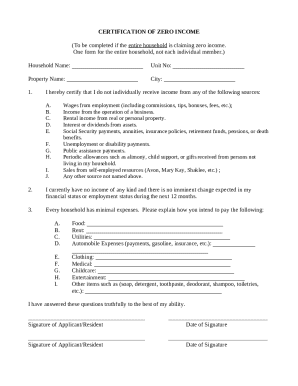
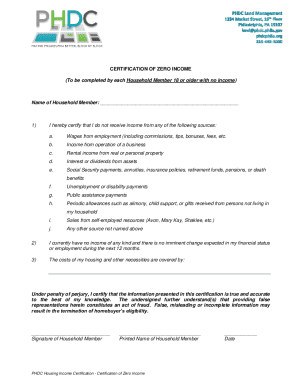
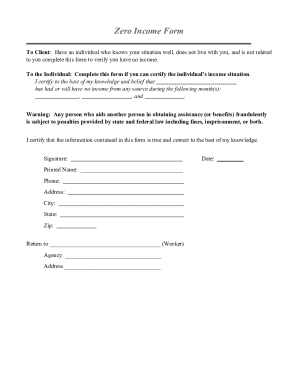
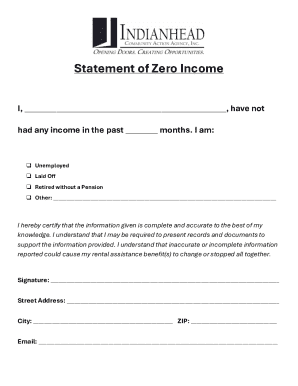
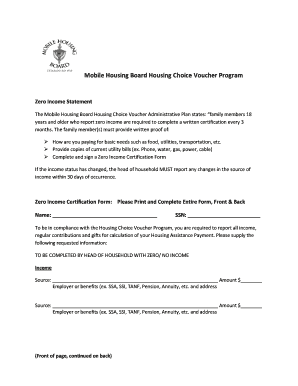
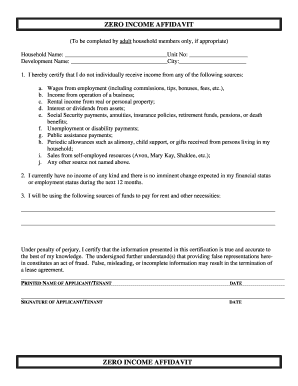
The Zero Income Certification Form is a personal document used by applicants to certify no income from various sources over the past 30 days.
pdfFiller scores top ratings on review platforms




Who needs Zero Income Form?
Explore how professionals across industries use pdfFiller.

Zero Income Form is needed by:
-
Individuals without any income
-
Applicants for sliding fee discounts
-
Clients seeking health benefits
-
Families applying for financial assistance
-
People requiring income verification
Comprehensive Guide to Zero Income Form
What is the Zero Income Certification Form?
The Zero Income Certification Form is a critical document used by applicants to confirm that they have not received any income from various sources within the past 30 days. This form plays a significant role in certifying income status, providing support for those who may qualify for assistance programs. It is essential to use this form in specific situations, such as when individuals are unemployed or otherwise unable to certify any income.
The form includes necessary fields such as the applicant's name, date of birth, and account number. These details are crucial for processing and validating the certification of income status.
Purpose and Benefits of the Zero Income Certification Form
The primary purpose of the Zero Income Certification Form is to certify an applicant's income status, which can significantly impact eligibility for sliding fee discounts and other financial assistance programs. By completing this form, individuals can provide transparency about their current income situation, which is often essential when applying for relief services.
Completing the zero income form can unlock various benefits, including access to reduced fees for healthcare services and assistance with living expenses. It enables individuals to receive the help they need without the burden of proving income in scenarios where they may have none.
Who Needs the Zero Income Certification Form?
The Zero Income Certification Form is designed for a broad audience, including families, individuals, and specific groups such as the unemployed or underemployed. These individuals often find themselves in situations where they need to certify zero income for various reasons.
-
Individuals seeking assistance during unemployment
-
Students or recent graduates entering the job market
-
Families facing financial hardships
-
Those receiving aid from non-profit organizations
Understanding the scenarios in which this no income certification form is required helps ensure that those in need can successfully apply for various assistance programs.
How to Fill Out the Zero Income Certification Form Online
Filling out the Zero Income Certification Form online is a straightforward process that can be completed in just a few steps. Here’s how you can do it using pdfFiller:
-
Access the form using a web browser.
-
Fill in your name, date of birth, and account number accurately.
-
Review the optional section regarding living expenses and fill it out if applicable.
-
Sign and date the form to confirm your certification status.
Accuracy is vital when completing the zero income form, as errors can lead to delays in processing or rejection of the application.
Field-by-Field Instructions for Completing the Zero Income Certification Form
When completing the Zero Income Certification Form, it’s important to address each section carefully. Most fields require basic information about the applicant, including:
-
Name
-
Date of birth
-
Account number
-
Living expenses (optional)
Particular attention should be given to the signature and date section at the end of the form, as this confirms the authenticity of your provided information.
Common Errors and How to Avoid Them
Applicants often make mistakes while filling out the Zero Income Certification Form. Common errors include:
-
Leaving required fields blank
-
Submitting the form without a signature
-
Providing incorrect personal details
To avoid these issues, it is recommended to verify all information before submission and to review the entire document to ensure completeness.
How to Submit the Zero Income Certification Form
Once you have completed the Zero Income Certification Form, there are several methods available for submission:
-
Submit the form online via pdfFiller
-
Deliver the form in person to the designated organization
Be aware of any associated fees or processing times that may apply. Proper submission ensures timely processing of your no income certification.
What Happens After You Submit the Zero Income Certification Form?
After you submit the Zero Income Certification Form, the organization will review your application and process it according to their defined protocols. Typically, applicants can expect the following:
-
A waiting period for processing
-
How to confirm receipt of the form
If issues arise regarding your submission, there are specified steps to follow to rectify any problems promptly.
Security and Data Protection when Using the Zero Income Certification Form
When utilizing pdfFiller to complete the Zero Income Certification Form, it is crucial to understand how security and data protection are handled. pdfFiller ensures the safety and privacy of sensitive documents through 256-bit encryption and compliance with regulations such as HIPAA and GDPR.
Maintaining the confidentiality of personal information is paramount when submitting these forms, and pdfFiller prioritizes safeguarding this data throughout the process.
Start Using pdfFiller for Your Zero Income Certification Form Today!
pdfFiller provides a reliable platform to fill out, edit, eSign, and submit your Zero Income Certification Form effortlessly. With its comprehensive tools and user-focused design, you can complete your forms with confidence and ease.
Experience the convenience of digital document management while ensuring security during the handling of sensitive information.
How to fill out the Zero Income Form
-
1.Access the Zero Income Certification Form on pdfFiller by searching for its title or using the form link provided by your organization.
-
2.Open the form in pdfFiller's editor, where you can easily navigate through the fillable fields.
-
3.Before starting, gather necessary information, including your name, date of birth, account number, and any details regarding living expenses.
-
4.Begin completing the form by filling in your personal information in the designated fields, ensuring accuracy and completeness.
-
5.If required, use the optional section to describe how you have managed your living expenses in the absence of income.
-
6.Once all fields are filled, review the form for any errors or missing information to ensure it meets all requirements.
-
7.After verifying the details, click the 'Sign' option to add your signature and date to the form.
-
8.Finalize your form by checking that all required fields are completed and that the document is ready for submission.
-
9.Save your completed form in pdfFiller's cloud storage, or download a copy to your device for your records.
-
10.If submitting electronically, follow the submission instructions provided by your organization through pdfFiller.

Who is eligible to complete the Zero Income Certification Form?
Anyone who has not received any income from all sources in the past 30 days can complete the Zero Income Certification Form to certify their status.
What information do I need to gather before filling out the form?
Before filling out the form, collect your name, date of birth, account number, and any details regarding living expenses that may be relevant for the optional section.
How can I submit the completed Zero Income Certification Form?
Once completed, you can submit the form by following your organization's specific submission methods, which may include electronic submission through pdfFiller or mailing a hard copy.
What are common mistakes to avoid when filling out this form?
Common mistakes include missing required fields, inaccurate personal information, and forgetting to sign and date the form. Double-check every section to ensure accuracy.
Is notarization required for this form?
No, notarization is not required for the Zero Income Certification Form, making it easier for applicants to certify their income status.
How long does it take to process the Zero Income Certification Form?
Processing times may vary by organization, but generally, you should allow a few days to a couple of weeks for the processing of your submitted form.
What should I do if I need help while filling out the form on pdfFiller?
If you need assistance while completing the form on pdfFiller, you can access the platform’s help section or contact customer service for guidance on using the features.
Related Forms




Get the latest insights from our blog


If you believe that this page should be taken down, please follow our DMCA take down process
here
.
This form may include fields for payment information. Data entered in these fields is not covered by PCI DSS compliance.