
Last updated on
Oct 17, 2026

Get the free Tenant Employment Verification Form
We are not affiliated with any brand or entity on this form

Fill out
Complete the form online in a simple drag-and-drop editor.

eSign
Add your legally binding signature or send the form for signing.

Share
Share the form via a link, letting anyone fill it out from any device.

Export
Download, print, email, or move the form to your cloud storage.
Why pdfFiller is the best tool for your documents and forms


End-to-end document management
From editing and signing to collaboration and tracking, pdfFiller has everything you need to get your documents done quickly and efficiently.
Accessible from anywhere
pdfFiller is fully cloud-based. This means you can edit, sign, and share documents from anywhere using your computer, smartphone, or tablet.
Secure and compliant
pdfFiller lets you securely manage documents following global laws like ESIGN, CCPA, and GDPR. It's also HIPAA and SOC 2 compliant.
What is Tenant Employment Form
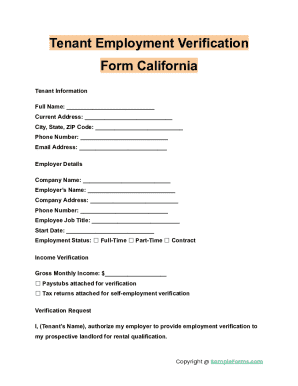
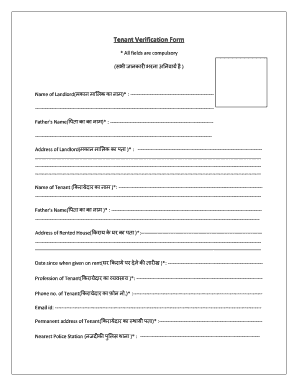
The Tenant Employment Verification Form is a document used by landlords or property managers to verify a tenant's employment details for rental purposes.
pdfFiller scores top ratings on review platforms




Who needs Tenant Employment Form?
Explore how professionals across industries use pdfFiller.

Tenant Employment Form is needed by:
-
Landlords seeking to verify tenant employment status
-
Property managers screening potential tenants
-
Employers required to provide employment verification
-
Tenants needing to confirm their employment for rental applications
-
Real estate agents assisting clients with documentation
-
HR departments responding to tenant employment verification requests
Comprehensive Guide to Tenant Employment Form
What is the Tenant Employment Verification Form?
The Tenant Employment Verification Form is an essential document that verifies a tenant's employment details for rental purposes. It serves landlords and property managers by providing critical information necessary for informed decision-making. In this process, key parties involved include the tenant, who provides personal and employment information, and the employer, who confirms the employment status of the tenant.
Purpose and Benefits of Using the Tenant Employment Verification Form
This form plays a vital role in tenant screening and risk management. For landlords, it reduces vacancy rates and minimizes rental risks, ensuring they select reliable tenants. Additionally, it supports tenants by lending legitimacy to their rental applications, enhancing their chances of approval.
Key Features of the Tenant Employment Verification Form
The Tenant Employment Verification Form includes several essential components necessary for efficient processing:
-
Fields for tenant and employer information
-
An authorization section allowing the release of employment details
-
A fillable format to facilitate easy completion
Who Needs the Tenant Employment Verification Form?
Key users of this form are landlords and property managers who require employment verification during the tenant screening process. Tenants may need to provide this documentation to support their rental applications. Additionally, employers might be asked to complete this form, particularly in scenarios involving tenant verification requests.
How to Fill Out the Tenant Employment Verification Form Online (Step-by-Step)
Filling out the Tenant Employment Verification Form involves several straightforward steps:
-
Access the form through your online platform.
-
Input tenant personal information, including name and contact details.
-
Provide employer information and confirm employment status.
-
Complete the authorization section to allow disclosures.
-
Review the entire form for accuracy and completeness.
-
Submit the form through the designated method.
Consider using pdfFiller's online tools to ensure a seamless and secure process.
Common Errors and How to Avoid Them
When filling out the Tenant Employment Verification Form, it is essential to avoid frequent mistakes, such as:
-
Incorrect personal or employer details
-
Missing signatures from either party
-
Incomplete authorization section
Double-checking entries before submission helps prevent these errors, ensuring a smoother tenant screening process.
Submission Methods and Delivery of the Tenant Employment Verification Form
Once completed, the Tenant Employment Verification Form can be submitted via various methods:
-
Electronic submission through email or an online portal
-
Physical delivery via postal service or in person
It is crucial to be aware of any important deadlines for submissions to facilitate timely processing.
Security and Compliance for the Tenant Employment Verification Form
Data protection is paramount when handling the Tenant Employment Verification Form. pdfFiller employs robust security measures such as:
-
256-bit encryption to protect sensitive data
-
Compliance with SOC 2 Type II, HIPAA, and GDPR standards
These measures ensure that both tenants and landlords can manage sensitive information securely and with confidence.
Realize the Benefits of Using pdfFiller for Your Tenant Employment Verification Form
Selecting pdfFiller enhances your experience with the Tenant Employment Verification Form. Users can easily edit, sign, and share forms online without the need for unnecessary downloads. Furthermore, stringent security credentials reassure users about the protection of their data throughout the process.
How to fill out the Tenant Employment Form
-
1.Access the Tenant Employment Verification Form on pdfFiller by searching for its name in the platform's search bar or navigating to the designated forms section.
-
2.Open the form by clicking on it, which will bring up the interactive editing interface provided by pdfFiller.
-
3.Before filling out the form, gather necessary information such as your personal details, employer name, job title, employment dates, and any other required verification details.
-
4.Navigate through the form by clicking into each blank field, and input your information where prompted, ensuring all fields relevant to your employment information are completed accurately.
-
5.Pay attention to the checkboxes for employment status, selecting the appropriate options that reflect your current situation, and ensure both tenant and employer details are correctly filled out.
-
6.Once all information is entered, review the form thoroughly to check for any errors or missing fields, making sure both you and your employer's sections are correctly completed.
-
7.Finalize the form by adding your signatures in the designated signature lines, ensuring that both tenant and employer provide their consent by signing.
-
8.Save your completed form by clicking on the save button, and choose to download it or submit it directly through pdfFiller’s sharing options, which may include email or cloud storage.

Who is eligible to use the Tenant Employment Verification Form?
The Tenant Employment Verification Form is intended for tenants applying for rental properties and their employers who are required to verify the employment details as part of the rental application process.
What is the timeframe for submitting the form?
While there is no strict deadline for submission, it is advisable to complete the Tenant Employment Verification Form as soon as it is requested by the landlord to avoid any delays in the rental approval process.
How should I submit the completed form?
The completed Tenant Employment Verification Form can be submitted via email to the landlord or property manager. Alternatively, it can be printed and handed in person if required.
What supporting documents are needed for this form?
Typically, no additional documents are required apart from the completed form. However, landlords may request pay stubs or an employment letter to supplement the verification process.
What common mistakes should I avoid while filling out this form?
Ensure all fields are filled out accurately, especially the employment status and details of both tenant and employer. Double-check for spelling errors and ensure signatures are included.
How long does the processing of this form take?
Processing time can vary but is generally quick, depending on the employer's response to the verification request. It’s best to follow up after a few days for timely responses.
Can I modify the form after it has been submitted?
Once submitted, modifications may require a new form to be completed. Always ensure the submitted details are final to avoid the need for changes later.
Related Forms





Get the latest insights from our blog


If you believe that this page should be taken down, please follow our DMCA take down process
here
.
This form may include fields for payment information. Data entered in these fields is not covered by PCI DSS compliance.