
Last updated on
Oct 17, 2026

Get the free GCC General Education Requirements Form
We are not affiliated with any brand or entity on this form

Fill out
Complete the form online in a simple drag-and-drop editor.

eSign
Add your legally binding signature or send the form for signing.

Share
Share the form via a link, letting anyone fill it out from any device.

Export
Download, print, email, or move the form to your cloud storage.
Why pdfFiller is the best tool for your documents and forms


End-to-end document management
From editing and signing to collaboration and tracking, pdfFiller has everything you need to get your documents done quickly and efficiently.
Accessible from anywhere
pdfFiller is fully cloud-based. This means you can edit, sign, and share documents from anywhere using your computer, smartphone, or tablet.
Secure and compliant
pdfFiller lets you securely manage documents following global laws like ESIGN, CCPA, and GDPR. It's also HIPAA and SOC 2 compliant.
What is GCC GE Form
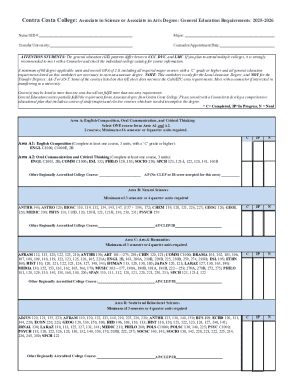
The GCC General Education Requirements Form is a student registration document used by Glendale Community College students to track their AA or AS degree progress.
pdfFiller scores top ratings on review platforms




Who needs GCC GE Form?
Explore how professionals across industries use pdfFiller.

GCC GE Form is needed by:
-
Current Glendale Community College students seeking to complete their degree requirements.
-
Academic advisors at Glendale Community College assisting students with course planning.
-
Administrators overseeing student registrations and compliance.
-
Incoming students needing to understand general education requirements.
-
Transfer students looking to meet California general education transfer curriculum.
Comprehensive Guide to GCC GE Form
What is the GCC General Education Requirements Form?
The GCC General Education Requirements Form is essential for students at Glendale Community College as it aids in academic planning. This form defines educational goals and helps students track their progress toward obtaining Associate of Arts (AA) and Associate of Science (AS) degrees. The form includes key sections such as English Composition and Mathematical Concepts, ensuring comprehensive oversight of degree requirements.
Purpose and Benefits of the GCC General Education Requirements Form
Students need the GCC General Education Requirements Form to stay organized and monitor their progress toward degree completion. By utilizing this tool, students gain clarity on requirements, enhancing communication with academic counselors. Additionally, the form fosters accountability, ensuring that students meet the academic standards necessary for graduation.
-
Organizes educational requirements.
-
Facilitates clear communication with advisors.
-
Tracks progress toward degree completion.
Key Features of the GCC General Education Requirements Form
This form is equipped with several functional features designed for easy use. It includes fillable fields where students can enter their names, Student ID numbers, and counselor information. Furthermore, checkboxes indicate course completion status, simplifying the tracking process. Digital options are available, making it easier for students to manage their forms electronically.
-
Fillable fields for personal information.
-
Checkboxes for course completion tracking.
-
Availability of digital options for streamlined processes.
Who Needs the GCC General Education Requirements Form?
The target audience for the GCC General Education Requirements Form primarily includes students enrolled at Glendale Community College who are pursuing AA or AS degrees. Academic advisors and counselors also play a crucial role in utilizing this form to guide students effectively. Additionally, transfer students may find this form beneficial in navigating their educational paths.
-
Students working toward AA or AS degrees.
-
Academic advisors assisting students.
-
Transfer students seeking clarity on requirements.
How to Fill Out the GCC General Education Requirements Form Online (Step-by-Step)
Filling out the GCC General Education Requirements Form online involves several straightforward steps. First, gather necessary personal details, including your name and Student ID. Next, follow these instructions to complete each section accurately:
-
Access the form online.
-
Enter your personal information in the fillable fields.
-
Mark completed courses using the checkboxes.
-
Review all entries for accuracy.
-
Submit the form as directed on the platform.
Submission Methods and Delivery for the GCC General Education Requirements Form
Once completed, students can submit the GCC General Education Requirements Form using various methods. Timely submission is crucial, as delays could impact degree progress. Students should also know how to track their submission status to ensure successful delivery.
-
Submit online through the GCC portal.
-
Deliver in person at the administrative office.
-
Mail the form to the designated address provided on the form.
Common Errors and How to Avoid Them
Completing the GCC General Education Requirements Form can present challenges if not approached carefully. Common mistakes include leaving fields incomplete or selecting incorrect courses. To maximize accuracy, users should adopt best practices and utilize a validation checklist before submission.
-
Ensure all fields are completed.
-
Double-check course selections against degree requirements.
-
Use a checklist to verify information before submitting.
Importance of Data Security and Compliance When Handling the GCC General Education Requirements Form
Users must be aware of data security when using the GCC General Education Requirements Form. pdfFiller employs robust security measures, including 256-bit encryption, ensuring compliance with HIPAA and GDPR regulations. Protecting personal data during the form completion process is paramount.
-
Utilizes 256-bit encryption for secure submissions.
-
Complies with HIPAA and GDPR for data protection.
-
Ensures safe handling of sensitive forms.
How to Download and Save the GCC General Education Requirements Form PDF
To access and save the GCC General Education Requirements Form PDF, follow these instructions. Start by downloading the form from pdfFiller. Once downloaded, users can save it in various formats, such as PDF or DOCX, ensuring their files are preserved securely.
-
Download the form directly from pdfFiller.
-
Choose the desired format for saving (PDF, DOCX).
-
Utilize pdfFiller's features for secure sharing of the form.
Maximize Your Experience with the GCC General Education Requirements Form Through pdfFiller
To enhance your experience completing the GCC General Education Requirements Form, consider using pdfFiller's features. This platform allows users to edit, eSign, and streamline the completion of their forms. By taking advantage of pdfFiller, students can ensure a smooth filing experience.
-
Leverage editing features for accuracy.
-
Use eSigning capabilities for quick submission.
-
Enjoy user-friendly tools that simplify the process.
How to fill out the GCC GE Form
-
1.To access the GCC General Education Requirements Form, visit pdfFiller's homepage and search for the form by name or browse through the Education Forms category.
-
2.Once you find the form, click on it to open in the pdfFiller interface. Familiarize yourself with the layout and the available tools.
-
3.Before filling out the form, gather your necessary information such as your student name, student ID number, and any details regarding the courses you have completed or plan to complete.
-
4.Begin filling in the sections of the form. Use the text boxes to enter your name and student ID. Use the date field to provide the date you are submitting the form.
-
5.Navigate to the course completion sections. Here, you will find checkboxes for the various areas of study. Check boxes for the courses you have completed to accurately represent your progress toward your degree.
-
6.To ensure accuracy, review all filled information carefully. Check that all required fields are completed as improper entries could lead to processing delays.
-
7.Once you are satisfied with the completed form, look for the options to save or download the file in pdfFiller. Choose your preferred format, typically PDF.
-
8.Finally, submit your completed form according to Glendale Community College’s requirements, either by uploading it directly online, emailing it, or printing it for physical submission.

Who is eligible to fill out the GCC General Education Requirements Form?
All current Glendale Community College students working towards their AA or AS degree are eligible to fill out this form. It helps them track their compliance with general education requirements specific to their degree.
Is there a deadline for submitting the GCC General Education Requirements Form?
While specific deadlines may vary, students are generally advised to submit the form as early as possible to ensure timely evaluation of their academic progress and to register for upcoming courses.
How do I submit the GCC General Education Requirements Form once completed?
You can submit the completed form by uploading it through the Glendale Community College's student portal or by emailing it directly to your academic advisor or the admissions office.
What documents do I need to provide when submitting this form?
Typically, you will need to provide your student ID and any transcripts or records showcasing the courses you have completed or are currently enrolled in. It's best to check with your advisor for any specific requirements.
What are common mistakes to avoid when filling out the form?
Common mistakes include forgetting to fill in the student ID or name, not checking the boxes for completed courses, and submitting the form without proper review. Always double-check for accuracy.
How long does it take to process the GCC General Education Requirements Form?
Processing times can vary based on the volume of submissions but generally take a few weeks. It’s advisable to follow up with your advisor if you haven't received confirmation.
Can I make changes after submitting the GCC General Education Requirements Form?
If you need to make changes after submission, contact your academic advisor as soon as possible to discuss the next steps, which may include submitting a revised form.
Related Forms





Get the latest insights from our blog


If you believe that this page should be taken down, please follow our DMCA take down process
here
.
This form may include fields for payment information. Data entered in these fields is not covered by PCI DSS compliance.