
Last updated on
Oct 17, 2026

Get the free Business License Application
We are not affiliated with any brand or entity on this form

Fill out
Complete the form online in a simple drag-and-drop editor.

eSign
Add your legally binding signature or send the form for signing.

Share
Share the form via a link, letting anyone fill it out from any device.

Export
Download, print, email, or move the form to your cloud storage.
Why pdfFiller is the best tool for your documents and forms


End-to-end document management
From editing and signing to collaboration and tracking, pdfFiller has everything you need to get your documents done quickly and efficiently.
Accessible from anywhere
pdfFiller is fully cloud-based. This means you can edit, sign, and share documents from anywhere using your computer, smartphone, or tablet.
Secure and compliant
pdfFiller lets you securely manage documents following global laws like ESIGN, CCPA, and GDPR. It's also HIPAA and SOC 2 compliant.
What is Business License
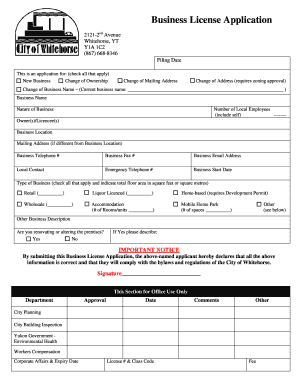
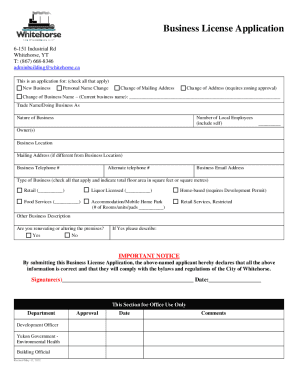
The Business License Application is a document used by individuals and businesses in Alberta, Canada, to apply for a business license.
pdfFiller scores top ratings on review platforms




Who needs Business License?
Explore how professionals across industries use pdfFiller.

Business License is needed by:
-
Entrepreneurs seeking to start a new business in Alberta
-
Existing business owners needing to renew their business license
-
Key contacts involved in business management and operations
-
Consultants assisting clients with business registrations
-
Individuals seeking a license for specific business activities
Comprehensive Guide to Business License
What is the Business License Application?
The Business License Application is a critical form used in Alberta, Canada, to formally request a business license. This document outlines the legal requirements for establishing a business and ensures compliance with local regulations. Obtaining a business license is essential for any entrepreneur or organization wishing to operate legally in the province.
Having a business license not only legitimizes your operations but also enhances your credibility and paves the way for potential funding opportunities. Filling out the business registration form correctly is crucial to avoid delays in your application process.
Purpose and Benefits of the Business License Application
The primary purpose of the Business License Application is to facilitate legal compliance in business operations. By securing a business license, companies can operate with the assurance that they are adhering to local laws and regulations.
Some key benefits of using the Alberta business license application include:
-
Enhancing the credibility of your business.
-
Gaining access to financial resources and funding options.
-
Avoiding legal issues related to unlicensed operations.
Who Needs the Business License Application?
Individuals and businesses must file a Business License Application if they are looking to operate commercially in Alberta. The roles involved in the application process include the Applicant, Owner, and Key Contact, each responsible for ensuring that the application is submitted accurately.
Specific situations where a business license is required encompass various types of enterprises, including but not limited to retail stores, service providers, and food establishments.
Eligibility Criteria for the Business License Application
To be eligible for the Business License Application, applicants must meet several criteria. First, certain business types are qualified for a license, which include sole proprietorships, partnerships, and corporations.
Additionally, residency or business location requirements also apply, necessitating that the applicant has a physical presence in Alberta. Understanding these eligibility factors is significant for a successful application.
How to Fill Out the Business License Application Online
Completing the Business License Application online involves a straightforward process. Here are the steps to follow:
-
Access the online application form via the appropriate platform.
-
Fill in key fields such as Business Activities and Authorized Signature.
-
Attach any required supporting documents.
-
Review your application for accuracy before submission.
Common Errors and How to Avoid Them
When applying for a business license, applicants often make common mistakes that lead to unnecessary delays. These errors can occur in various areas of the application and frequently include:
-
Incomplete fields.
-
Incorrect business information.
To avoid these pitfalls, double-check all key fields for accuracy and ensure that all required documentation is included before submitting your application.
Submitting the Business License Application
The Business License Application can be submitted through various methods, such as online, in-person, or by mail. Understanding the fee structure is also essential, as costs can vary depending on submission type and business nature.
Payment can typically be made via credit card or other accepted methods, and it's good to check for any fee waivers that may apply depending on specific circumstances.
What Happens After You Submit the Application?
After submission, applicants can expect a processing period during which their documents will be reviewed. Tracking application status is crucial, as it allows businesses to stay informed about their application’s progress.
Additionally, follow-up actions may be necessary, such as providing additional documentation if requested. Knowing what to anticipate is vital for managing expectations during this process.
Security and Compliance for the Business License Application
To safeguard sensitive information while completing the Business License Application, security and compliance are paramount. pdfFiller implements robust privacy regulations and data protection measures to ensure that applicants' information remains secure throughout the submission process.
By focusing on security, pdfFiller protects users against potential data breaches, making it a reliable choice for submitting important documents.
Why Use pdfFiller for Your Business License Application?
Utilizing pdfFiller for your Business License Application streamlines the entire process. With capabilities for editing, filling, eSigning, and sharing documents securely, pdfFiller enhances efficiency in managing the application.
Choosing pdfFiller not only simplifies form completion but also ensures your information is handled securely, providing peace of mind during the application process.
How to fill out the Business License
-
1.To access the Business License Application on pdfFiller, visit the pdfFiller website and log in to your account. Use the search bar to find 'Business License Application' or navigate through the forms section.
-
2.Once you've located the form, click on it to open it in the pdfFiller editor. Familiarize yourself with the layout, which includes fillable fields, checkboxes, and sections for signatures.
-
3.Before you begin filling out the form, gather all necessary information, such as details about your business activities, business address, contact information, and any supporting documents that may be required.
-
4.Start completing the form by clicking on each fillable field. Input the required information accurately. For sections requiring checkboxes, simply click to select your responses.
-
5.Refer to the explicit instructions provided within the form prompts, such as 'Describe Business Activities' and make sure to fill all required fields marked clearly.
-
6.Once you have filled out all the necessary information, review the completed form for any errors or omissions. Make corrections as needed to ensure everything is accurate.
-
7.After finalizing the form, you can save your work by clicking the 'Save' button in the pdfFiller interface. If you're ready to download or submit the form, use the respective options available.
-
8.To download the form, click on the 'Download' option and choose your preferred file format. If you need to submit it directly, select the submit option provided by pdfFiller for easy processing.

Who is eligible to apply for a business license in Alberta?
Any individual or entity looking to conduct business activities in Alberta is eligible to apply. Ensure you meet specific provincial and municipal licensing requirements before submitting your application.
Is there a deadline for submitting the Business License Application?
There is typically no fixed deadline for submitting the Business License Application. However, it is advisable to submit it well in advance of your planned business operations to allow time for processing.
What documents are required to submit with the application?
Applicants may need to provide supporting documents such as identification, proof of business address, and any local permits related to specific business activities. Ensure to check local requirements which may vary.
How can I submit my Business License Application once completed?
You can submit your Business License Application through pdfFiller by using the direct submission feature. Alternatively, download the filled form and submit it in person or via mail to the relevant local authorities.
What common mistakes should I avoid when filling out the form?
Common mistakes include omitting required fields, errors in business information, and failing to provide necessary supporting documents. Always double-check before submission to avoid delays.
How long does processing the business license application take?
Processing times can vary, but applicants can generally expect a response within a few weeks. During busy periods, it may take longer, so it's best to apply early.
Do I need to notarize my Business License Application?
No, notarization is not required for the Business License Application in Alberta. Ensure that all signatures required on the form are completed to validate your submission.
Related Forms




Get the latest insights from our blog


If you believe that this page should be taken down, please follow our DMCA take down process
here
.
This form may include fields for payment information. Data entered in these fields is not covered by PCI DSS compliance.