
Last updated on
Oct 20, 2026

Get the free Connecticut Educator Certification Application
We are not affiliated with any brand or entity on this form

Fill out
Complete the form online in a simple drag-and-drop editor.

eSign
Add your legally binding signature or send the form for signing.

Share
Share the form via a link, letting anyone fill it out from any device.

Export
Download, print, email, or move the form to your cloud storage.
Why pdfFiller is the best tool for your documents and forms


End-to-end document management
From editing and signing to collaboration and tracking, pdfFiller has everything you need to get your documents done quickly and efficiently.
Accessible from anywhere
pdfFiller is fully cloud-based. This means you can edit, sign, and share documents from anywhere using your computer, smartphone, or tablet.
Secure and compliant
pdfFiller lets you securely manage documents following global laws like ESIGN, CCPA, and GDPR. It's also HIPAA and SOC 2 compliant.
What is CT Educator Application
The Connecticut Educator Certification Application is a form used by educators to apply for initial, renewal, or advancement of their educator certification in Connecticut.
pdfFiller scores top ratings on review platforms




Who needs CT Educator Application?
Explore how professionals across industries use pdfFiller.

CT Educator Application is needed by:
-
Aspiring teachers seeking certification in Connecticut
-
Current educators looking to renew their teaching licenses
-
Individuals applying for advanced educator endorsements
-
Education institutions verifying certification applications
-
School districts conducting hiring processes
-
Professional development program participants
Comprehensive Guide to CT Educator Application
What is the Connecticut Educator Certification Application?
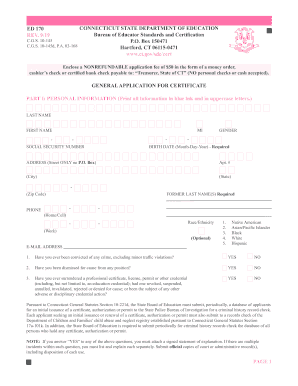
The Connecticut Educator Certification Application, also known as ED 170, is a crucial document for individuals aspiring to obtain or renew their educator certification in Connecticut. It outlines necessary information that educators must provide to ensure compliance with state certification standards.
This application serves as an essential starting point for educators to demonstrate their qualifications. It gathers key data, such as personal information, educational history, and teaching experience, which are vital for the certification process.
Purpose and Benefits of the Connecticut Educator Certification Application
The primary purpose of the Connecticut Educator Certification Application is to enable educators to meet the state's certification standards. By using tools like pdfFiller, the process becomes more efficient and user-friendly, streamlining the steps necessary for application submission.
Submitting this application not only facilitates professional development but also opens doors for career advancement within the education sector. Completing the application accurately can significantly enhance an educator's qualifications and opportunities in Connecticut.
Who Needs the Connecticut Educator Certification Application?
The application is designed for a variety of educators, each with distinct needs. New applicants who are seeking initial certification are a primary audience, alongside current educators who wish to renew or advance their existing certifications.
In addition, other categories of educators, such as those applying for specific teaching endorsements or additional certifications, also require this application form to demonstrate their readiness for the teaching profession.
Eligibility Criteria for the Connecticut Educator Certification Application
Before submitting the Connecticut Educator Certification Application, it is essential to ensure that all eligibility requirements are met. These include educational background qualifications and relevant teaching experience that align with state standards.
Applicants must also have the appropriate credentials in place before applying. It is crucial to verify that all supporting documents and credentials are accurate and complete to avoid delays in the certification process.
How to Fill Out the Connecticut Educator Certification Application Online
Filling out the Connecticut Educator Certification Application online is an intuitive process. Begin by accessing the form through pdfFiller, and follow these steps to complete your application:
-
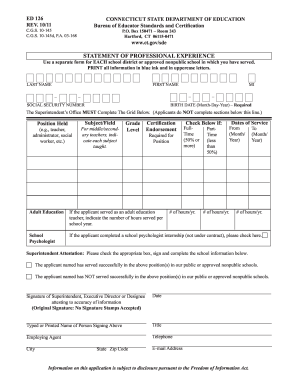
Provide your personal information, including LAST NAME, FIRST NAME, and SOCIAL SECURITY NUMBER.
-
Detail your educational background, listing all institutions attended and degrees obtained.
-
Outline your relevant teaching experience, demonstrating your qualifications for certification.
-
Complete the attestation section, where you confirm that all information provided is accurate.
It is advisable to double-check each section for common mistakes before submitting your application to ensure accuracy and completeness.
Required Documents and Supporting Materials
To successfully submit the Connecticut Educator Certification Application, certain documents are required. Key materials include official transcripts from your educational institutions and payment of the nonrefundable application fee.
Additional documents may be necessary depending on the specific type of certification you are applying for. Gathering these materials ahead of time and ensuring they meet the required formatting will streamline the overall application process.
Submission Methods and Delivery for the Connecticut Educator Certification Application
There are multiple submission methods available for the Connecticut Educator Certification Application. Educators can choose to submit their application online through pdfFiller or opt for physical mailing of their submitted documents.
Adhering to deadlines and following payment instructions is critical for successful submission. Additionally, tips on ensuring delivery confirmation can help applicants track their submissions effectively.
What Happens After You Submit the Connecticut Educator Certification Application?
Once the Connecticut Educator Certification Application is submitted, applicants can expect a defined processing timeline. Familiarizing yourself with this process is essential to understand what comes next.
Tracking the status of your application is possible, allowing you to stay updated on its progress. Be prepared for various potential outcomes as the application is reviewed and processed by the appropriate state department.
How to Correct or Amend the Connecticut Educator Certification Application
If you find that corrections or amendments are necessary after submitting the Connecticut Educator Certification Application, it is important to know the steps to take. Common reasons for needing to amend an application include incorrect information or changes in your educational status.
To make corrections, follow the specific guidelines for resubmission or request amendments through the state department's contact points. Having this information readily available can ease the process of making corrections.
Your Solution to Fill Out the Connecticut Educator Certification Application with Ease
Engaging with pdfFiller can enhance the experience of filling out the Connecticut Educator Certification Application. Leveraging pdfFiller's tools for document handling provides significant benefits, including a streamlined process and enhanced security.
By using pdfFiller, educators can confidently navigate the application process, ensuring their forms are completed efficiently and securely. Start your application process now to maximize the advantages offered by the platform.
How to fill out the CT Educator Application
-
1.Access the Connecticut Educator Certification Application on pdfFiller by searching for 'ED 170' or visiting the official site directly.
-
2.Once the form is open, familiarize yourself with the structure and various sections labeled clearly within the interface.
-
3.Gather necessary personal information, including full name, social security number, birth date, address, and phone number before filling out the form.
-
4.Begin filling in the applicant fields, ensuring that your information aligns with the requirements listed in the form’s description.
-
5.Complete all required fields related to educational background, making sure to provide accurate details about your degrees and certifications.
-
6.Enter your teaching experience, detailing prior roles and responsibilities in educational settings, following the instructions provided.
-
7.Look for checkboxes where applicable and ensure they are marked correctly according to your situation or the requirements.
-
8.Once all fields are filled out, review the entire form thoroughly to catch any errors or omissions.
-
9.Make sure to complete the attestation section and sign the application where prompted.
-
10.After reviewing and ensuring all information is accurate, save your completed form using the ‘Save’ function in pdfFiller.
-
11.You can download the form for your records or submit it directly through pdfFiller according to the application guidelines.

Who is eligible to apply using the Connecticut Educator Certification Application?
The application is open to individuals looking to obtain initial certification, renew an existing license, or advance their educator endorsements in Connecticut.
What documents are required to complete this application?
Applicants must submit official transcripts, a nonrefundable fee, and any additional documentation specific to the certification type they are applying for.
How can I submit my completed form?
You can submit your completed Connecticut Educator Certification Application through pdfFiller, or download and submit it physically as per the instructions provided in the application.
What common mistakes should I avoid when filling out this form?
Ensure that all personal information is accurately entered, all required fields are completed, and that you check for any missing signatures before submission.
Are there any deadlines I should be aware of?
Application deadlines may vary depending on certification type. Check the Connecticut State Department of Education’s website for specific deadlines related to your application.
When can I expect to receive my certification after submitting the application?
Processing times can vary, but applicants typically receive feedback or certification status within several weeks after submission. Monitor your application status for updates.
Is notarization required to submit this application?
No, notarization is not required for the Connecticut Educator Certification Application, simplifying the submission process for applicants.
Related Forms




Get the latest insights from our blog


If you believe that this page should be taken down, please follow our DMCA take down process
here
.
This form may include fields for payment information. Data entered in these fields is not covered by PCI DSS compliance.