
Last updated on
Oct 19, 2026

Get the free Notice of Completion Template
We are not affiliated with any brand or entity on this form

Fill out
Complete the form online in a simple drag-and-drop editor.

eSign
Add your legally binding signature or send the form for signing.

Share
Share the form via a link, letting anyone fill it out from any device.

Export
Download, print, email, or move the form to your cloud storage.
Why pdfFiller is the best tool for your documents and forms


End-to-end document management
From editing and signing to collaboration and tracking, pdfFiller has everything you need to get your documents done quickly and efficiently.
Accessible from anywhere
pdfFiller is fully cloud-based. This means you can edit, sign, and share documents from anywhere using your computer, smartphone, or tablet.
Secure and compliant
pdfFiller lets you securely manage documents following global laws like ESIGN, CCPA, and GDPR. It's also HIPAA and SOC 2 compliant.
What is Completion Notice
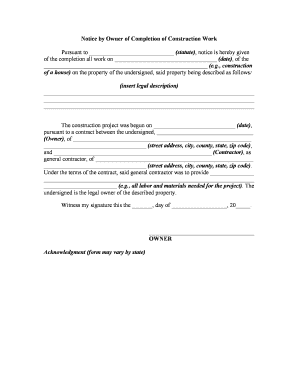
The Notice of Completion Template is a business form used by contractors to formally notify that a construction project has been completed in accordance with the agreement and regulations.
pdfFiller scores top ratings on review platforms




Who needs Completion Notice?
Explore how professionals across industries use pdfFiller.

Completion Notice is needed by:
-
Contractors preparing to complete a construction project
-
Project managers overseeing construction work
-
Construction firms requiring final project documentation
-
Homeowners completing renovations or building projects
-
Real estate agents managing property sales
-
Legal professionals reviewing construction contracts
Comprehensive Guide to Completion Notice
What is the Notice of Completion Template?
The Notice of Completion Template serves as a formal document notifying stakeholders that a construction project has been completed. This essential project completion notice includes critical information, such as the project name, location, permit number, and scope of work. Designed as a construction completion form, it simplifies the process by ensuring that all vital details are captured succinctly.
Key attributes of this template include its accessibility and relevance in various construction settings, making it a standardized tool for project reporting. Using this template minimizes the chances of miscommunication by providing a clear record of completion.
Why Use the Notice of Completion Template?
This template is vital for formally informing stakeholders upon project completion, ensuring transparency and accountability. By utilizing the Notice of Completion Template, parties involved benefit from:
-
Clarity in project status
-
Compliance with contractual obligations
-
Streamlined finalization of projects
Moreover, it mitigates misunderstandings among contractors, project owners, and regulatory bodies, fostering a smooth transition to the next phases of construction or project close-out.
Key Features of the Notice of Completion Template
The Notice of Completion Template includes several key features that enhance user experience:
-
Fillable fields for precise information entry
-
Checkbox options for indicating final approvals
-
A designated section for contractor signatures and dates
These practical aspects ensure that completing and submitting the form is straightforward, aligning with industry regulations and standards for construction documentation.
Who Needs the Notice of Completion Template?
The primary users of the Notice of Completion Template include contractors operating in various construction sectors. Additionally, project owners, subcontractors, and regulatory agencies often need this document to maintain compliance and facilitate project oversight.
This template is crucial for anyone involved in managing construction projects, as it serves as a formal acknowledgment of work completed and supports the coordination between different teams and stakeholders.
How to Fill Out the Notice of Completion Template Online (Step-by-Step)
Filling out the Notice of Completion Template online is a simple process. Follow these steps to complete the form efficiently:
-
Gather necessary project details: project name, location, permit number, and scope of work.
-
Access the template through a PDF editor, such as pdfFiller.
-
Start filling in the required fields and checkboxes, ensuring accuracy.
-
Add the contractor's signature and date in the designated sections.
-
Review the completed form for any errors before finalizing.
Utilizing online editing features can streamline the process and make it easier to submit the form digitally.
Common Errors and How to Avoid Them
When filling out the Notice of Completion Template, various common mistakes may occur, which can lead to rejection of the form. To prevent these issues, consider the following tips:
-
Double-check all entries for accuracy and completeness.
-
Ensure that the project name and permit number match official documents.
-
Review all checkbox selections before submission.
Avoiding these errors can significantly improve the likelihood of successful approval and processing of the notice.
Submission Methods and Delivery
Submitting the completed Notice of Completion Template can be done through various methods. Options include:
-
Emailing the form to relevant stakeholders
-
Submitting via online portals provided by local authorities
-
Mailing physical copies if required
Review potential fees and note deadlines for submission to ensure timely processing, while also tracking the status of the submission for verification purposes.
Security and Compliance in Using the Notice of Completion Template
When handling sensitive construction documents, such as the Notice of Completion Template, maintaining security is paramount. pdfFiller implements robust security features, including:
-
256-bit encryption to protect data during editing
-
Compliance with regulations such as HIPAA and GDPR
This emphasis on data protection ensures that contractors and project stakeholders can confidently manage their information securely throughout the editing and submission process.
How pdfFiller Simplifies the Notice of Completion Process
pdfFiller enhances the experience of using the Notice of Completion Template by providing a user-friendly platform that allows users to create, edit, and share documents efficiently. Key features include:
-
E-signature capabilities for faster approvals
-
Document management tools to organize multiple submissions
-
Accessibility from any browser without the need for downloads
PdfFiller encourages users to leverage these resources for a seamless and effective completion process.
Final Thoughts on Using the Notice of Completion Template
Embracing the Notice of Completion Template with pdfFiller leads to a more efficient process for finalizing construction projects. Utilizing this resource simplifies workflow, ensuring that all stakeholders are kept informed and compliant.
By exploring related templates and incorporating the tools available from pdfFiller, users can achieve improved outcomes in their project management efforts.
How to fill out the Completion Notice
-
1.To access the Notice of Completion Template on pdfFiller, navigate to the pdfFiller website and sign in to your account. Use the search bar to find the template by name or browse through the 'Business Forms' category.
-
2.Once you have opened the form, familiarize yourself with the layout. The form will have various fillable fields and checkboxes to complete. You can click on each field to enter the required information.
-
3.Before you start filling out the form, gather all necessary details such as the project name, location, permit number, and a brief description of the completed work. This information is vital for accurately completing the form.
-
4.Begin by entering the project name and location in the specified fields. Ensure that the entered details accurately reflect the completed project to avoid any future discrepancies.
-
5.Proceed to fill in the permit number and the scope of work fields. Be thorough in your descriptions to ensure compliance with regulations and to provide clear documentation.
-
6.Once all sections are filled, review the form for accuracy. Verify that all information is correct and make corrections as needed. Double-check that the contractor's signature and date fields are left empty for completion.
-
7.After confirming all details are correct, save your work. You can download the completed form or choose to submit it directly through pdfFiller’s submission options as per your requirements.

Who is eligible to use the Notice of Completion Template?
The Notice of Completion Template is primarily for contractors and construction professionals who need to formally document the completion of a construction project in compliance with agreements and regulations.
Is there a deadline for submitting the Notice of Completion?
While specific deadlines can vary by jurisdiction, it is generally advisable to submit the Notice of Completion promptly after project completion to avoid potential legal complications.
How do I submit the completed Notice of Completion?
Once you've filled out the Notice of Completion Template, you can submit it through pdfFiller or download it for physical submission to the relevant authority or organization. Check your local guidelines for submission methods.
Are there any supporting documents required?
Typically, submitting the Notice of Completion does not require additional documents; however, it's recommended to keep relevant project documents, such as permits and contracts, readily available for reference.
What common mistakes should I avoid when filling out this form?
Common mistakes include incomplete fields, incorrect project details, and forgetting to sign the form. Always double-check all entries and ensure that all signatures are provided to prevent processing delays.
What is the processing time for a Notice of Completion?
Processing times can vary based on local regulations and the office handling the form. It's advisable to check with your local authority for specific timelines after submission.
Can I edit the Notice of Completion Template after saving it?
Yes, once saved on pdfFiller, you can reopen the Notice of Completion Template and make additional edits as needed before finalizing your submission.
Related Forms




Get the latest insights from our blog


If you believe that this page should be taken down, please follow our DMCA take down process
here
.
This form may include fields for payment information. Data entered in these fields is not covered by PCI DSS compliance.