
Last updated on
Oct 31, 2026

Get the free Canada Pension Plan Survivor\'s Pension and Child(ren)\'s Benefits Application
We are not affiliated with any brand or entity on this form

Fill out
Complete the form online in a simple drag-and-drop editor.

eSign
Add your legally binding signature or send the form for signing.

Share
Share the form via a link, letting anyone fill it out from any device.

Export
Download, print, email, or move the form to your cloud storage.
Why pdfFiller is the best tool for your documents and forms


End-to-end document management
From editing and signing to collaboration and tracking, pdfFiller has everything you need to get your documents done quickly and efficiently.
Accessible from anywhere
pdfFiller is fully cloud-based. This means you can edit, sign, and share documents from anywhere using your computer, smartphone, or tablet.
Secure and compliant
pdfFiller lets you securely manage documents following global laws like ESIGN, CCPA, and GDPR. It's also HIPAA and SOC 2 compliant.
What is CPP Survivor's Pension Application
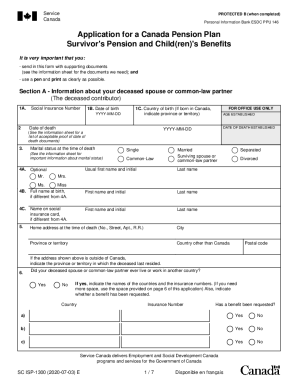
The Canada Pension Plan Survivor's Pension and Child(ren)'s Benefits Application is a government form used by the surviving spouse or common-law partner of a deceased contributor to apply for survivor's pension and child(ren)'s benefits.
pdfFiller scores top ratings on review platforms




Who needs CPP Survivor's Pension Application?
Explore how professionals across industries use pdfFiller.

CPP Survivor's Pension Application is needed by:
-
Surviving spouses of deceased Canada Pension Plan contributors
-
Common-law partners of deceased contributors
-
Parents applying for children's benefits under CPP
-
Individuals seeking government benefits related to pensions
-
Family members managing estate matters
Comprehensive Guide to CPP Survivor's Pension Application
What is the Canada Pension Plan Survivor's Pension and Child(ren)'s Benefits Application?
The Canada Pension Plan Survivor's Pension and Child(ren)'s Benefits Application is a crucial form for the surviving spouse or common-law partner of a deceased contributor. This application is essential for securing financial support through the survivor's pension and benefits for eligible children.
Eligibility to apply includes surviving spouses or common-law partners who meet specific criteria. The benefits covered under this application include both the survivor's pension and financial assistance for dependent children.
Purpose and Benefits of the Canada Pension Plan Survivor's Pension and Child(ren)'s Benefits Application
This application serves the vital purpose of providing financial support to surviving family members during a challenging time. By applying, eligible individuals can access significant benefits that help alleviate economic pressures.
Among the primary benefits of this application are financial safety nets for both the surviving spouse and children, ensuring that the family can maintain a level of stability after a loss.
Eligibility Criteria for the Canada Pension Plan Survivor's Pension and Child(ren)'s Benefits Application
To qualify for the Canada Pension Plan Survivor's Pension, applicants must meet specific requirements. Surviving spouses or common-law partners must provide documentation proving their relationship with the deceased.
-
Children applying for benefits must be categorized as dependent, typically under a certain age.
-
Situations that may disqualify individuals include failure to complete application sections or provide required documents.
How to Fill Out the Canada Pension Plan Survivor's Pension and Child(ren)'s Benefits Application Online (Step-by-Step)
Completing the Canada Pension Plan application online involves several important steps. Begin by accessing the appropriate platform, where you can fill out the required fields.
-
Enter the social insurance number of the deceased and the applicant.
-
Provide details such as dates of birth and addresses of both the applicant and dependent children.
-
Gather necessary supporting documents before submission to streamline the process.
Common Errors and How to Avoid Them When Submitting Your Application
Applicants often encounter pitfalls during the submission process, leading to delays or denials. Common mistakes include omitting fields or entering incorrect information.
-
Ensure all required sections are filled in accurately.
-
Double-check your form for completeness before submitting to avoid unnecessary errors.
Submission Methods and Where to Submit the Canada Pension Plan Survivor's Pension Application
Once the application is completed, applicants have different submission options available. You can submit the form online, by mail, or in person at designated Service Canada locations.
-
For in-person submissions, verify the operating hours and locations of Service Canada offices.
-
Check if there are any applicable fees related to the submission process.
What Happens After You Submit the Canada Pension Plan Survivor's Pension Application?
Following submission, it's important to know what to expect. Processing times can vary, and applicants should be prepared to wait for a decision from Service Canada.
Applicants can track the status of their submission, which may yield potential outcomes, including approval or requests for further information.
Ensuring Security and Privacy While Filling Out the Canada Pension Plan Survivor's Pension Application
Data security is critical when handling sensitive applications such as the Canada Pension Plan Survivor's Pension. pdfFiller employs advanced data protection measures to ensure personal information remains secure.
Users can fill out this form confidently, knowing that compliance with regulations and secure handling of information are prioritized.
Get Help with Your Canada Pension Plan Survivor's Pension and Child(ren)'s Benefits Application
For those seeking assistance, pdfFiller offers robust features that simplify the application process. These include options for editing, signing, and storing the necessary forms securely.
Leveraging pdfFiller's cloud-based services provides users with a convenient and secure method for accurate submissions, adding peace of mind during this process.
How to fill out the CPP Survivor's Pension Application
-
1.Access pdfFiller and search for the 'Canada Pension Plan Survivor's Pension and Child(ren)'s Benefits Application' form.
-
2.Once the form is opened, familiarize yourself with the layout and sections that require information.
-
3.Gather essential information, including social insurance numbers, dates of birth, and addresses for both the deceased and applicants before starting the form.
-
4.Begin filling in the relevant fields in the form, starting with details of the deceased contributor.
-
5.Navigate to the section for the applicant's information and input the required data accurately.
-
6.Complete the fields for any eligible children, ensuring you have all necessary details ready.
-
7.Refer to the instructions provided within the form for guidance on specific sections.
-
8.Once all sections are filled, review your inputs for accuracy and completeness to prevent mistakes.
-
9.After reviewing, use pdfFiller’s options to finalize the form, ensuring you save a copy.
-
10.You can download the completed form in your preferred format or submit it directly through the provided submission method within pdfFiller.

Who is eligible to apply for the CPP Survivor's Pension and Child Benefits?
Eligibility includes surviving spouses or common-law partners of a deceased Canada Pension Plan contributor who has made sufficient contributions, as well as children of the deceased under certain conditions.
What are the deadlines for submitting the application?
While specific deadlines may not be mentioned in the metadata, it's best to submit the application as soon as possible after the contributor's passing to ensure timely processing and benefits.
How should the application be submitted?
The completed application form must be submitted directly to Service Canada along with required supporting documents. Ensure you follow the guidelines provided with the form for submission methods.
What supporting documents are required with the application?
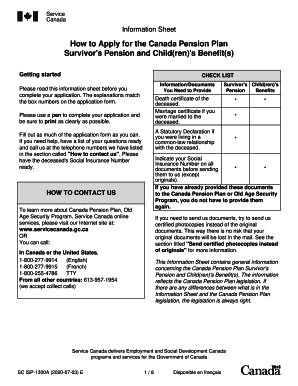
You will typically need to provide the death certificate of the contributor, proof of your relationship with the deceased, and identification documents for the applicant and children. Determine specific requirements before submission.
What common mistakes should I avoid when completing the form?
Ensure all sections are fully completed and that information is accurate. Avoid missing signatures, providing incomplete information, and submitting unclear or unreadable documents. Double-check your entries.
How long does it take to process the application?
Processing times can vary, but generally, you can expect it to take several weeks. To ensure a timely response, submit complete applications with all required documents.
Can I make changes to my application after submission?
Once submitted, changes are typically not allowed. If you need to make changes, contact Service Canada directly for guidance on how to proceed with corrections.
Related Forms



Get the latest insights from our blog


If you believe that this page should be taken down, please follow our DMCA take down process
here
.
This form may include fields for payment information. Data entered in these fields is not covered by PCI DSS compliance.