
Last updated on
Oct 31, 2026

Get the free Armed Forces Pension Forecast Request
We are not affiliated with any brand or entity on this form

Fill out
Complete the form online in a simple drag-and-drop editor.

eSign
Add your legally binding signature or send the form for signing.

Share
Share the form via a link, letting anyone fill it out from any device.

Export
Download, print, email, or move the form to your cloud storage.
Why pdfFiller is the best tool for your documents and forms


End-to-end document management
From editing and signing to collaboration and tracking, pdfFiller has everything you need to get your documents done quickly and efficiently.
Accessible from anywhere
pdfFiller is fully cloud-based. This means you can edit, sign, and share documents from anywhere using your computer, smartphone, or tablet.
Secure and compliant
pdfFiller lets you securely manage documents following global laws like ESIGN, CCPA, and GDPR. It's also HIPAA and SOC 2 compliant.
What is Pension Forecast Request
The Armed Forces Pension Forecast Request is a government form used by members of the Armed Forces to request a detailed forecast of their individual pension benefits.
pdfFiller scores top ratings on review platforms




Who needs Pension Forecast Request?
Explore how professionals across industries use pdfFiller.

Pension Forecast Request is needed by:
-
Current members of the UK Armed Forces
-
Veterans seeking pension information
-
Individuals planning retirement from military service
-
Financial advisors for military personnel
-
Civilian employees affiliated with the military
Comprehensive Guide to Pension Forecast Request
What is the Armed Forces Pension Forecast Request?
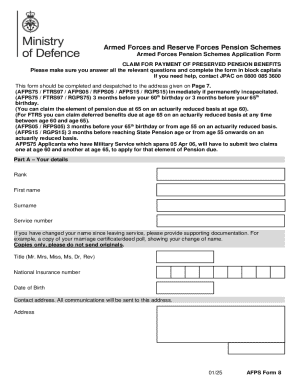
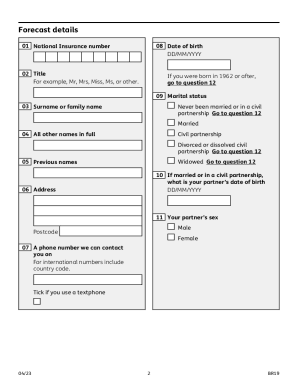
The Armed Forces Pension Forecast Request is initiated using the AFPS Form 12, which serves a crucial purpose for service members. This form enables individuals to understand their pension benefits more comprehensively, making it easier to plan for their financial future. By requesting a forecast, service members can gain insights into their potential retirement income, ensuring they are well-prepared for the years ahead.
Purpose and Benefits of the Armed Forces Pension Forecast Request
Obtaining a pension forecast is vital for effective financial planning. It allows service members to understand individual pension entitlements and the various Armed Forces pension benefits available to them. Knowing what to expect in terms of retirement income can greatly influence personal budgeting and long-term financial decisions.
Eligibility Criteria for the Armed Forces Pension Forecast Request
The AFPS Form 12 can be utilized by a range of individuals, including current members of the Armed Forces and veterans. To qualify, applicants must meet specific criteria, such as being a member of one of the relevant pension schemes. It is important to ensure that all conditions are satisfied to successfully obtain a pension forecast.
How to Fill Out the Armed Forces Pension Forecast Request Online
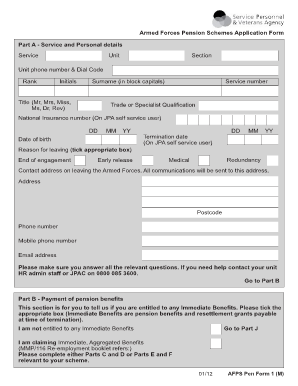
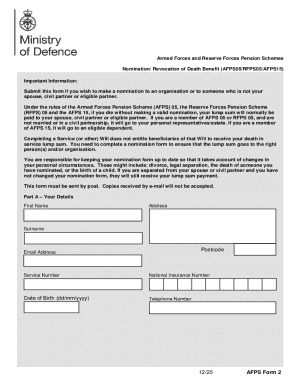
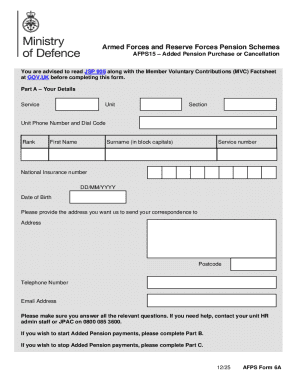
Completing the AFPS Form 12 digitally requires careful attention. Here are the steps to fill out the form:
-
Access the online form on the official website.
-
Fill in personal details such as name and service number.
-
Provide information about pension scheme membership.
-
Indicate the reason for your forecast request.
-
Review all information for accuracy before submitting.
It is crucial to ensure all mandatory fields are completed to avoid processing delays.
Common Errors and How to Avoid Them When Filing the Armed Forces Pension Forecast Request
While filling out the AFPS Form 12, users often make specific mistakes that can hinder their application. Common errors include:
-
Leaving essential fields unanswered.
-
Incorrectly entering personal details or service number.
-
Failing to provide adequate reasons for the forecast request.
To ensure accuracy, applicants should use a validation checklist to review their form before submission.
Submission Methods for the Armed Forces Pension Forecast Request
Once the AFPS Form 12 is completed, there are several methods for submission:
-
Postal service is the primary method for sending in the form.
-
Some service members may have options for electronic submission through secure platforms.
Applicants should verify specific submission requirements to avoid any delays.
What Happens After You Submit the Armed Forces Pension Forecast Request?
After submission of the AFPS Form 12, applicants can expect a structured response process. Typically, they will receive a confirmation of submission. Tracking options may be available, allowing users to stay informed about their application status. It is advisable to anticipate a certain timeline for processing to better manage expectations.
Security and Compliance for the Armed Forces Pension Forecast Request
Handling sensitive pension information necessitates robust security measures. Ensuring that personal details are protected is paramount, and compliance with regulations such as GDPR is crucial in this process. Using platforms like pdfFiller ensures data privacy and adherence to high security standards in managing the Armed Forces pension forecast.
How to Use pdfFiller for the Armed Forces Pension Forecast Request
pdfFiller offers distinct advantages for completing the AFPS Form 12 efficiently. Users can benefit from features such as:
-
eSigning capabilities that simplify the approval process.
-
Editing tools to make necessary adjustments to the form.
-
File sharing options for easy distribution of the completed request.
These features streamline the pension forecast request experience.
Ready to Get Your Armed Forces Pension Forecast?
Starting the forecast request process is straightforward, thanks to the resources available through pdfFiller. Users can access support and the necessary tools to fill out the AFPS Form 12 securely and with ease. The process is designed to empower applicants in achieving clarity about their pension benefits.
How to fill out the Pension Forecast Request
-
1.Access pdfFiller and search for the Armed Forces Pension Forecast Request form.
-
2.Click on the form to open it in the pdfFiller editing interface.
-
3.Review the form's requirements and gather necessary information, including personal details and pension scheme membership.
-
4.Fill in your personal information in the designated fields.
-
5.Provide details of your pension scheme membership as required in the form.
-
6.Explain the reasons for your forecast request in the relevant section.
-
7.Using pdfFiller’s tools, check the box indicating that you have signed the form.
-
8.After completing all necessary sections, review your entries for accuracy.
-
9.Finalize the form by clicking on the save option. Ensure all fields are correctly filled out before submitting.
-
10.Save, download a copy for your records, or follow the submission instructions provided within pdfFiller to send the form by post.

Who is eligible to use the Armed Forces Pension Forecast Request form?
Eligibility to use the form is primarily for current and former members of the UK Armed Forces seeking their pension forecast.
What information do I need to fill out this form?
You will need personal details, pension scheme membership information, and reasons for your forecast request to accurately complete the form.
How do I submit the Armed Forces Pension Forecast Request?
Once completed, the form must be signed, then printed, and sent by post to the relevant military pension authority as instructed.
Are there any fees associated with requesting a pension forecast?
The form does not specify fees, but if additional forecasts are requested, payment instructions will be provided within the form.
What common mistakes should I avoid when filling out this form?
Ensure you fill out all required fields clearly, don't forget to sign the form, and double-check your information before submission.
How long does it take to receive my pension forecast after submitting this form?
Processing times may vary, so it is advisable to submit your request well in advance to ensure you receive your forecast promptly.
Can I edit the form after completing it on pdfFiller?
Yes, pdfFiller allows you to edit the form before finalizing it, ensuring all information is accurate before submission.





Get the latest insights from our blog


If you believe that this page should be taken down, please follow our DMCA take down process
here
.
This form may include fields for payment information. Data entered in these fields is not covered by PCI DSS compliance.