
Last updated on
Oct 20, 2026

Get the free Continuing Disability Review Report
We are not affiliated with any brand or entity on this form

Fill out
Complete the form online in a simple drag-and-drop editor.

eSign
Add your legally binding signature or send the form for signing.

Share
Share the form via a link, letting anyone fill it out from any device.

Export
Download, print, email, or move the form to your cloud storage.
Why pdfFiller is the best tool for your documents and forms


End-to-end document management
From editing and signing to collaboration and tracking, pdfFiller has everything you need to get your documents done quickly and efficiently.
Accessible from anywhere
pdfFiller is fully cloud-based. This means you can edit, sign, and share documents from anywhere using your computer, smartphone, or tablet.
Secure and compliant
pdfFiller lets you securely manage documents following global laws like ESIGN, CCPA, and GDPR. It's also HIPAA and SOC 2 compliant.
What is Disability Review Report
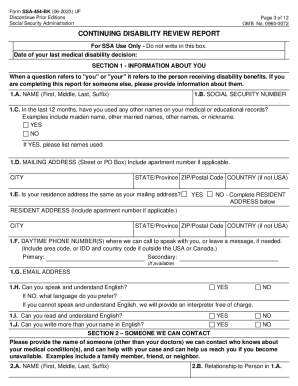
The Continuing Disability Review Report (Form SSA-454-BK) is a government document used by the Social Security Administration to assess ongoing eligibility for disability benefits.
pdfFiller scores top ratings on review platforms




Who needs Disability Review Report?
Explore how professionals across industries use pdfFiller.

Disability Review Report is needed by:
-
Individuals currently receiving disability benefits
-
Social Security beneficiaries undergoing a review
-
Healthcare providers documenting medical conditions
-
Family members assisting with the application
-
Social workers or case managers supporting clients
Comprehensive Guide to Disability Review Report
What is the Continuing Disability Review Report?
The Continuing Disability Review Report, known as SSA-454-BK, plays a crucial role in assessing ongoing eligibility for disability benefits within the Social Security Administration's processes. This form is essential for evaluating whether individuals receiving benefits continue to qualify based on their medical conditions and treatments.
The SSA conducts periodic reviews, known as continuing disability reviews, to ensure that the benefits are allocated only to those who genuinely need them. Completing this form accurately is vital for maintaining your benefits.
Purpose and Benefits of the Continuing Disability Review Report
The Continuing Disability Review Report is necessary for several reasons. Maintaining accurate records of an individual’s disability status ensures that resources are directed appropriately and that benefits are provided to those who truly require assistance.
This review process aids in verifying ongoing entitlement, thereby enhancing the integrity of the disability benefits system. Accurate submissions can prevent future complications in benefit allocation.
Who Needs the Continuing Disability Review Report?
This report is required for individuals currently receiving Social Security Administration disability benefits. Regular reviews mandate that beneficiaries submit the form to confirm their continuing eligibility.
Certain scenarios may trigger the necessity for this report, such as changes in medical conditions or treatment regimens, prompting immediate reviews. Understanding these situations helps ensure compliance with SSA requirements.
How to Fill Out the Continuing Disability Review Report Online
Filling out the Continuing Disability Review Report can effortlessly be done online using pdfFiller's platform. Start by accessing the platform and selecting the form from the available options.
Utilize features such as editing and eSigning, which streamline the process. The intuitive interface of pdfFiller guides users through each step, making it easy to complete the SSA form 2023 accurately.
Field-by-Field Instructions for the Continuing Disability Review Report
Completing the Continuing Disability Review Report involves several key sections, and attention to detail is crucial. Start with the personal information section, where you must provide accurate identification details.
Next, thoroughly describe your medical conditions and treatment history. Common mistakes to avoid include inaccuracies in personal details and failing to update treatment information, which are critical to the SSA's assessment.
Consequences of Not Filing or Late Filing the Report
Failing to submit the Continuing Disability Review Report on time can lead to significant repercussions. One major risk is the potential loss of disability benefits, which can create financial hardships for recipients.
Additionally, delays may complicate the ongoing evaluations of your disability status, affecting timely access to necessary resources.
Required Documents and Supporting Materials
To complete the Continuing Disability Review Report effectively, several documents are necessary. These include medical records that detail your health conditions, treatment history, and personal identification information.
Organizing these documents before starting the form can facilitate a smoother filling process, ensuring that you have all vital records readily available.
How to Submit the Continuing Disability Review Report
Once you complete the Continuing Disability Review Report, there are various submission methods available. You can submit it at your local SSA office, through pdfFiller online, or by mailing the completed form.
To ensure that your submission is processed effectively, follow the guidelines provided by the SSA on preferred submission methods and keep copies of all submitted documents.
What Happens After You Submit the Continuing Disability Review Report?
After submission, the SSA will initiate the review process, which involves evaluating your information and determining your ongoing eligibility for benefits. Typically, response times vary, and you can expect updates as the review progresses.
If further action is required, such as providing additional documentation, be prepared to follow up promptly to maintain your benefits and avoid delays.
Enhance Your Experience with pdfFiller
Utilizing pdfFiller for the form-filling experience provides several advantages. Its user-friendly interface simplifies the process of completing forms, and the platform offers robust features designed to assist users.
Additionally, pdfFiller ensures that document handling adheres to high security standards, including 256-bit encryption and compliance with HIPAA and GDPR regulations, making it a trustworthy option for sensitive information.
How to fill out the Disability Review Report
-
1.Access pdfFiller and search for 'Continuing Disability Review Report (Form SSA-454-BK)'. Open the form by clicking on the provided link.
-
2.Once the form is open, navigate through the sections using the toolbar to the left of the document. Familiarize yourself with the fields that need to be completed.
-
3.Gather all necessary information prior to starting the form. This includes personal details, medical history, treatment information, and contact information.
-
4.Begin filling out the personal information section at the top of the form. Ensure accuracy with your name, Social Security number, and contact info.
-
5.Proceed to the medical condition details section. Provide comprehensive information about the disability, including diagnosis, treatment history, and healthcare provider information.
-
6.For each field, utilize pdfFiller’s tools such as text boxes and dropdown menus. Ensure you fill out each section completely by following the instructions on the form.
-
7.As you fill out the form, constantly review the information for correctness and completeness to prevent errors that could delay processing.
-
8.Once all sections are completed, review the entire document carefully to ensure all required fields are filled and information is accurate.
-
9.When satisfied with the completed form, use the 'Save' option to keep a copy for your records. You can also download it directly to your computer.
-
10.To submit the form, follow the instructions for submission found at the end of the document and utilize pdfFiller's submission options if available.

Who needs to fill out the Continuing Disability Review Report?
The form needs to be completed by individuals currently receiving Social Security disability benefits who are undergoing a review to ensure they still qualify.
What information is required to complete the form?
Necessary information includes personal details, medical history, treatment records, and contact information. Ensure all data is accurate and thorough.
Where should I submit the completed report?
The completed Continuing Disability Review Report should be submitted to your local Social Security field office or the U.S. embassy or consulate if overseas.
What are common mistakes to avoid when filling out this form?
Common mistakes include omitting required fields, providing inaccurate information, and failing to double-check for completeness before submission.
How long does it take to process the review report?
Processing times can vary, but typically allow several weeks. Follow up with your local office to check on the status of your review.
Is there a deadline for submitting the Continuing Disability Review Report?
Yes, there usually is a deadline indicated on your notice regarding the review. It is crucial to submit the form by this date to avoid benefit interruptions.
Are there any fees to submit the Continuing Disability Review Report?
There are no fees associated with submitting the Continuing Disability Review Report; it is a government form provided at no cost.
Related Forms






Get the latest insights from our blog


If you believe that this page should be taken down, please follow our DMCA take down process
here
.
This form may include fields for payment information. Data entered in these fields is not covered by PCI DSS compliance.