
Last updated on
Oct 20, 2026

Get the free Farm Rental Income and Expenses Form 4835
We are not affiliated with any brand or entity on this form

Fill out
Complete the form online in a simple drag-and-drop editor.

eSign
Add your legally binding signature or send the form for signing.

Share
Share the form via a link, letting anyone fill it out from any device.

Export
Download, print, email, or move the form to your cloud storage.
Why pdfFiller is the best tool for your documents and forms


End-to-end document management
From editing and signing to collaboration and tracking, pdfFiller has everything you need to get your documents done quickly and efficiently.
Accessible from anywhere
pdfFiller is fully cloud-based. This means you can edit, sign, and share documents from anywhere using your computer, smartphone, or tablet.
Secure and compliant
pdfFiller lets you securely manage documents following global laws like ESIGN, CCPA, and GDPR. It's also HIPAA and SOC 2 compliant.
What is Form 4835
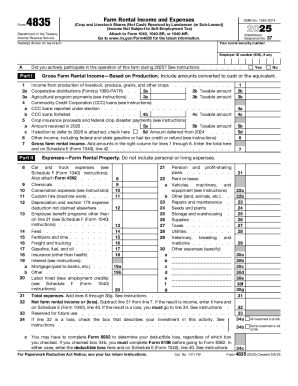
The Farm Rental Income and Expenses Form 4835 is a tax document used by landowners or sub-lessors to report farm rental income based on crops or livestock produced by the tenant.
pdfFiller scores top ratings on review platforms




Who needs Form 4835?
Explore how professionals across industries use pdfFiller.

Form 4835 is needed by:
-
Landowners receiving rental income from farmland.
-
Farmers reporting income as land tenants.
-
Tax professionals assisting clients with agricultural taxes.
-
Individuals looking to claim rental expenses related to farming.
-
Sub-lessors of farm property managing rental arrangements.
Comprehensive Guide to Form 4835
What is the Farm Rental Income and Expenses Form 4835?
Form 4835 is a pivotal tax document that allows landowners and sub-lessors to report their farm rental income derived from crops or livestock cultivated by tenants. This IRS form plays a crucial role in tax reporting as it helps clarify rental activity for those who derive passive income from farming. Primarily used by individuals who obtain revenue from leasing their land, this form is essential for accurately reporting income and ensuring compliance with tax regulations.
Purpose and Benefits of the Farm Rental Income and Expenses Form 4835
The necessity of Form 4835 lies in its ability to streamline the reporting of farm rental income for tax purposes. By using this form, landowners can document their earnings effectively, which is particularly beneficial when it comes to identifying potential deductions for farming-related expenses. Additionally, understanding passive activity loss limitations can inform users on how to navigate their tax obligations, ultimately leading to optimal tax outcomes.
Who Needs to Complete the Farm Rental Income and Expenses Form 4835?
Individuals who own rental property related to farming, including landowners and sub-lessors, are the primary candidates for completing Form 4835. Legitimate farming operations must meet certain criteria to qualify for this IRS form. Furthermore, income thresholds may dictate whether users are required to file this form, ensuring that only those who meet specific financial criteria are tasked with this obligation.
How to Fill Out the Farm Rental Income and Expenses Form 4835 Online (Step-by-Step)
To complete the Farm Rental Income and Expenses Form 4835 online effectively, follow these steps:
-
Access the pdfFiller platform and locate Form 4835.
-
Begin filling out the form by entering the necessary personal details.
-
Provide accurate data in the income section, including gross farm rental income.
-
Document all expenses incurred related to the farming operation.
-
Review the form thoroughly to ensure all information is correct.
-
Submit the completed form electronically or print it for mailing to the IRS.
Common Errors and How to Avoid Them When Completing Form 4835
Filling out Form 4835 can be challenging, and several common mistakes may occur. Below are frequent errors and tips to avoid them:
-
Incorrectly entering income figures that do not match tax records.
-
Omitting specific farming expenses that qualify for deductions.
-
Failing to complete all required sections of the form.
Always conduct a thorough review using a validation checklist before submission to ensure accuracy and completeness.
Required Documents and Supporting Materials for Form 4835
To accurately complete Form 4835, users must gather several essential documents:
-
Documentation of farm rental income received.
-
Receipts or records for farming expenses incurred during the reporting period.
-
Additional supporting materials that validate income and expenses.
Securing the correct documentation is vital to avoid complications with the IRS during the review process.
Submission Methods for the Farm Rental Income and Expenses Form 4835
Form 4835 can be submitted through various methods. Users have the option to:
-
Submit electronically via the pdfFiller platform for immediate processing.
-
Mail the completed paper form directly to the IRS address specified in the form's instructions.
Filing promptly is essential for ensuring timely processing and confirmation from the IRS.
What Happens After You Submit the Farm Rental Income and Expenses Form 4835?
After submission, users can expect several follow-up actions. It is essential to:
-
Track the status of the submitted form, which can typically be done via the IRS website.
-
Be prepared for potential audits or inquiries initiated by the IRS.
Understanding post-submission procedures can help mitigate surprises later on.
Maintaining Security and Compliance for the Farm Rental Income and Expenses Form 4835
When using pdfFiller for Form 4835, users can rest assured about data security. pdfFiller employs robust security features, including:
-
256-bit encryption to protect sensitive tax information.
-
Compliance with industry standards such as SOC 2 Type II, HIPAA, and GDPR.
Adhering to best practices for handling confidential tax documents is vital for maintaining privacy throughout the submission process.
Get Started with pdfFiller for Your Farm Rental Income and Expenses Form 4835
Utilizing pdfFiller to fill out Form 4835 is a straightforward and efficient choice. The platform offers intuitive features that simplify the filing process. Leverage the benefits of pdfFiller for an organized and efficient tax reporting experience that ensures compliance and accuracy.
How to fill out the Form 4835
-
1.Begin by accessing pdfFiller's website and logging into your account. Use the search bar to find 'Farm Rental Income and Expenses Form 4835'.
-
2.Once you locate the form, click on it to open it in the pdfFiller editing interface. Familiarize yourself with the layout and available tools.
-
3.Gather all necessary information such as rental income, expenses incurred, and any relevant tenant details before starting your entry.
-
4.Start filling out the form by clicking on each fillable field. pdfFiller allows you to add text easily, so type in the gross farm rental income and total expenses.
-
5.Use the checkboxes to indicate applicable expenses, ensuring you include all relevant categories as per IRS guidelines.
-
6.Review the completed fields for accuracy. Utilize the preview feature to see the finished format of your form.
-
7.Once you are satisfied with the entries and have filled in all required fields, save your work to avoid data loss.
-
8.After saving, choose to either download the form to your device or submit it directly through pdfFiller's submission options, following any provided filing instructions.

Who is eligible to use Form 4835?
Landowners and sub-lessors who receive rental income from farming activities based on tenant-produced crops or livestock can use Form 4835. It is specifically designed for passive activity reporting.
Are there any deadlines for submitting Form 4835?
Form 4835 must be attached to your annual tax return, typically due on April 15. However, if that date falls on a weekend or holiday, the deadline may be extended to the next business day.
How can I submit Form 4835?
You can submit Form 4835 by attaching it to your Form 1040, 1040-SR, or 1040-NR. Ensure all forms are filled out correctly and consider e-filing for faster processing.
What supporting documents do I need for Form 4835?
You should include documentation of your farm rental income, a detailed account of expenses, and any receipts relevant to your farming activities for accurate reporting.
What common mistakes should I avoid when filling out Form 4835?
Ensure you report all income and expenses accurately. Double-check for omissions, especially in the gross rental income section and specific expense categories, to avoid potential audits.
How long does it take for Form 4835 to be processed?
Processing times for Form 4835 can vary. Generally, if submitted electronically, it may be processed within a few weeks. Paper submissions can take longer, sometimes up to 8 weeks.
Is there a fee for submitting Form 4835?
There are no direct fees for submitting Form 4835 itself; however, if you use a tax professional, they may charge a fee for assistance in preparing your tax returns.
Related Forms



Get the latest insights from our blog



If you believe that this page should be taken down, please follow our DMCA take down process
here
.
This form may include fields for payment information. Data entered in these fields is not covered by PCI DSS compliance.