
Last updated on
Oct 20, 2026

Get the free Retiree and Survivor Enrollment Change Form
We are not affiliated with any brand or entity on this form

Fill out
Complete the form online in a simple drag-and-drop editor.

eSign
Add your legally binding signature or send the form for signing.

Share
Share the form via a link, letting anyone fill it out from any device.

Export
Download, print, email, or move the form to your cloud storage.
Why pdfFiller is the best tool for your documents and forms


End-to-end document management
From editing and signing to collaboration and tracking, pdfFiller has everything you need to get your documents done quickly and efficiently.
Accessible from anywhere
pdfFiller is fully cloud-based. This means you can edit, sign, and share documents from anywhere using your computer, smartphone, or tablet.
Secure and compliant
pdfFiller lets you securely manage documents following global laws like ESIGN, CCPA, and GDPR. It's also HIPAA and SOC 2 compliant.
What is Form-RS
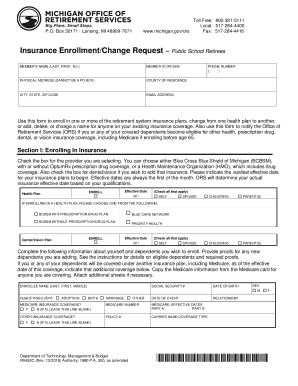
The Retiree and Survivor Enrollment Change Form is an insurance document used by GIC members in Massachusetts to modify or enroll in health insurance coverage.
pdfFiller scores top ratings on review platforms




Who needs Form-RS?
Explore how professionals across industries use pdfFiller.

Form-RS is needed by:
-
Retirees looking to change their health insurance coverage
-
Survivors of GIC members needing to enroll in insurance
-
Authorized officials assisting in health insurance enrollment
-
Healthcare administrators managing retiree benefits
-
Individuals without digital access requiring paper forms
Comprehensive Guide to Form-RS
What is the Retiree and Survivor Enrollment Change Form?
The Retiree and Survivor Enrollment Change Form, often referred to as the GIC retiree enrollment form, is essential for GIC members in Massachusetts. This document enables members to enroll in or modify their health insurance coverage. Key components of the form include the GIC-ID, insured details, retirement information, and Medicare details. Understanding these elements is crucial for ensuring your application is accurate and complete.
Purpose and Benefits of the Retiree and Survivor Enrollment Change Form
This form is vital for members needing to make enrollment or coverage changes. The benefits of using the health insurance enrollment form include streamlined processing of changes, which ensures that members maintain appropriate health coverage. Members can elect Medicare coverage or switch plans depending on their personal or family needs.
Who Needs the Retiree and Survivor Enrollment Change Form?
The target groups for this form primarily include retirees and survivors of GIC members. Eligibility to use the Massachusetts survivor change form generally requires that you either be a retired member of the GIC or a designated survivor. Specific requirements may include valid identification and documentation regarding your relationship to the deceased member.
How to Fill Out the Retiree and Survivor Enrollment Change Form (Step-by-Step)
Filling out the Retiree and Survivor Enrollment Change Form accurately is essential to avoid delays. Follow these steps:
-
Gather necessary information such as your GIC-ID and retirement details.
-
Complete the insured details section, including personal and contact information.
-
Provide retirement and Medicare information as required.
-
Ensure all sections are filled out completely and accurately.
-
Sign the form and include the signature of an authorized official.
Common Errors and How to Avoid Them When Submitting the Retiree and Survivor Enrollment Change Form
Several frequent mistakes can occur when completing the form. Common errors include incomplete sections and missing signatures. To avoid these issues:
-
Double-check that all fields are filled out
-
Verify that GIC-ID and personal details are correct
-
Ensure both the applicant and authorized official sign the document
How to Submit the Retiree and Survivor Enrollment Change Form
Once you have completed the form, submission can be done via mail or in person. Check for submission deadlines to ensure your application is processed on time. Note any potential fees associated with the submission process and follow up through the designated channels for confirmation post-submission.
Post-Submission: What Happens After You Submit the Form?
After submitting the Retiree and Survivor Enrollment Change Form, you will receive a confirmation of receipt. Processing timelines may vary, but tracking your submission is important. If your application is rejected, you will be informed of the reasons and necessary actions to rectify the situation.
How pdfFiller Can Help with the Retiree and Survivor Enrollment Change Form
pdfFiller offers valuable features to facilitate filling out and managing the Retiree and Survivor Enrollment Change Form. Users can enjoy document editing capabilities, eSigning functionalities, and improved organization for their forms. The platform prioritizes secure handling of sensitive information, which aligns with privacy regulations.
Security and Compliance When Using the Retiree and Survivor Enrollment Change Form
Security is paramount when handling sensitive health insurance documents. pdfFiller implements comprehensive security measures, including 256-bit encryption and compliance with HIPAA regulations. Ensuring the confidentiality of your information protects both the members and their families during the enrollment process.
Get Started with the Retiree and Survivor Enrollment Change Form Today!
Utilize pdfFiller’s user-friendly features to begin the process of filling out the Retiree and Survivor Enrollment Change Form. The platform provides easy access and assistance for a successful form completion, guiding you step by step for accuracy and efficiency.
How to fill out the Form-RS
-
1.To access the Retiree and Survivor Enrollment Change Form on pdfFiller, navigate to their website and use the search bar to locate the form. You can enter the form name directly for quick access.
-
2.Once the form is open, familiarize yourself with the layout. pdfFiller provides fillable fields, checkboxes, and signature lines that you will need to complete.
-
3.Before starting to fill out the form, gather all required information, including your GIC-ID, insured details, retirement information, and Medicare details to ensure the process goes smoothly.
-
4.Carefully enter the information into each section of the form. Make sure to fill out all mandatory fields accurately to avoid delays or rejections.
-
5.After completing the form, review all entered information for completeness and accuracy. Ensure you have signed in the required areas, including both the applicant and authorized official signatures.
-
6.Once you are satisfied with the form, utilize the pdfFiller options to save your completed document. You can download it to your device or save it directly to your pdfFiller account.
-
7.Finally, if you need to submit the form, follow the submission methods outlined in the form instructions. Ensure you include any required supporting documentation as indicated.

Who is eligible to use the Retiree and Survivor Enrollment Change Form?
Eligibility includes GIC members in Massachusetts who are retirees or those acting on behalf of survivors. If you need to enroll in or change health insurance coverage, this form is for you.
What documents or information do I need to complete the form?
You will need your GIC-ID, details of the insured, retirement information, and Medicare details. Gathering this data beforehand will facilitate a smoother completion process.
Is there a deadline for submitting this form?
While specific deadlines may vary based on insurance plans, it’s advisable to submit the form as soon as changes occur. Check with your local GIC office for time-sensitive requirements.
How do I submit the completed form?
After completing the Retiree and Survivor Enrollment Change Form, follow the submission guidelines provided. Typically, this can involve mailing the form or submitting it through an authorized official.
What are common mistakes to avoid when filling out this form?
Common mistakes include leaving mandatory fields blank, incorrect signatures, or missing supporting documents. Always double-check all inputs to ensure accuracy.
How long does processing take once I submit the form?
Processing times can vary based on the GIC's workload and specific case details. Generally, you can expect confirmation within a few weeks; however, check directly with GIC for more precise estimates.
Can I complete this form online?
This form can be filled out on pdfFiller, providing an online method for completion and submission. If you lack digital access, a paper version is available.
Related Forms





Get the latest insights from our blog


If you believe that this page should be taken down, please follow our DMCA take down process
here
.
This form may include fields for payment information. Data entered in these fields is not covered by PCI DSS compliance.