
Last updated on
Oct 20, 2026

Get the free Data Portability Request Form
We are not affiliated with any brand or entity on this form

Fill out
Complete the form online in a simple drag-and-drop editor.

eSign
Add your legally binding signature or send the form for signing.

Share
Share the form via a link, letting anyone fill it out from any device.

Export
Download, print, email, or move the form to your cloud storage.
Why pdfFiller is the best tool for your documents and forms


End-to-end document management
From editing and signing to collaboration and tracking, pdfFiller has everything you need to get your documents done quickly and efficiently.
Accessible from anywhere
pdfFiller is fully cloud-based. This means you can edit, sign, and share documents from anywhere using your computer, smartphone, or tablet.
Secure and compliant
pdfFiller lets you securely manage documents following global laws like ESIGN, CCPA, and GDPR. It's also HIPAA and SOC 2 compliant.
What is Data Portability Request
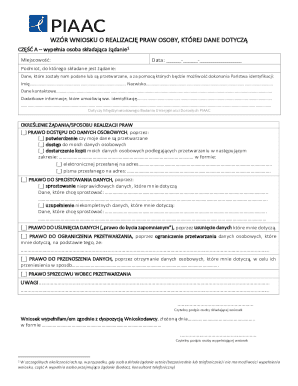
The Data Portability Request Form is a legal document used by individuals to request the transfer of their personal data from Jabil to themselves or a third party.
pdfFiller scores top ratings on review platforms




Who needs Data Portability Request?
Explore how professionals across industries use pdfFiller.

Data Portability Request is needed by:
-
Individuals wishing to transfer personal data.
-
Personal representatives acting on behalf of individuals.
-
Clients of Jabil requiring data retrieval.
-
Consumers interested in data portability rights.
-
Legal professionals assisting clients with data requests.
Comprehensive Guide to Data Portability Request
What is the Data Portability Request Form?
The Data Portability Request Form is designed for individuals to formally request the transfer of their personal data. This form is essential for safeguarding one's right to personal data transfer, allowing individuals to manage their information effectively across different platforms.
Through this form, users can request various types of personal data, including contact information, transaction history, and other relevant records. Utilizing a data portability request form enhances individual control over personal data, fostering transparency and trust in data management practices.
Purpose and Benefits of the Data Portability Request Form
The primary purpose of the Data Portability Request Form is to empower consumers with access to their personal data. By submitting this request, individuals can easily manage their information across multiple services and platforms, ensuring they retain control over their digital identity.
Some key benefits include:
-
Facilitated access to personal data as a consumer.
-
Improved data management across platforms.
-
Enhanced ability to switch service providers with relevant data.
Key Features of the Data Portability Request Form
The Data Portability Request Form features essential elements that streamline the request process. Notably, the form includes requirements for signatures from both the requester and any personal representatives, ensuring authenticity and validity.
Additionally, the form provides clear options for data transfer methods, allowing users to choose between email or receiving a thumb drive for physical delivery. These features enhance user experience by offering flexibility in how personal data is requested and received.
Who Needs the Data Portability Request Form?
The Data Portability Request Form is beneficial for a variety of users, including individual requesters and personal representatives acting on behalf of someone else. Scenarios that typically warrant this request include:
-
Individuals seeking to consolidate their personal data from multiple services.
-
Users transitioning to new platforms that require previous data.
-
Personal representatives managing data requests for clients or family members.
Steps to Fill Out the Data Portability Request Form Online (Step-by-Step Guide)
Filling out the Data Portability Request Form online using pdfFiller is straightforward. Follow these steps for a seamless experience:
-
Access the form on pdfFiller and select "Fill Out."
-
Complete each blank field, ensuring accuracy with personal information.
-
Review requirements for signature and supporting documents if applicable.
-
Submit the completed form through the preferred submission method.
Make sure to gather any necessary supporting documents before submission to avoid delays in processing your request.
How to Sign and Notarize the Data Portability Request Form
Signing the Data Portability Request Form is a crucial step to validate your request. Users can choose between digital signatures, which are convenient for online submissions, or wet signatures, which may be necessary for formal submissions.
If notarization is required, consider locating a local notary service. This can often be done through banks or using mobile notary services for added convenience. Ensuring proper signatures is vital to facilitate a smooth request process.
Submission Methods for the Data Portability Request Form
Once the Data Portability Request Form is filled out, it must be submitted through appropriate channels. Common submission methods include:
-
Emailing the form directly to the designated recipient.
-
Mailing the completed form to the appropriate office.
Be aware of any associated fees or deadlines that may impact how quickly your request is processed. Checking these details will help manage expectations regarding the submission process.
What to Expect After You Submit Your Data Portability Request Form
After submitting the Data Portability Request Form, users can anticipate several outcomes. Initially, a confirmation of receipt should be provided, allowing for tracking of the request's status.
Common reasons for requests being rejected include incomplete information or lack of required documentation. Promptly addressing any issues raised will aid in resolving potential roadblocks and ensure the continuation of your request.
Security and Compliance for the Data Portability Request Form
Handling the Data Portability Request Form involves adhering to strict security practices and compliance with legal regulations. PdfFiller employs 256-bit encryption and is aligned with HIPAA and GDPR standards, ensuring that personal data is managed with the utmost integrity and safety.
This robust security framework instills trust in users, as their sensitive information remains protected throughout the request process.
How pdfFiller Can Help with Your Data Portability Request Form
PdfFiller simplifies the process of filling out the Data Portability Request Form, providing a range of helpful features. Users can take advantage of its eSigning capabilities and straightforward editing tools to ensure their forms are accurate and complete.
Utilizing pdfFiller enhances the user experience, making the process of managing personal data both efficient and secure, thus helping individuals focus on what truly matters—their data.
How to fill out the Data Portability Request
-
1.Access the Data Portability Request Form on pdfFiller by searching for the form name in the search bar or navigating to the relevant section.
-
2.Once the form is open, use pdfFiller's interface to click on each field that requires information. Fields with labels will guide you on what to fill in.
-
3.Before starting, gather all necessary documentation such as proof of identity and any supporting paperwork needed for your personal representative, if applicable.
-
4.Carefully complete each section, ensuring the information is accurate. Use the provided explanations and tips on the right side of the pdfFiller workspace for assistance.
-
5.After filling out the form, review all entries for completeness and accuracy. Check that you've included your signature or the signature of your personal representative in the appropriate section.
-
6.To finalize, save your completed form within pdfFiller. You can download it as a PDF, print it directly, or submit it electronically through the platform if applicable.

Who is eligible to use the Data Portability Request Form?
Any individual who wishes to transfer their personal data from Jabil is eligible to use the Data Portability Request Form. This includes personal representatives acting on behalf of eligible individuals.
What supporting documents are required with this form?
When submitting the Data Portability Request Form, you may need to provide proof of identity, such as a driver's license or passport, and any additional documentation for personal representatives, such as a letter of authorization.
What are the submission methods for the Data Portability Request Form?
You can submit the completed Data Portability Request Form either by mailing it to Jabil, using a secure email, or submitting it directly through pdfFiller. Be sure to follow the specific guidelines provided by Jabil.
Is there a deadline for submitting the Data Portability Request Form?
While specific deadlines may vary, it's advised to submit your request as soon as possible to ensure timely processing of your data transfer. Check Jabil's guidelines for any specific timeframes.
How long does it take to process the Data Portability Request Form?
Processing times can vary based on the complexity of the request and the volume of requests Jabil is handling. Typically, expect to receive a response within 30 days.
What common mistakes should I avoid when filling out the form?
Common mistakes include omitting required fields, failing to sign the form, or not providing necessary supporting documents. Ensure to double-check all entries to avoid delays.
Related Forms




Get the latest insights from our blog


If you believe that this page should be taken down, please follow our DMCA take down process
here
.
This form may include fields for payment information. Data entered in these fields is not covered by PCI DSS compliance.