
Last updated on
Oct 20, 2026

Get the free Ohio 4-H Achievement Record Form
We are not affiliated with any brand or entity on this form

Fill out
Complete the form online in a simple drag-and-drop editor.

eSign
Add your legally binding signature or send the form for signing.

Share
Share the form via a link, letting anyone fill it out from any device.

Export
Download, print, email, or move the form to your cloud storage.
Why pdfFiller is the best tool for your documents and forms


End-to-end document management
From editing and signing to collaboration and tracking, pdfFiller has everything you need to get your documents done quickly and efficiently.
Accessible from anywhere
pdfFiller is fully cloud-based. This means you can edit, sign, and share documents from anywhere using your computer, smartphone, or tablet.
Secure and compliant
pdfFiller lets you securely manage documents following global laws like ESIGN, CCPA, and GDPR. It's also HIPAA and SOC 2 compliant.
What is Ohio 4-H Record
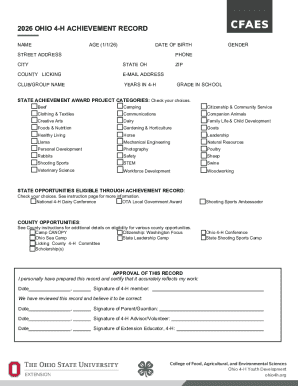
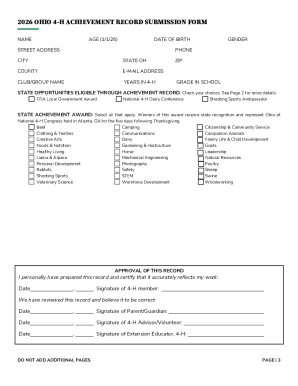
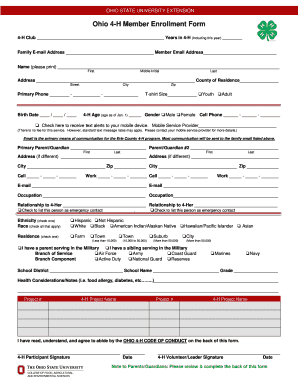
The Ohio 4-H Achievement Record Form is a report card template used by 4-H members in Ohio to record their project work and activities.
pdfFiller scores top ratings on review platforms




Who needs Ohio 4-H Record?
Explore how professionals across industries use pdfFiller.

Ohio 4-H Record is needed by:
-
4-H members documenting their achievements
-
Parents or guardians signing on behalf of 4-H members
-
4-H advisors or volunteers overseeing member submissions
-
Extension educators, 4-H processing and reviewing records
Comprehensive Guide to Ohio 4-H Record
What is the Ohio 4-H Achievement Record Form?
The Ohio 4-H Achievement Record Form is a crucial document that holds significant value for 4-H members. This form serves as a structured tool for documenting individual project work, participation, achievements, community service, and leadership roles throughout the year.
Included within the form are essential fields such as the member's name, date of birth, and specific signature requirements. These details ensure proper identification and verification of the individual's contributions. The completed form is vital when applying for both state and county opportunities, helping members take full advantage of the resources available to them.
Purpose and Benefits of the Ohio 4-H Achievement Record Form
Completing the Ohio 4-H Achievement Record Form is essential for 4-H members as it allows for effective tracking of achievements and participation in various activities. This form not only showcases accomplishments but also emphasizes the importance of receiving signatures from all relevant parties, including the member, parent or guardian, and advisor.
By maintaining accurate records, youth can document their growth and development, which is critical for future applications and project validation. The 4-H achievement record also serves as a foundation for setting personal goals and reflecting on learning experiences over time.
Who Needs the Ohio 4-H Achievement Record Form?
The responsibility of completing the Ohio 4-H Achievement Record Form falls primarily on 4-H members. However, it is a collaborative effort that involves various stakeholders. Parents or guardians play a crucial role in providing support and signing the form, while advisors and educators contribute by reviewing and co-signing to verify the information submitted.
This collaborative nature of the form submission reinforces the significance of teamwork within the 4-H community, ensuring comprehensive documentation and acknowledgment of each member's efforts.
How to Fill Out the Ohio 4-H Achievement Record Form Online (Step-by-Step)
Filling out the Ohio 4-H Achievement Record Form online is made simple using pdfFiller. Follow these detailed steps to complete the process:
-
Access the form on pdfFiller and create an account if you don't already have one.
-
Gather all necessary information, including personal details and project specifics.
-
Fill in each section of the form, ensuring accuracy and completeness.
-
Make use of pdfFiller’s editing tools to add or modify information as needed.
-
Sign the form electronically and obtain signatures from others involved.
By utilizing pdfFiller, users can leverage a range of features to ensure a smooth and efficient form-filling experience.
Field-by-Field Instructions for the Ohio 4-H Achievement Record Form
Understanding each section of the Ohio 4-H Achievement Record Form is vital for accurate completion. Key fields within the form include:
-
Name: Ensure correct spelling and full name.
-
Date of Birth: Enter the member's birth date in the required format.
-
Project Details: Provide comprehensive descriptions of all projects undertaken.
Be mindful of common pitfalls such as leaving fields incomplete or failing to secure necessary signatures. Pay close attention to any specific instructions included in the form to avoid potential delays in submission.
Submission Methods and Delivery for the Ohio 4-H Achievement Record Form
After completing the Ohio 4-H Achievement Record Form, it's essential to submit it correctly. Users can submit the form to designated county offices or via online platforms provided by the extension service. Prompt submission is critical to avoid any penalties for late entries.
Additionally, consider utilizing tracking methods to confirm the status of your submission, which can provide peace of mind and ensure compliance with deadlines.
Common Errors and How to Avoid Them
When filling out the Ohio 4-H Achievement Record Form, several common errors may arise. Here are some typical mistakes to be aware of:
-
Missing signatures from required parties.
-
Incomplete fields that may cause processing delays.
To improve accuracy, always review the completed form before submission. Adopting best practices can significantly reduce the likelihood of errors, ensuring a smooth submission process.
Security and Compliance for the Ohio 4-H Achievement Record Form
Using pdfFiller for the Ohio 4-H Achievement Record Form provides users with peace of mind regarding data security. With state-of-the-art security features such as 256-bit encryption, pdfFiller ensures that sensitive information is handled with care.
Compliance with regulations like HIPAA and GDPR underscores pdfFiller's commitment to safeguarding user data. This trust is vital, especially when dealing with personal and achievement records of youth members.
Use pdfFiller for Your Ohio 4-H Achievement Record Form Needs
For an efficient experience in managing the Ohio 4-H Achievement Record Form, consider utilizing pdfFiller's capabilities. Users will appreciate the platform's ease of use, allowing for seamless editing and signing of documents.
Additionally, the benefits of cloud storage ensure that forms are accessible from anywhere, making it easier to keep track of important files over time. Start utilizing pdfFiller today to streamline your form-filling process and maximize your 4-H opportunities.
How to fill out the Ohio 4-H Record
-
1.Access the Ohio 4-H Achievement Record Form by navigating to pdfFiller's website and searching for the form.
-
2.Once located, open the form in pdfFiller's editor. You will find a user-friendly interface designed for easy editing.
-
3.Before filling out the form, gather all necessary information such as member details, participation records, and signatures from parents/guardians, 4-H advisors, and extension educators.
-
4.Begin filling in the fields by clicking on the relevant areas. Use the provided blank fields for the member's name, date of birth, and project details.
-
5.Utilize checkboxes to indicate participation in various activities, community service, and leadership roles.
-
6.After entering all necessary information, carefully review each section to ensure accuracy and completeness before moving on to the signatures.
-
7.Make sure all signatures are gathered as required. Ask each signer to digitally sign using the options available in pdfFiller.
-
8.To finalize your form, check for any missing information. You can save the form at any time while completing it.
-
9.Once satisfied with your entries, download a copy of the completed form directly from pdfFiller. You may also submit it electronically if that option is available.

Who is eligible to complete the Ohio 4-H Achievement Record Form?
The form is intended for 4-H members in Ohio. Parents or guardians, 4-H advisors, and extension educators also play roles in the completion process.
When is the Ohio 4-H Achievement Record Form due?
The form should be submitted annually, but check with your local 4-H program for specific deadlines to ensure timely submission.
How can I submit the Ohio 4-H Achievement Record Form?
You can submit the form electronically through pdfFiller if your local 4-H program accepts online submissions or download it to submit by mail.
Is notarization required for the Ohio 4-H Achievement Record Form?
No, notarization is not required for this form. However, all necessary signatures must be collected before submission.
What common mistakes should I avoid while filling out the form?
Ensure you fill in all required fields and gather all signatures before submission to avoid processing delays. Double-check your information for accuracy.
How long does it take to process the Ohio 4-H Achievement Record Form?
Processing times can vary depending on the local 4-H office. Generally, you should expect a response within a few weeks after submission.
What supporting documents are required with the form?
Typically, no additional documents are necessary with this form. However, check locally if your group requires any supplemental materials.
Related Forms
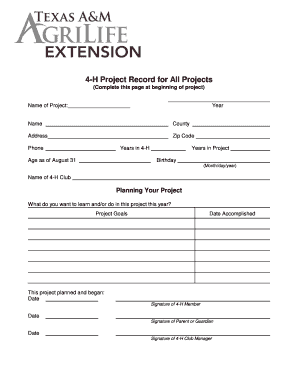


Get the latest insights from our blog


If you believe that this page should be taken down, please follow our DMCA take down process
here
.
This form may include fields for payment information. Data entered in these fields is not covered by PCI DSS compliance.