
Last updated on
Oct 20, 2026

Get the free Church Donation Authorization Form
We are not affiliated with any brand or entity on this form

Fill out
Complete the form online in a simple drag-and-drop editor.

eSign
Add your legally binding signature or send the form for signing.

Share
Share the form via a link, letting anyone fill it out from any device.

Export
Download, print, email, or move the form to your cloud storage.
Why pdfFiller is the best tool for your documents and forms


End-to-end document management
From editing and signing to collaboration and tracking, pdfFiller has everything you need to get your documents done quickly and efficiently.
Accessible from anywhere
pdfFiller is fully cloud-based. This means you can edit, sign, and share documents from anywhere using your computer, smartphone, or tablet.
Secure and compliant
pdfFiller lets you securely manage documents following global laws like ESIGN, CCPA, and GDPR. It's also HIPAA and SOC 2 compliant.
What is Church Donation Form
The Church Donation Authorization Form is a document used by donors in Canada to authorize monthly donations to a church via direct bank debits.
pdfFiller scores top ratings on review platforms




Who needs Church Donation Form?
Explore how professionals across industries use pdfFiller.

Church Donation Form is needed by:
-
Individual church members wishing to donate regularly
-
Church administrators handling donation processes
-
Financial coordinators managing church accounts
-
Businesses wanting to support local churches
-
Tax professionals needing documentation for clients
-
Organizations offering financial guidance to churches
Comprehensive Guide to Church Donation Form
What is the Church Donation Authorization Form?
The Church Donation Authorization Form is a critical document that facilitates monthly donations to churches via direct bank debits. This form allows donors to specify essential information such as the donor's name, church name, and the designated monthly donation amount. By using this church donation form, individuals can ensure their contributions are made regularly and automatically.
Purpose and Benefits of the Church Donation Authorization Form
Donors should consider using the Church Donation Authorization Form for several compelling reasons. The form streamlines the donation process, providing convenience through automated donations which assist with better budgeting. Additionally, it empowers donors by outlining their rights, including the ability to revoke authorization and protections against unauthorized debits.
Key Features of the Church Donation Authorization Form
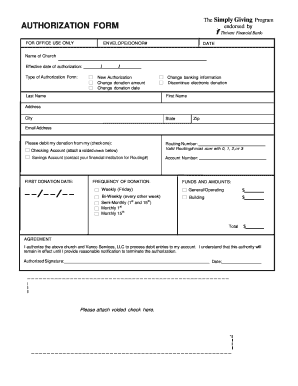
This form includes several essential fillable fields that are designed for accuracy, such as the donor's information and desired donation amounts. It also features optional checkboxes that allow donors to indicate whether they are contributing as an individual or on behalf of a business. Clear instructions accompany the form to assist users throughout the completion process.
Who Needs the Church Donation Authorization Form?
The Church Donation Authorization Form caters to both individuals and businesses looking to make regular donations to their chosen churches. Common scenarios where this form is necessary include recurring charity events or systematic donations as part of a comprehensive budgeting strategy. Users in Canada should be aware of the eligibility criteria that apply when using this document.
How to Fill Out the Church Donation Authorization Form Online
Filling out the Church Donation Authorization Form online is straightforward. Follow these steps:
-
Access the form via pdfFiller.
-
Enter your signature and other important fields, including your address and the monthly contribution amount.
-
Review each section of the form to ensure all information is accurate.
Utilize a checklist for each step to verify that all necessary fields are completed before submission.
Submission Methods and Delivery of the Church Donation Authorization Form
Once the form is filled out, there are several methods for submission, including email, physical delivery, or online submission through platforms like pdfFiller. After finalizing your document, ensure you save it correctly on pdfFiller and track your submissions to confirm they have been received and processed.
Security and Compliance for the Church Donation Authorization Form
When dealing with any financial information, data security is paramount. The Church Donation Authorization Form is processed in compliance with security regulations, ensuring sensitive information is protected through encryption standards. Users must understand the importance of privacy when submitting their forms to avoid unauthorized access.
What Happens After You Submit the Church Donation Authorization Form?
Upon submission of the Church Donation Authorization Form, users will receive confirmation notifications outlining the next steps. Donors can track the status of their donations and should be aware of procedures for any necessary amendments or corrections to the form after submission.
Example of a Completed Church Donation Authorization Form
To aid in understanding, a visual representation of a completed form is available. This example illustrates how to accurately fill out each section of the form, emphasizing the importance of precision to prevent any potential issues with processing donations in the future.
Maximize Your Donation Experience with pdfFiller
pdfFiller enhances the Church Donation Authorization Form experience by providing users with an efficient platform for filling out and managing their documents. Users are encouraged to leverage pdfFiller's diverse features, including editing, eSigning, and sharing options, to simplify their donation process.
How to fill out the Church Donation Form
-
1.To access the Church Donation Authorization Form, visit pdfFiller's website and use the search bar to locate the form by its name.
-
2.Once you find the form, click on it to open it in the pdfFiller interface, where you can start editing.
-
3.Before filling out the form, gather all necessary information, including your bank account details, intended donation amount, and personal identification such as your name and address.
-
4.Begin by clicking on each fillable field to input your information. Enter the church's name, your monthly donation amount, and provide your signature in the designated area.
-
5.As you fill out the form, use the instructions provided on pdfFiller to ensure that you complete all sections correctly, including the checkboxes for 'Individual or Business'.
-
6.After completing the form, thoroughly review each field to make sure all information is accurate and that your signature is present and legible.
-
7.Once you are satisfied with the form, save your progress using the save function in pdfFiller. You can also download the completed form as a PDF for your records.
-
8.Finally, submit the completed form according to your church's submission guidelines, whether that means sending it electronically or printing and mailing it.

Who is eligible to use the Church Donation Authorization Form?
Any individual or business wanting to make regular monthly donations to a church in Canada can use this form. It is designed for all donors, regardless of their financial status.
Are there deadlines for submitting this form?
There are typically no specific deadlines for submitting the Church Donation Authorization Form. However, it's best to submit it before your next scheduled donation date to ensure proper processing.
How should I submit the completed form?
You can submit the completed Church Donation Authorization Form according to your church's guidelines. This may involve emailing it, mailing a hard copy, or delivering it in person.
What documents do I need to attach with the form?
No additional documents are typically required when submitting the Church Donation Authorization Form. However, you may want to keep a copy of your bank authorization and any correspondence regarding your donations.
What are common mistakes to avoid when filling out the form?
Common mistakes include forgetting to sign the form, entering incorrect bank account information, or failing to specify the donation amount. Always double-check your entries before submission.
How long does it take for the donations to start processing after I submit the form?
Processing times can vary, but typically, donations will begin within one or two billing cycles after the form is submitted and approved by your church.
Can I revoke my authorization for donations at any time?
Yes, you can revoke your authorization for donations at any time. Make sure to follow the process outlined in the form or contact your church for specific instructions.
Related Forms


Get the latest insights from our blog


If you believe that this page should be taken down, please follow our DMCA take down process
here
.
This form may include fields for payment information. Data entered in these fields is not covered by PCI DSS compliance.