
Last updated on
Oct 20, 2026

Get the free Fixed Deposit and Recurring Deposit Form
We are not affiliated with any brand or entity on this form

Fill out
Complete the form online in a simple drag-and-drop editor.

eSign
Add your legally binding signature or send the form for signing.

Share
Share the form via a link, letting anyone fill it out from any device.

Export
Download, print, email, or move the form to your cloud storage.
Why pdfFiller is the best tool for your documents and forms


End-to-end document management
From editing and signing to collaboration and tracking, pdfFiller has everything you need to get your documents done quickly and efficiently.
Accessible from anywhere
pdfFiller is fully cloud-based. This means you can edit, sign, and share documents from anywhere using your computer, smartphone, or tablet.
Secure and compliant
pdfFiller lets you securely manage documents following global laws like ESIGN, CCPA, and GDPR. It's also HIPAA and SOC 2 compliant.
What is FD RD Form
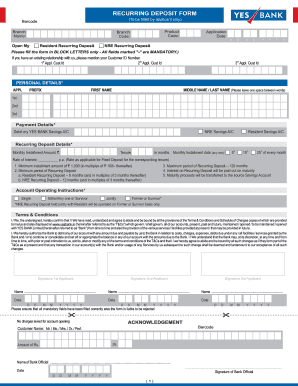
The Fixed Deposit and Recurring Deposit Form is a financial document used by customers of YES BANK in India to apply for fixed or recurring deposit accounts.
pdfFiller scores top ratings on review platforms




Who needs FD RD Form?
Explore how professionals across industries use pdfFiller.

FD RD Form is needed by:
-
Existing customers of YES BANK
-
Individuals looking to invest in fixed deposits
-
Those wanting to establish recurring deposit accounts
-
Financial advisors assisting clients with bank applications
-
Family members nominated for deposits
Comprehensive Guide to FD RD Form
What is the Fixed Deposit and Recurring Deposit Form?
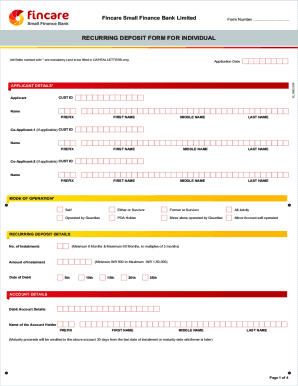
The Fixed Deposit and Recurring Deposit Form is essential for customers of YES BANK in India who wish to set up fixed deposit (FD) or recurring deposit (RD) accounts. This form serves to capture vital personal details and deposit instructions while ensuring that applicants follow the necessary procedures. Accurately completing this form is crucial, as it prevents errors that could delay the account setup process.
A fixed deposit accumulates interest over a specific term, offering a stable investment option, while a recurring deposit allows individuals to make regular monthly contributions. Both account types provide financial security and can enhance one's savings strategy.
Purpose and Benefits of the Fixed Deposit and Recurring Deposit Form
This form simplifies account setup by streamlining the information collection process. By using the Fixed Deposit and Recurring Deposit Form, individuals can enjoy multiple benefits, including competitive interest rates that can enhance their savings and long-term financial planning.
-
Consolidation of application details in one form
-
Facilitates accurate processing by the bank
-
Enhances financial security through structured savings
The form plays a critical role in helping customers manage their finances effectively, ultimately contributing to improved financial literacy and planning.
Who Needs the Fixed Deposit and Recurring Deposit Form?
This form targets existing customers of YES BANK who are interested in opening fixed deposit or recurring deposit accounts. The primary audience includes applicants who provide the necessary information, nominees who may benefit from the funds, and witnesses who validate the signatures.
Furthermore, potential customers considering these account options are also encouraged to familiarize themselves with the form and its requirements.
Key Features of the Fixed Deposit and Recurring Deposit Form
The structure of the Fixed Deposit and Recurring Deposit Form is user-friendly, containing several key features designed to facilitate completion. Important fields require user input, such as personal details and deposit type, while dedicated signature lines ensure compliance with bank requirements.
-
Nomination options for added security
-
Digital compatibility with platforms like pdfFiller
-
Clear layout for easy navigation
These features make it easy for users to fill out the form successfully and accurately.
How to Fill Out the Fixed Deposit and Recurring Deposit Form Online
Filling out the form electronically via pdfFiller is a straightforward process. To ensure accuracy, applicants should follow these steps:
-
Access the YES BANK FD form or YES BANK RD form via pdfFiller.
-
Enter personal details in the designated fields.
-
Select the appropriate deposit type for your needs.
-
Review all input for accuracy before submission.
Utilizing pdfFiller’s robust features, such as auto-save and validation checks, will enhance the filling experience.
Common Errors and How to Avoid Them When Completing the Form
Completing the Fixed Deposit and Recurring Deposit Form may seem simple, but common errors can occur. Frequent mistakes include missing signatures, providing incorrect personal details, or failing to verify information.
-
Always check for mandatory fields before submission.
-
Use a checklist to review details entered in the form.
-
Consult with bank representatives if unsure about any requirements.
Taking the time to avoid these pitfalls ensures a smoother application process.
How to Sign the Fixed Deposit and Recurring Deposit Form
Signature requirements vary for different roles involved in the form process. Applicants, nominees, and witnesses each have specific signing obligations that must be adhered to. It is essential to understand the difference between digital signatures and traditional wet signatures.
Digital signature options available through pdfFiller provide a secure and convenient way to comply with signing requirements, ensuring that documents are handled safely and efficiently.
Where to Submit the Fixed Deposit and Recurring Deposit Form
Applicants have a couple of options for submitting the Fixed Deposit and Recurring Deposit Form. Submissions can be made online through platforms like pdfFiller or in person at YES BANK branches.
It’s important to be aware of processing times and any applicable fees associated with submission. Additionally, tracking submissions can significantly help in ensuring timely processing of the application.
What Happens After You Submit the Fixed Deposit and Recurring Deposit Form?
Once the form is submitted, applicants will receive confirmation of receipt. The next steps include checking the application status, which can typically be done through YES BANK’s customer service channels.
-
Be prepared to address possible rejection reasons, such as incomplete information.
-
Understand the steps for resubmission if necessary.
Staying proactive after submission can aid in a smoother banking experience.
Enhance Your Experience with pdfFiller for Your Deposit Forms
Using pdfFiller is highly encouraged for filling out the Fixed Deposit and Recurring Deposit Form securely and efficiently. By leveraging pdfFiller's unique capabilities for editing, eSigning, and managing documents, users can ensure a hassle-free experience while handling sensitive banking information.
Take advantage of its robust features to simplify the complexities of form management.
How to fill out the FD RD Form
-
1.To access the Fixed Deposit and Recurring Deposit Form on pdfFiller, visit the website and log in to your account. Search for the form by its name in the search bar.
-
2.Once you have opened the form, familiarize yourself with its layout. You will see different sections for personal details, type of deposit, and signature fields.
-
3.Before filling out the form, gather necessary information such as your identity proof, PAN card, and details about your deposit preferences. Make sure to have your bank account details on hand.
-
4.Start filling in the form by clicking on the designated fields. You will need to enter personal information such as your name, age, address, and contact details accurately.
-
5.Select the type of deposit you wish to apply for, whether it's a fixed deposit or recurring deposit, by using the checkboxes provided in the form.
-
6.Fill in any additional required fields, including options for nomination and deposit management preferences, ensuring that all information is correct and complete.
-
7.After you have completed all fields, review the form thoroughly to confirm that there are no errors or missing information.
-
8.Once satisfied with the form, you can save it on pdfFiller. You may also download a copy to your device or submit it directly to YES BANK through the platform's submission options.

Who is eligible to fill out the Fixed Deposit and Recurring Deposit Form?
Existing customers of YES BANK in India are eligible to complete this form for opening fixed or recurring deposit accounts.
What supporting documents do I need to submit with this form?
Typically, you'll need identity proof, a PAN card, and potentially other documentation like proof of address or income. Please check with YES BANK for specific requirements.
How can I submit the completed form?
You can submit the completed Fixed Deposit and Recurring Deposit Form directly through pdfFiller by utilizing the submit feature or download it and submit in-person at your nearest YES BANK branch.
What are common mistakes to avoid when filling out the form?
Common mistakes include omitting required fields, entering incorrect personal information, or failing to sign in the necessary spots. Double-check all entries before submission.
How long does it take for the bank to process my application?
Processing times may vary, but typically you can expect feedback within a few working days. Check with YES BANK for their specific timelines.
Are there any fees associated with the application process?
There are no fees associated with filling out this form but inquire at YES BANK about any related fees for account handling or maintenance.
Related Forms


Get the latest insights from our blog


If you believe that this page should be taken down, please follow our DMCA take down process
here
.
This form may include fields for payment information. Data entered in these fields is not covered by PCI DSS compliance.