
Last updated on
Oct 20, 2026

Get the free Confidential Student Evaluation Form
We are not affiliated with any brand or entity on this form

Fill out
Complete the form online in a simple drag-and-drop editor.

eSign
Add your legally binding signature or send the form for signing.

Share
Share the form via a link, letting anyone fill it out from any device.

Export
Download, print, email, or move the form to your cloud storage.
Why pdfFiller is the best tool for your documents and forms


End-to-end document management
From editing and signing to collaboration and tracking, pdfFiller has everything you need to get your documents done quickly and efficiently.
Accessible from anywhere
pdfFiller is fully cloud-based. This means you can edit, sign, and share documents from anywhere using your computer, smartphone, or tablet.
Secure and compliant
pdfFiller lets you securely manage documents following global laws like ESIGN, CCPA, and GDPR. It's also HIPAA and SOC 2 compliant.
What is Student Evaluation Form
The Confidential Student Evaluation Form is a document used by Seacrest Country Day School to collect teacher recommendations for student admissions.
pdfFiller scores top ratings on review platforms




Who needs Student Evaluation Form?
Explore how professionals across industries use pdfFiller.

Student Evaluation Form is needed by:
-
Teachers evaluating student performance
-
Parents providing necessary information
-
School admissions committees reviewing applications
-
Educational institutions requiring evaluations
-
Private schools assessing student readiness
Comprehensive Guide to Student Evaluation Form
What is the Confidential Student Evaluation Form?
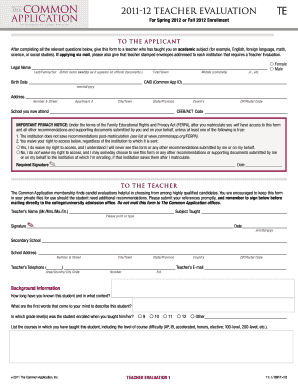
The Confidential Student Evaluation Form is a key component of the student admission process at Seacrest Country Day School. This form serves to gather essential insights from teachers regarding a student’s academic performance, work habits, and personal development, enabling a comprehensive evaluation during admissions.
Defined as a method for teacher evaluations, this form plays a significant role in assessing a student’s capabilities. It is critical in shaping the admissions decision and ensures that teachers contribute valuable information based on their observations.
Purpose and Benefits of the Confidential Student Evaluation Form
This form aids teachers, parents, and schools by highlighting students' strengths and areas for growth. It allows teachers to articulate observations on student performance effectively, facilitating a better understanding of each child's academic journey.
By documenting progress, teachers benefit from having a structured method to evaluate student work habits and achievements. The insights provided in the evaluations are invaluable for parents, helping them stay informed about their child's development during the admission process.
Key Features of the Confidential Student Evaluation Form
The Confidential Student Evaluation Form includes several practical features designed to enhance its usability and effectiveness:
-
Fillable fields and checkboxes streamline the teacher evaluation process.
-
Instructions are clearly outlined to guide teachers on proper completion and submission.
-
Signature requirements ensure accountability and authenticity of the evaluation.
-
The form maintains strict confidentiality, protecting sensitive information.
Who Needs to Complete the Confidential Student Evaluation Form?
The completion of the Confidential Student Evaluation Form involves multiple stakeholders, primarily teachers, who must sign and submit the document to the school. Parents play a crucial role by providing initial information about their child, enabling a comprehensive evaluation.
Additionally, it is important for schools to clarify the responsibilities of all parties involved in the process, including eligibility criteria for students, which must be understood by both parents and educators.
How to Fill Out the Confidential Student Evaluation Form Online (Step-by-Step)
Filling out the Confidential Student Evaluation Form online is a straightforward process:
-
Access the form through the designated platform.
-
Input necessary student and parent information in the fillable fields.
-
Complete the teacher evaluation sections, being thorough in ratings and comments.
-
Sign the form to validate your evaluation.
-
Submit the completed form via online upload or other specified submission methods.
Common Errors and How to Avoid Them When Filling Out the Confidential Student Evaluation Form
To ensure accuracy and completeness, here are common pitfalls to avoid:
-
Neglecting to review entries before submission may lead to errors.
-
Failing to complete all required sections can result in an incomplete evaluation.
-
Overlooking the importance of clarity in comments can decrease the form’s effectiveness.
-
Not adhering to submission deadlines might hinder the evaluation process.
Where to Submit the Confidential Student Evaluation Form
Once completed, the Confidential Student Evaluation Form can be submitted through various methods:
-
Online upload via the school’s admissions portal.
-
Direct mailing to the admissions office as specified.
-
Confirm deadlines to ensure timely processing of the evaluation.
-
Understand the processing times after submission to anticipate the next steps in the admission process.
How pdfFiller Can Enhance Your Experience with the Confidential Student Evaluation Form
pdfFiller offers a robust platform to facilitate the management of the Confidential Student Evaluation Form. Key features include user-friendly tools for editing and filling out documents, which simplify the completion and submission processes.
With strong security measures in place, including 256-bit encryption and HIPAA compliance, users can rest assured that their sensitive information remains protected. Additionally, testimonials highlight the platform's effectiveness for educational forms, reinforcing its value for teachers and parents alike.
Privacy and Security of the Confidential Student Evaluation Form
The confidentiality of information shared through the Confidential Student Evaluation Form is a top priority. Robust data protection measures are implemented to safeguard sensitive student evaluations.
Compliance with regulations such as GDPR and HIPAA ensures that personal data is handled with utmost care, reinforcing the trust of parents and educators in the evaluation process.
Engage with pdfFiller to Complete Your Confidential Student Evaluation Form
Utilizing pdfFiller for the Confidential Student Evaluation Form streamlines the process, making it easy for teachers and parents to manage their evaluations online. With an emphasis on security and efficiency, users are encouraged to take advantage of the platform's capabilities for filling out and submitting forms.
By choosing pdfFiller, educators and parents can achieve a quicker and more secure way to manage essential student evaluations, fostering a smooth admission journey.
How to fill out the Student Evaluation Form
-
1.Access the Confidential Student Evaluation Form by visiting pdfFiller and searching for the form name or directly navigate to Seacrest Country Day School's portal.
-
2.Once opened, familiarize yourself with the layout. You will find fillable fields, checkboxes, and instructional text to guide you in completing the evaluation.
-
3.Gather necessary information including the student's academic records, behavioral notes, and any prior evaluations to prepare for filling out the form.
-
4.Begin completing the form by entering the student's basic information in the designated fields, ensuring accuracy as this data is crucial for the admissions process.
-
5.Proceed to answer the evaluation sections carefully, providing ratings and comments on the student's academic performance, work habits, and personal development as per the instructions.
-
6.Use pdfFiller’s tools to navigate through the fields easily. You can click on a checkbox or text box to fill it in directly without printing the form.
-
7.After completing all sections, review your entries thoroughly to ensure there are no errors or omissions. Double-check that you've signed and dated the form where required.
-
8.Once satisfied, save the completed form by clicking on the save icon. You may also download a copy to your device for your records or submission.
-
9.To submit the form, follow the school's submission methods as directed, typically involving direct email or an online upload feature provided by Seacrest Country Day School.

Who is eligible to complete the Confidential Student Evaluation Form?
The Confidential Student Evaluation Form can be completed by current teachers of the student being evaluated, as it's specifically designed for teacher recommendations during the admissions process.
What is the deadline for submitting the evaluation form?
Deadlines for submissions may vary, but it’s essential to check with Seacrest Country Day School for specific dates to ensure the form is submitted on time for the admissions cycle.
How should the completed form be submitted?
The completed Confidential Student Evaluation Form should typically be submitted directly to Seacrest Country Day School. Submission methods may include email or an online upload through the school's portal.
What supporting documents are needed along with the evaluation form?
Along with the evaluation form, any previous academic records or additional references supporting the evaluation may be needed, though specific requirements should be confirmed with the school.
What are common mistakes to avoid when filling this form?
Ensure that all sections are completed, the information is accurate, and the form is signed appropriately. Avoid leaving ratings blank or providing vague comments.
How long does it take to process the evaluation once submitted?
Processing times can vary; however, typically you can expect a timeframe communicated by the school during the admissions process, often outlined in their guidelines.
Can the evaluation be edited after submission?
Once the Confidential Student Evaluation Form is submitted, it may not be editable. It’s crucial to review for accuracy before submission.
Related Forms




Get the latest insights from our blog


If you believe that this page should be taken down, please follow our DMCA take down process
here
.
This form may include fields for payment information. Data entered in these fields is not covered by PCI DSS compliance.