
Last updated on
Oct 20, 2026

Get the free Vaccine Registration Form
We are not affiliated with any brand or entity on this form

Fill out
Complete the form online in a simple drag-and-drop editor.

eSign
Add your legally binding signature or send the form for signing.

Share
Share the form via a link, letting anyone fill it out from any device.

Export
Download, print, email, or move the form to your cloud storage.
Why pdfFiller is the best tool for your documents and forms


End-to-end document management
From editing and signing to collaboration and tracking, pdfFiller has everything you need to get your documents done quickly and efficiently.
Accessible from anywhere
pdfFiller is fully cloud-based. This means you can edit, sign, and share documents from anywhere using your computer, smartphone, or tablet.
Secure and compliant
pdfFiller lets you securely manage documents following global laws like ESIGN, CCPA, and GDPR. It's also HIPAA and SOC 2 compliant.
What is Vaccine Registration
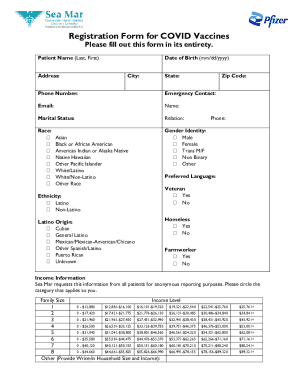
The Vaccine Registration Form is a healthcare document used by individuals to register for a vaccine by providing personal and demographic information.
pdfFiller scores top ratings on review platforms




Who needs Vaccine Registration?
Explore how professionals across industries use pdfFiller.

Vaccine Registration is needed by:
-
Individuals seeking vaccination
-
Parents registering minors for vaccinations
-
Healthcare providers administering vaccines
-
Clinical staff managing patient records
-
Public health officials tracking vaccination data
-
Researchers studying vaccination trends
Comprehensive Guide to Vaccine Registration
What is the Vaccine Registration Form?
The Vaccine Registration Form is a crucial document for individuals seeking to receive vaccinations. This form facilitates the collection of essential personal and demographic details required for proper registration. Among the key components, users will find sections for information such as name, date of birth, and contact details, ensuring a smooth vaccination process.
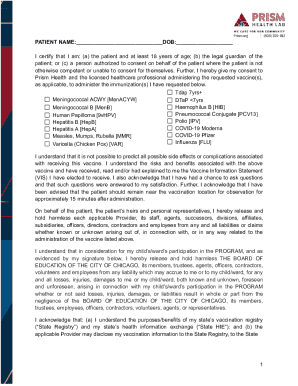
Additionally, the form includes areas dedicated to collecting consent for vaccination, which is vital for safeguarding patient rights and ensuring compliance with healthcare regulations. Its design allows for easy completion during vaccination appointments.
Purpose and Benefits of the Vaccine Registration Form
The importance of the Vaccine Registration Form extends beyond mere paperwork; it plays a significant role in streamlining the vaccination process. By capturing accurate personal and medical information, this form helps healthcare providers manage patient data effectively.
Patients benefit from a more efficient vaccination process, where reduced wait times and organized follow-up care are made possible. Moreover, it serves as a foundation for building comprehensive patient records, facilitating smoother interactions with clinical staff.
Key Features of the Vaccine Registration Form
The Vaccine Registration Form boasts several features that enhance user experience. It includes fillable fields alongside checkboxes, making it user-friendly and accessible for patients. These elements allow individuals to enter their information seamlessly, minimizing the risk of errors.
Furthermore, the form contains dedicated sections for consent, ensuring that clinical staff document vaccination details correctly. These features contribute to a structured approach to managing vaccination records and improve overall data integrity.
Who Needs to Complete the Vaccine Registration Form?
The Vaccine Registration Form is primarily designed for patients who are registering for vaccination. However, clinical staff play a vital role in supporting this process, assisting in the completion and verification of the form.
Various circumstances necessitate the use of this form, including participation in public health initiatives, routine clinic visits, or scheduled immunization events. Understanding the roles of both patients and clinical staff is essential for effective registration.
How to Fill Out the Vaccine Registration Form Online (Step-by-Step)
-
Access the Vaccine Registration Form through the designated platform.
-
Fill out personal information, including your name, date of birth, and contact details in the appropriate fields.
-
Review the consent section and provide your signature where indicated to authorize vaccination.
-
Ensure that all details are complete and accurate before confirming your submission.
-
Submit the form electronically, following any additional instructions provided by the platform.
By following these steps, users can ensure an efficient online registration experience. Attention to detail is vital, especially when entering personal information and consent signatures.
Common Errors and How to Avoid Them
Completing the Vaccine Registration Form can be straightforward, but there are potential pitfalls to be mindful of. Common mistakes include missing required fields, incorrect entries, and failing to provide valid consent signatures.
To prevent these issues, users should double-check their entries after completion. Thorough review ensures the accuracy of personal data before submission, reducing any chances of delays in the vaccination process.
Submission Methods and Delivery of the Vaccine Registration Form
Users have several options for submitting their completed Vaccine Registration Form. These methods include online submission, mailing the form, or delivering it in person to the designated healthcare facility.
After submission, users can expect processing times to vary based on the chosen method and the specific requirements of the healthcare provider. Understanding these processes helps set expectations for when vaccination can occur.
Security and Compliance for the Vaccine Registration Form
Data protection is a top priority for the Vaccine Registration Form, which employs robust security measures. Utilizing 256-bit encryption, the form ensures compliance with HIPAA and GDPR regulations, safeguarding sensitive information collected during the registration process.
Users can further enhance their privacy by taking steps such as avoiding public Wi-Fi when submitting the form and ensuring they access secure websites for online submissions.
Utilizing pdfFiller for Your Vaccine Registration Form Needs
pdfFiller offers a seamless solution for managing the Vaccine Registration Form through its cloud-based editing platform. Users can create, fill, and securely manage forms without the need for downloads, making the process convenient and efficient.
The platform also enables easy eSigning and document sharing features, enhancing user experience by allowing individuals to complete their registration efficiently and securely.
Sample of a Completed Vaccine Registration Form
To assist users in understanding the proper completion of the Vaccine Registration Form, a sample is available for reference. This sample showcases key areas such as personal information and consent sections, providing a clear visual guide.
Using the sample can help users effectively navigate their own form completion, ensuring they understand the requirements for each section of the Vaccine Registration Form.
How to fill out the Vaccine Registration
-
1.To access the Vaccine Registration Form on pdfFiller, visit the website and search for 'Vaccine Registration Form' using the search bar.
-
2.Once you locate the form, click on it to open the document in the pdfFiller editor interface.
-
3.Before starting, gather the necessary information, including your name, date of birth, contact details, race, ethnicity, gender, and consent for vaccination.
-
4.Begin filling in the fields by clicking on each form element. The pdfFiller platform allows you to input data directly into fillable fields.
-
5.Use the 'Add Text' feature to enter your details accurately. Utilize the checkboxes for consent and demographic questions.
-
6.Carefully review all entries after filling in the fields, ensuring that personal details are correct and complete before finalizing the form.
-
7.Once satisfied with your information, save your work and then choose to download, print, or submit the form directly through pdfFiller.

Who is eligible to use the Vaccine Registration Form?
Anyone who intends to receive a vaccine can use the Vaccine Registration Form, including adults and parents registering minors.
Is there a deadline for submitting the Vaccine Registration Form?
Submission deadlines can vary by provider. Check with your local health department or vaccination site for specific timelines.
How do I submit the Vaccine Registration Form?
The completed Vaccine Registration Form can be submitted online through pdfFiller, printed for in-person submission, or emailed based on the vaccination provider's requirements.
What supporting documents do I need with this form?
Typically, no additional documents are required, but it’s advisable to have identification or any medical records handy for accurate entry.
What common mistakes should I avoid when filling out the form?
Ensure all fields are completed accurately, including dates and contact information. Double-check for typographical errors before submission.
What are the processing times for this form?
Processing times may vary depending on the vaccination site; generally, you'll receive follow-up information shortly after submission.
Can I edit the Vaccine Registration Form after submitting?
Once submitted, modifications typically require a new form unless your healthcare provider allows updates. Contact them directly for guidance.
Related Forms



Get the latest insights from our blog


If you believe that this page should be taken down, please follow our DMCA take down process
here
.
This form may include fields for payment information. Data entered in these fields is not covered by PCI DSS compliance.