
Last updated on
Oct 20, 2026

Get the free Virginia Service Request Form
We are not affiliated with any brand or entity on this form

Fill out
Complete the form online in a simple drag-and-drop editor.

eSign
Add your legally binding signature or send the form for signing.

Share
Share the form via a link, letting anyone fill it out from any device.

Export
Download, print, email, or move the form to your cloud storage.
Why pdfFiller is the best tool for your documents and forms


End-to-end document management
From editing and signing to collaboration and tracking, pdfFiller has everything you need to get your documents done quickly and efficiently.
Accessible from anywhere
pdfFiller is fully cloud-based. This means you can edit, sign, and share documents from anywhere using your computer, smartphone, or tablet.
Secure and compliant
pdfFiller lets you securely manage documents following global laws like ESIGN, CCPA, and GDPR. It's also HIPAA and SOC 2 compliant.
What is VA Service Request
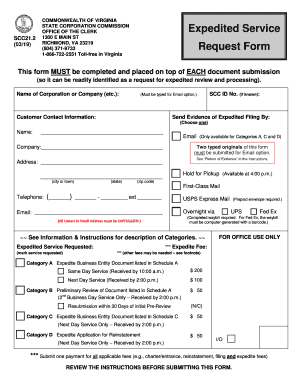
The Virginia Service Request Form is a government document used by individuals or entities to request changes to their Virginia insurance licenses.
pdfFiller scores top ratings on review platforms




Who needs VA Service Request?
Explore how professionals across industries use pdfFiller.

VA Service Request is needed by:
-
Virginia insurance agents looking to update their licensing information
-
Agencies needing to change licensed officers or principals
-
Individuals changing their personal information related to insurance licenses
-
Businesses requesting a Letter of Clearance when relocating from Virginia
-
Candidates for insurance license transfer within Virginia
Comprehensive Guide to VA Service Request
What is the Virginia Service Request Form?
The Virginia Service Request Form is a crucial document for individuals and agencies looking to request amendments to their Virginia insurance licenses. Its purpose includes managing essential updates such as name changes, corrections to Social Security Numbers (SSNs) or Federal Employer Identification Numbers (FEINs), and notifications regarding trade names.
Submitting this form necessitates the inclusion of a signature along with supporting documentation, validating the request's authenticity and accuracy. The Virginia Service Request Form is integral for maintaining compliant licensing in the state, thereby facilitating effective communication between licensees and regulatory authorities.
Purpose and Benefits of the Virginia Service Request Form
Individuals and agencies must utilize the Virginia Service Request Form to ensure their insurance licenses remain current. Keeping licenses updated is not only beneficial for compliance but also helps avoid potential issues that may arise from outdated information.
The timely processing of requests can prevent complications with licensing, safeguarding one's professional standing in the industry. This underscores the importance of using the form to manage licensing effectively in Virginia.
Who Needs the Virginia Service Request Form?
The Virginia Service Request Form is primarily intended for licensees, agency officers, or any individual needing to amend their Virginia insurance license. Various scenarios may prompt the use of this form, including changes in personal or business names and circumstances necessitating a Letter of Clearance.
Whether an agent needs to update their records or an agency must inform about a trade name change, understanding the user base helps in streamlining license management processes.
How to Fill Out the Virginia Service Request Form Online
To complete the Virginia Service Request Form online, follow these steps:
-
Access the form through pdfFiller's platform.
-
Carefully input personal and relevant identification information into the required fields.
-
Review all entries for accuracy to avoid common pitfalls.
-
Attach necessary supporting documents as outlined in the form.
-
Sign the form electronically to finalize your submission.
By following these specific steps, you can ensure a smoother submission process for your license updates.
Field-by-Field Instructions for the Virginia Service Request Form
Each section of the Virginia Service Request Form requires detailed information. Here’s a breakdown of essential fields:
-
Personal Information: Full name, address, contact details.
-
License Information: Current license number, type of license held.
-
Request Details: Clearly specify the type of request (name change, SSN correction, etc.).
-
Signature: Ensure that you sign the form where required.
It’s crucial to accompany the form with any necessary documents, such as the Letter of Clearance when changing trade names or personal details.
Required Documents and Supporting Materials
When submitting the Virginia Service Request Form, the following documents must be included:
-
Proof of identity (e.g., a government-issued ID).
-
Legal documents supporting the name change (if applicable).
-
Any relevant additional paperwork such as the Letter of Clearance.
These documents help substantiate your request and assist in the efficient processing of your form.
Submission Methods and Processing Details
The Virginia Service Request Form can be submitted in various ways, ensuring flexibility for users. Here are the submission methods:
-
Electronic submission via pdfFiller's online platform.
-
Physical mail submission to the relevant office.
Processing times vary, and specific deadlines may apply, so it is advisable to check for any associated fees and ensure timely filing to avoid complications.
What Happens After You Submit the Virginia Service Request Form?
Once submitted, users can expect a confirmation of receipt from the licensing authority. During the processing stages, it's important to track the status of your request to ensure that it’s moving forward.
If any issues arise post-submission, stakeholders should promptly seek guidance on resolving them to prevent delays or complications.
Enhancing Security and Compliance for Your Submission
pdfFiller employs advanced security measures to protect sensitive information submitted through the Virginia Service Request Form. Users can trust that their data is safeguarded by 256-bit encryption and adheres to strict compliance with legal standards such as HIPAA and GDPR.
Ensuring security when handling confidential documents is of utmost importance, providing peace of mind when managing licensing forms online.
Utilizing pdfFiller for Your Virginia Service Request Form Needs
Leveraging pdfFiller’s platform simplifies the process of filling, editing, and eSigning the Virginia Service Request Form. User-friendly features and robust security make it a reliable choice for managing your forms online.
With pdfFiller, you can focus on what matters—keeping your licensing compliant—while enjoying the convenience of an efficient form management solution.
How to fill out the VA Service Request
-
1.Access the Virginia Service Request Form on pdfFiller by searching for it in the platform's form gallery or by navigating to the specific URL provided.
-
2.Once the form is loaded, familiarize yourself with the fields and instructions presented in the digital interface.
-
3.Before filling out the form, collect all necessary information including your current license details, identification numbers, and any supporting documentation needed for changes.
-
4.Begin completing the form by clicking into the blank fields and typing in the required information. Use the checkboxes where applicable to indicate your requests.
-
5.Review each section carefully to ensure all details are accurate and comprehensive, as incomplete submissions may delay processing.
-
6.After filling in the form, utilize the review feature on pdfFiller to verify your entries before finalizing the document.
-
7.When you are satisfied with the completed form, choose the save option to keep a copy for your records, or download it directly to your device.
-
8.Submit the form through the designated method on pdfFiller, whether electronically or by printing and mailing it, depending on your preference and the requirements of the Virginia licensing authority.

Who is eligible to submit the Virginia Service Request Form?
Eligibility to submit the Virginia Service Request Form typically includes licensed insurance agents, agencies with licensed officers, or individuals needing updates to their personal insurance licensing information.
What supporting documents are required with this form?
Supporting documents often include identification verification, previous license copies, and any relevant legal documents such as marriage certificates for name changes or SSN change proof.
How do I submit the completed Virginia Service Request Form?
You can submit the completed Virginia Service Request Form through pdfFiller by downloading it and mailing it to the relevant licensing authority, or by submitting electronically if that option is available.
Are there any deadlines I need to be aware of related to the form?
While specific deadlines may vary, it is crucial to submit the Virginia Service Request Form as soon as possible, especially to avoid issues with licensing when changing addresses or names.
What are the common mistakes to avoid when filling out this form?
Common mistakes include failing to sign the form, neglecting to include necessary supporting documents, and not double-checking personal information for accuracy.
How long does processing take for the Virginia Service Request Form?
Processing times for the Virginia Service Request Form can vary, but it usually takes several weeks. Ensure to follow up if you do not receive confirmation within this period.
Is notarization required for the Virginia Service Request Form?
No, notarization is not required for the Virginia Service Request Form, simplifying the process for applicants.
Related Forms




Get the latest insights from our blog


If you believe that this page should be taken down, please follow our DMCA take down process
here
.
This form may include fields for payment information. Data entered in these fields is not covered by PCI DSS compliance.