
Last updated on
Oct 20, 2026

Get the free Patient\'s Request for Access to Protected Health Information
We are not affiliated with any brand or entity on this form

Fill out
Complete the form online in a simple drag-and-drop editor.

eSign
Add your legally binding signature or send the form for signing.

Share
Share the form via a link, letting anyone fill it out from any device.

Export
Download, print, email, or move the form to your cloud storage.
Why pdfFiller is the best tool for your documents and forms


End-to-end document management
From editing and signing to collaboration and tracking, pdfFiller has everything you need to get your documents done quickly and efficiently.
Accessible from anywhere
pdfFiller is fully cloud-based. This means you can edit, sign, and share documents from anywhere using your computer, smartphone, or tablet.
Secure and compliant
pdfFiller lets you securely manage documents following global laws like ESIGN, CCPA, and GDPR. It's also HIPAA and SOC 2 compliant.
What is Health Information Access Request
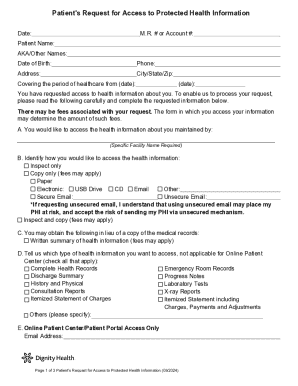
The Patient's Request for Access to Protected Health Information is a healthcare form used by patients or their representatives to request access to their health information from Dignity Health facilities.
pdfFiller scores top ratings on review platforms




Who needs Health Information Access Request?
Explore how professionals across industries use pdfFiller.

Health Information Access Request is needed by:
-
Patients seeking to access their medical records
-
Personal representatives managing healthcare information
-
Hospital employees verifying patient requests
-
Caregivers needing access to health information
-
Health information management staff at Dignity Health
Comprehensive Guide to Health Information Access Request
What is the Patient's Request for Access to Protected Health Information?
The Patient's Request for Access to Protected Health Information form, specifically X-MR-4869, serves as an essential tool for individuals seeking access to their protected health information (PHI). PHI encompasses various types of medical records, including clinical notes, billing records, and other related documents that are critical for informed health management. This form not only enables patients to understand their medical history better but also empowers them by facilitating direct access to their essential health information.
Purpose and Benefits of the Patient's Request for Access to Protected Health Information
Accessing personal health information is crucial for patients to effectively manage their health outcomes. The Patient's Request form supports this objective by allowing individuals to monitor their treatments, follow up on care regimens, and ensure they have the necessary information for discussions with healthcare providers. Not only do patients benefit from their access to health records, but their personal representatives can also use the form to ensure that family members receive appropriate medical information, thus maintaining the dignity and autonomy of individuals receiving care.
Who Needs the Patient's Request for Access to Protected Health Information?
The Patient's Request form is designed for several users, including patients, their personal representatives, and hospital employees involved in the request process. Patients seeking information from their medical records will find this form helpful, while personal representatives can file the request on behalf of someone unable to do so, such as minors or incapacitated individuals. Hospital employees also play a role in processing these requests, ensuring compliance with regulatory requirements and patient needs.
Key Features of the Patient's Request for Access to Protected Health Information
This form includes various fillable fields that are essential for processing requests accurately. Required fields typically include:
-
Patient Name
-
Date of Birth
-
Address
-
Information Type Requested (e.g., clinical or billing records)
Furthermore, patients can select from options for how they wish to access their health information—whether to inspect, obtain a copy, or both. The format in which records can be provided is also flexible, with choices available for electronic or paper documentation.
How to Fill Out the Patient's Request for Access to Protected Health Information Online
To complete the Patient's Request form online, follow these steps:
-
Access the form via the designated platform.
-
Fill in required fields, ensuring accuracy in each section.
-
Select the desired method of information access (inspect, copy, both).
-
Choose the format (electronic or paper) for receiving your records.
-
Review the information for any common errors, such as misspellings or missing signatures.
By following these steps, users can effectively navigate the online request process without encountering common pitfalls.
Submission Methods for the Patient's Request for Access to Protected Health Information
Once the Patient's Request form is completed, it can be submitted through several methods, including online platforms, in-person delivery, or postal mail. Choosing the appropriate submission method depends on individual circumstances and preferences. It's essential to ensure that the submission is done securely and that users keep track of their submission status to confirm receipt and processing of their requests.
What Happens After You Submit the Patient's Request for Access to Protected Health Information?
Upon submitting the Patient's Request form, users can expect to receive notifications regarding the status of their request. Processing timelines may vary based on the volume of requests received. There are two possible outcomes: approval, granting access to the requested information, or denial, which may occur for various reasons, including inadequate documentation. If access is denied or additional documents are required, the form typically outlines the next steps to follow to resolve any issues.
Security and Compliance for the Patient's Request for Access to Protected Health Information
When handling health records, security and compliance with regulations such as HIPAA are of utmost importance. Patients should be aware of privacy concerns and the necessity of using secure platforms for completing and submitting the Patient's Request form. This compliance ensures that personal health information remains protected throughout the entire process, safeguarding patients' rights and confidentiality.
How pdfFiller Can Help with the Patient's Request for Access to Protected Health Information
pdfFiller offers robust capabilities for filling and signing forms, making it an ideal solution for users of the Patient's Request form. With features designed for ease of use, users can quickly edit their documents, securely eSign them, and submit them without hassle. The platform’s emphasis on security, combined with its user-friendly interface, ensures a seamless experience for those managing sensitive health information.
Next Steps for Completing Your Medical Records Access Request
To begin the process, users are encouraged to leverage pdfFiller to fill out the Patient's Request form. The platform provides comprehensive support, including editing and signing tools to enhance the user experience. For further assistance, ongoing support is available to answer any questions throughout the completion process, ensuring that all users are well-equipped to manage their health information effectively.
How to fill out the Health Information Access Request
-
1.Begin by visiting pdfFiller's website and logging in to your account, or create a new account if you don't have one.
-
2.Search for the 'Patient's Request for Access to Protected Health Information' form using the search bar.
-
3.Click on the form to open it. Familiarize yourself with the document layout, which includes sections for your information and signatures.
-
4.Gather the necessary information before filling out the form, such as your personal details (name, date of birth), address, and the specifics of the health information you are requesting.
-
5.Start filling out the form by clicking into each field and entering the requested information. Use the intuitive pdfFiller interface to navigate each section.
-
6.In the fields for requesting access type, specify your preferences for viewing or copying health information, and select the format in which you would like to receive it.
-
7.Ensure you complete all required fields, including sections for signature. If you are a personal representative, include your details in the designated sections.
-
8.Review the completed form for accuracy, ensuring you've provided all necessary information and signatures.
-
9.Once you're satisfied with the form, you can save it directly to your pdfFiller account or download it as a PDF file.
-
10.If you need to submit the form, refer to the instructions on how to submit it to your healthcare provider or the appropriate Dignity Health facility.

Who is eligible to request access to health information using this form?
Patients or their personal representatives can request access to health information through this form. It is essential that the patient provides consent or authorization for a representative.
What is the deadline for submitting the Patient's Request for Access to Protected Health Information?
There is no specific deadline for submitting this form; however, it is advisable to submit it as soon as possible if you need access to your health information for timely decision-making.
How can I submit the completed form after filling it out?
After completing the form on pdfFiller, you can download it and submit it either via mail, fax, or directly to Dignity Health facilities, as per their submission guidelines.
What supporting documents are required with the request?
Generally, no additional documents are required aside from the filled form. However, personal representatives may need to provide proof of authority to act on behalf of the patient.
What common mistakes should I avoid when completing this form?
Ensure that all required fields are completed accurately, especially signatures. Double-check your contact information and the specific details of the requested health information to avoid processing delays.
How long does it take to process the request after submission?
The processing time can vary, but typically, Dignity Health processes requests within 30 days. If there are any delays, you will receive a notification.
Can I change or amend my request after submitting the form?
If you need to make changes, you should contact the healthcare facility where you submitted the form as soon as possible to discuss any amendments needed to your request.
Related Forms






Get the latest insights from our blog


If you believe that this page should be taken down, please follow our DMCA take down process
here
.
This form may include fields for payment information. Data entered in these fields is not covered by PCI DSS compliance.