
Last updated on
Oct 31, 2026

Get the free Pre-Admission Clinic and Admission Orders
We are not affiliated with any brand or entity on this form

Fill out
Complete the form online in a simple drag-and-drop editor.

eSign
Add your legally binding signature or send the form for signing.

Share
Share the form via a link, letting anyone fill it out from any device.

Export
Download, print, email, or move the form to your cloud storage.
Why pdfFiller is the best tool for your documents and forms


End-to-end document management
From editing and signing to collaboration and tracking, pdfFiller has everything you need to get your documents done quickly and efficiently.
Accessible from anywhere
pdfFiller is fully cloud-based. This means you can edit, sign, and share documents from anywhere using your computer, smartphone, or tablet.
Secure and compliant
pdfFiller lets you securely manage documents following global laws like ESIGN, CCPA, and GDPR. It's also HIPAA and SOC 2 compliant.
What is Pre-Admission Orders
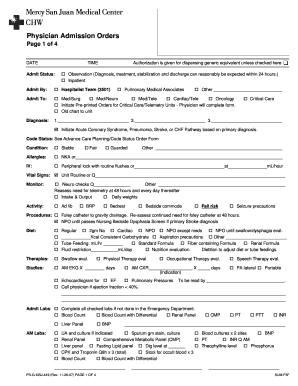
The Pre-Admission Clinic and Admission Orders is a medical history form used by healthcare providers to gather essential patient information prior to surgery.
pdfFiller scores top ratings on review platforms




Who needs Pre-Admission Orders?
Explore how professionals across industries use pdfFiller.

Pre-Admission Orders is needed by:
-
Healthcare providers preparing for a surgical procedure
-
Patients undergoing surgery requiring pre-operative documentation
-
Witnesses affirming consent during medical admissions
-
Medical administrators managing patient intake
-
Legal representatives involved in informed consent processes
Comprehensive Guide to Pre-Admission Orders
What is the Pre-Admission Clinic and Admission Orders?
The Pre-Admission Clinic and Admission Orders form is a crucial document used by healthcare providers to collect essential medical information from patients prior to surgical procedures. It plays a significant role in ensuring patient safety by facilitating thorough data collection.
This form captures critical components such as the patient's diagnosis, relevant ICD9 code, and details of the attending physician. Understanding and completing the pre-admission orders form accurately can greatly impact the efficiency of the surgical process.
Purpose and Benefits of the Pre-Admission Clinic and Admission Orders
The admission orders template serves key purposes in the healthcare setting. It helps to gather comprehensive information that is vital for patient safety and informed decision-making.
-
Ensures accurate medical history is communicated to the surgical team.
-
Facilitates informed consent, requiring necessary signatures from physicians, patients, and witnesses.
Clearly defined purposes empower healthcare providers and enhance the overall patient experience during pre-surgical assessments.
Key Features of the Pre-Admission Clinic and Admission Orders
This form includes multiple fillable fields essential for documenting patient information effectively. Each field has specific instructions to aid in accurate completion.
-
Diagnosis
-
ICD9 code
-
Physician Signature
These features are designed to ensure clarity and completeness in the patient's medical history, contributing to a smooth surgical process.
Who Needs the Pre-Admission Clinic and Admission Orders?
Identifying the appropriate users of the Texas pre-admission clinic form is essential for its effective implementation. The primary roles involved include patients, physicians, and witnesses.
-
Patients are responsible for providing their medical history.
-
Physicians need to assess and sign off on the information.
-
Witnesses ensure that proper consent protocols are followed.
Understanding these roles aids in determining eligibility and compliance with pre-surgical requirements.
How to Fill Out the Pre-Admission Clinic and Admission Orders Online (Step-by-Step)
Filling out the form online can be a straightforward process when following a step-by-step guide. Here’s how to complete the pre-surgical medical form via pdfFiller:
-
Open the form through the pdfFiller platform.
-
Fill in personal details and medical history in the designated fields.
-
Provide accurate diagnosis and ICD9 code information.
-
Ensure physician and witness signatures are included.
-
Review the completed form for accuracy before submission.
Signing the Pre-Admission Clinic and Admission Orders
The form requires signatures from all involved parties to validate the information and ensure legal compliance. Understanding the requirements for signing is essential.
-
Digital signatures may be used for convenience, while wet signatures are often required for legal documents.
-
Signatures play a critical role in ensuring medical and legal accountability.
By adhering to these requirements, users maintain the form's integrity and legitimacy.
Submitting the Pre-Admission Clinic and Admission Orders
Once the form is completed, users need to submit it according to specific guidelines. Here’s how to ensure proper submission of the Texas pre-admission clinic form:
-
Online submission through the healthcare provider’s portal.
-
In-person deliveries to designated healthcare facilities.
Be aware of any associated fees and deadlines to avoid complications during the submission process.
Security and Compliance for the Pre-Admission Clinic and Admission Orders
It’s crucial to understand how sensitive information is managed during the process. pdfFiller implements strict security measures to protect user data.
-
All documents are encrypted using 256-bit encryption.
-
Compliance with HIPAA and GDPR ensures privacy and data protection.
These measures are designed to give users peace of mind when handling patient medical information.
Sample of a Completed Pre-Admission Clinic and Admission Orders
Providing users with a visual reference can enhance their understanding of how to correctly fill out the form. A downloadable sample of a completed form can serve as a helpful guide for users.
This example not only illustrates the required fields but also reinforces the importance of accuracy when completing the admission orders template.
Enhance Your Experience with pdfFiller
Using pdfFiller can significantly improve the process of managing the pre-admission orders form. The platform offers a range of capabilities that make editing and submitting forms seamless.
-
Edit text and images within the forms easily.
-
Utilize electronic signing features for convenience.
pdfFiller's user-friendly interface ensures that completing forms accurately and securely is a straightforward task for everyone.
How to fill out the Pre-Admission Orders
-
1.Access the Pre-Admission Clinic and Admission Orders form on pdfFiller by searching the form name in the search bar.
-
2.Open the form once it appears in the search results to begin filling it out.
-
3.Gather necessary information such as the diagnosis, ICD9 code, medication list, and allergies before you fill out the form.
-
4.Use the fillable fields to enter patient details, starting with the diagnosis and then moving to the ICD9 code, ensuring accuracy.
-
5.Continue filling out the form by providing details for the attending physician and inputting any known allergies and medications.
-
6.Review the form fields as you fill them to ensure all required information is correctly entered, paying special attention to any highlighted sections.
-
7.Once all fields are filled, go back through the completed form to double-check for errors or missing information before finalizing it.
-
8.To finalize the form on pdfFiller, look for the review or finalize option typically located in the toolbar.
-
9.After reviewing, save your work by clicking on the save option, or download the completed form for your records.
-
10.If electronic submission is required, utilize pdfFiller's submit function to send the form directly to your healthcare provider or institution.

Who is required to sign the Pre-Admission Clinic and Admission Orders?
The form requires signatures from the physician, patient, and a witness to ensure informed consent and legality.
Is notarization needed for the Pre-Admission Clinic and Admission Orders?
No, notarization is not required for this form; however, obtaining signatures is essential.
What information do I need to gather before filling out the form?
You should gather information such as the patient's diagnosis, ICD9 code, medications, allergies, and details about the attending physician.
How should I submit the completed form?
Completed forms can typically be saved and downloaded for printing or submitted electronically via pdfFiller's submission option, directly to the required recipient.
What are common mistakes to avoid when filling out this form?
Common mistakes include leaving fields blank, incorrect patient details, and not obtaining all required signatures before submission.
Are there any deadlines for submitting the Pre-Admission Clinic and Admission Orders?
It is advisable to submit the form as early as possible prior to surgery; contact your healthcare provider for specific deadlines.
What if I need to make changes after submitting the form?
If changes are necessary post-submission, contact your healthcare provider immediately to discuss how to rectify the information provided.
Related Forms




Get the latest insights from our blog


If you believe that this page should be taken down, please follow our DMCA take down process
here
.
This form may include fields for payment information. Data entered in these fields is not covered by PCI DSS compliance.