
Last updated on
Oct 22, 2026

Get the free Arogya Top Up Policy Form
We are not affiliated with any brand or entity on this form

Fill out
Complete the form online in a simple drag-and-drop editor.

eSign
Add your legally binding signature or send the form for signing.

Share
Share the form via a link, letting anyone fill it out from any device.

Export
Download, print, email, or move the form to your cloud storage.
Why pdfFiller is the best tool for your documents and forms


End-to-end document management
From editing and signing to collaboration and tracking, pdfFiller has everything you need to get your documents done quickly and efficiently.
Accessible from anywhere
pdfFiller is fully cloud-based. This means you can edit, sign, and share documents from anywhere using your computer, smartphone, or tablet.
Secure and compliant
pdfFiller lets you securely manage documents following global laws like ESIGN, CCPA, and GDPR. It's also HIPAA and SOC 2 compliant.
What is Arogya Top Up
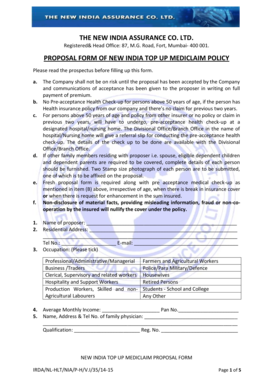
The Arogya Top Up Policy Form is an insurance document used by individuals in India to obtain additional health coverage.
pdfFiller scores top ratings on review platforms




Who needs Arogya Top Up?
Explore how professionals across industries use pdfFiller.

Arogya Top Up is needed by:
-
Individuals seeking additional health insurance coverage
-
Proposers filling out insurance for themselves or family members
-
Nominees designated for health insurance benefits
-
Healthcare professionals assisting patients with insurance matters
-
Insurance agents facilitating health policy applications
Comprehensive Guide to Arogya Top Up
What is the Arogya Top Up Policy Form?
The Arogya Top Up Policy Form is an essential document in the healthcare system of India, designed to augment health insurance coverage. This form caters to individuals seeking additional financial support for medical expenses, enhancing their existing health insurance plans. By filling out the Arogya Top Up Policy Form, applicants can secure more comprehensive health coverage tailored to their needs.
This health insurance form plays a critical role in ensuring accessibility to medical services, while also enabling users to better manage their healthcare expenses in India.
Purpose and Benefits of the Arogya Top Up Policy Form
The Arogya Top Up Policy Form serves several crucial purposes for individuals looking to boost their health coverage. One primary benefit is the provision of extra coverage at lower premiums compared to more extensive comprehensive plans. This makes it a financially viable option for those who require additional protection without incurring substantial costs.
-
Accessible health coverage for additional medical expenses
-
Lower premium rates while providing enhanced benefits
-
Simplified process for acquiring more comprehensive insurance
Key Features of the Arogya Top Up Policy Form
Key features of the Arogya Top Up Policy Form include various fillable fields that collect necessary information to facilitate the insurance application. Essential sections require details about the insured persons, nominee information, and premium specifics.
-
Fillable fields for personal and contact information
-
Sections to detail insured person’s and nominee’s details
-
Clear instruction set to guide applicants through the completion process
Who Should Fill Out the Arogya Top Up Policy Form?
The target audience for the Arogya Top Up Policy Form includes the proposer, which is typically the individual seeking insurance, as well as the insured persons and nominees who will benefit from the policy. Accurate information from all parties is crucial for seamless processing and claim settlements.
This form is particularly beneficial for those who require additional coverage due to existing health conditions or higher medical expenses.
How to Fill Out the Arogya Top Up Policy Form Online (Step-by-Step)
To fill out the Arogya Top Up Policy Form online, follow these steps:
-
Begin by entering personal details, including the name of the proposer and contact information.
-
Select the policy period, ensuring it aligns with your healthcare needs.
-
Provide details of the insured persons and their respective nominees.
-
Review premium details for accuracy before finalizing the application.
Utilizing visual cues often helps minimize common mistakes, leading to smoother submissions.
Navigating Common Errors in the Arogya Top Up Policy Form
Users often encounter several pitfalls while completing the Arogya Top Up Policy Form. Common mistakes include incorrect entries in key fields and overlooking required information. To minimize errors, referring to a checklist prior to submission can be immensely helpful.
-
Ensure all required fields are filled accurately
-
Double-check contact information and dates
-
Review nominee details for consistency
Signing Requirements for the Arogya Top Up Policy Form
The Arogya Top Up Policy Form requires signatures from different parties involved in the application process. The proposer and insured persons must provide their signatures, affirming the accuracy of the submitted information. Additionally, understanding the differences between digital and wet signatures can enhance compliance and security.
Where and How to Submit the Arogya Top Up Policy Form
Submission of the Arogya Top Up Policy Form can be carried out through various methods, including online platforms, in-person visits, or postal services. Applicants should be mindful of submission deadlines and expect specific processing times based on their chosen method.
-
Online submission via the insurance provider’s platform
-
In-person submission at designated insurance offices
-
Mailing the completed form to the insurance company
Security and Compliance when Using the Arogya Top Up Policy Form
Maintaining security is paramount when handling the Arogya Top Up Policy Form, particularly due to the sensitive personal information it requires. Ensuring compliance with applicable regulations is crucial for protecting user data. Implementing data protection measures helps mitigate risks associated with potential breaches and instills confidence in the submission process.
Enhance Your Arogya Top Up Policy Experience with pdfFiller
pdfFiller offers an efficient solution for filling out, signing, and managing the Arogya Top Up Policy Form. By leveraging the platform’s features, such as eSigning and document management, users can streamline their experience, making the process more straightforward and user-friendly. Utilizing pdfFiller assists in maintaining security while ensuring compliance with healthcare regulations.
How to fill out the Arogya Top Up
-
1.Start by accessing pdfFiller and navigate to the Arogya Top Up Policy Form template available within the platform.
-
2.Click on the form to open it in the pdfFiller editor, ensuring a blank version loads for data entry.
-
3.Before you begin filling out the form, gather necessary information such as the proposer’s personal details, policy period preferences, and insured person details.
-
4.Use the fillable fields to enter information, including 'Name of Proposer', 'Present Address', 'Policy Period From Date and Time', 'Contact Number', and 'Mail ID'. Make sure to check for accuracy.
-
5.Proceed to provide the 'Date of Birth', 'Insured Person’s Details', 'Nominee Details', and 'Premium Details' in the respective fields. Use drop-downs or text boxes as appropriate, following any instructions given.
-
6.After completion, review all entries to ensure every field is filled correctly and matches the required details for submission.
-
7.Once satisfied with the filled form, you have options to save it in your preferred format, download it for printing, or use the submission features available on pdfFiller to send it directly to the relevant insurance provider.
-
8.Ensure you have copies of any required supporting documents attached if needed, such as identity proof or age verification documentation.

Who is eligible to fill out the Arogya Top Up Policy Form?
Individuals residing in India who need additional health insurance coverage can fill out this form. It is essential for the proposer and the insured persons to provide required information and sign the form.
Are there any specific deadlines for submitting this form?
The submission deadlines may vary based on the insurance provider's policies. It’s advisable to check directly with the insurance company to confirm any application timelines related to the Arogya Top Up coverage.
What supporting documents are needed when submitting the form?
Typically, you may need to provide identity proof, age verification documents, and any previous health insurance records. Check specific requirements with your insurance provider.
How should I submit the form once it's completed?
You can submit the completed Arogya Top Up Policy Form through pdfFiller's submission options, or download and send it via email or postal service to the insurance company as per their guidelines.
What are common mistakes to avoid when filling out this form?
Avoid leaving any mandatory fields blank. Ensure all personal details are accurate and double-check the premium calculations. Missing signatures from the proposer or insured parties can also lead to delays.
How long does processing take after submitting the form?
Processing times can vary by provider. Typically, it may take between a few business days to a couple of weeks for your application to be reviewed and approved.
Can I edit the form after I have saved it?
Yes, pdfFiller allows you to reopen and edit your saved forms. Simply access your saved version in your account to make any necessary changes before final submission.
Related Forms




Get the latest insights from our blog


If you believe that this page should be taken down, please follow our DMCA take down process
here
.
This form may include fields for payment information. Data entered in these fields is not covered by PCI DSS compliance.