
Last updated on
Oct 22, 2026

Get the free Queensland Student Enrolment Form
We are not affiliated with any brand or entity on this form

Fill out
Complete the form online in a simple drag-and-drop editor.

eSign
Add your legally binding signature or send the form for signing.

Share
Share the form via a link, letting anyone fill it out from any device.

Export
Download, print, email, or move the form to your cloud storage.
Why pdfFiller is the best tool for your documents and forms


End-to-end document management
From editing and signing to collaboration and tracking, pdfFiller has everything you need to get your documents done quickly and efficiently.
Accessible from anywhere
pdfFiller is fully cloud-based. This means you can edit, sign, and share documents from anywhere using your computer, smartphone, or tablet.
Secure and compliant
pdfFiller lets you securely manage documents following global laws like ESIGN, CCPA, and GDPR. It's also HIPAA and SOC 2 compliant.
What is Queensland Enrolment Form
The Queensland Student Enrolment Form is a legal document used by parents or carers to apply for their child's enrolment in a Queensland state school.
pdfFiller scores top ratings on review platforms




Who needs Queensland Enrolment Form?
Explore how professionals across industries use pdfFiller.

Queensland Enrolment Form is needed by:
-
Parents looking to enroll their children in Queensland state schools
-
Carers responsible for students seeking enrollment
-
Education administrators needing student information
-
School staff reviewing enrollment applications
-
Local government officials processing education forms
Comprehensive Guide to Queensland Enrolment Form
What is the Queensland Student Enrolment Form?
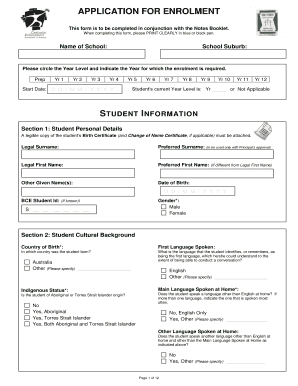
The Queensland Student Enrolment Form is a comprehensive document utilized by parents and guardians to apply for their child's school enrolment in Queensland. This form is integral to ensuring the accuracy of demographic details for both the child and parent, including legal names, dates of birth, and contact information. Providing precise details is crucial for a successful application, as it facilitates seamless processing and verification by the school's administration.
Purpose and Benefits of the Queensland Student Enrolment Form
A well-structured enrolment process benefits families by offering clarity and efficiency. The Queensland Student Enrolment Form streamlines access to education, allowing children to secure a spot in schools more effectively. Furthermore, this consistent process aids schools in verifying applications, reducing potential administrative errors and enhancing operational efficiency.
-
Facilitates structured enrolment for easier access to education.
-
Streamlines school's verification process for quicker outcomes.
-
Minimizes paperwork and confusion for families.
Who Needs to Complete the Queensland Student Enrolment Form?
This form is specifically designed for parents or guardians of prospective students. It is essential that all information provided is accurate, as it affects the child's eligibility for enrolment. In certain cases, such as for international students or those with special circumstances, additional considerations may apply, thereby necessitating careful attention to the details submitted.
-
Parents or guardians of new students.
-
Individuals responsible for enrolling children.
-
Special considerations for international candidates.
Required Documents and Supporting Materials
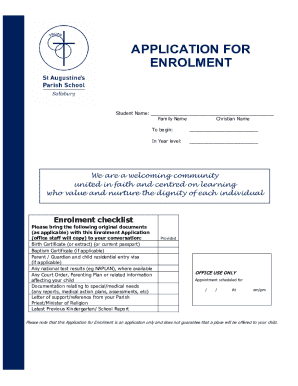
To successfully complete the Queensland Student Enrolment Form, several supporting documents are mandatory. Essential documents include the child's birth certificate, proof of residency, and any medical records that may be relevant. Ensuring that these documents are organized and readily available can significantly expedite the enrolment process.
-
Birth certificate of the student.
-
Proof of residency (e.g., utility bill, lease agreement).
-
Medical records outlining any conditions.
How to Fill Out the Queensland Student Enrolment Form Online (Step-by-Step)
Filling out the form digitally is straightforward. Follow these steps for efficient completion:
-
Access the form through the designated school portal.
-
Begin with entering the STUDENT NAME and PARENT/CARER NAME.
-
Complete all demographic sections, ensuring accuracy in dates and identification.
-
Review the document for any overlooked fields.
Attention to detail will help reduce errors that could delay the application process.
Reviewing and Submitting Your Queensland Student Enrolment Form
Before submission, it's critical to conduct a thorough review of the enrolment form. Check the accuracy of all entries and make sure all required documents are attached. Submissions can be made online or delivered in person, with each method potentially having different processing times and fees involved.
-
Checklist for accuracy prior to submission.
-
Options for online or physical submission of documents.
-
Awareness of deadlines and any associated fees.
What Happens After You Submit Your Queensland Student Enrolment Form?
Upon submission, applicants will receive notifications regarding their application's status. The timeline for responses varies, but schools typically provide updates on both approvals and rejections. Understanding how to check application status can help ease any waiting periods.
-
Regular updates on the application status.
-
Information on expected response times from schools.
-
Understanding next steps post-approval or rejection.
Security and Compliance When Handling the Queensland Student Enrolment Form
When submitting sensitive information, security becomes paramount. The Queensland Student Enrolment Form must be handled in compliance with regulations such as HIPAA and GDPR. Utilizing secure platforms for submissions is crucial to protect personal data from unauthorized access.
-
Implementing robust security measures for document handling.
-
Complying with privacy regulations to safeguard information.
-
Utilizing secure platforms for submissions.
Utilizing pdfFiller to Complete Your Queensland Student Enrolment Form
pdfFiller offers an efficient solution for completing the Queensland Student Enrolment Form. With features like online editing, eSigning, and document sharing, users can navigate the enrolment process smoothly. The platform ensures a secure environment for managing sensitive documents, providing peace of mind for applicants.
-
Online editing capabilities for easy form completion.
-
Simplified process for eSigning and sharing documents.
-
Strong security measures protecting user data.
How to fill out the Queensland Enrolment Form
-
1.Visit pdfFiller and search for 'Queensland Student Enrolment Form' in the search bar.
-
2.Open the document by clicking on the form title displayed in the search results.
-
3.Review the form fields carefully to understand the information required before filling it out.
-
4.Begin by entering the STUDENT NAME in the designated field at the top of the form.
-
5.Fill in the PARENT/CARER NAME under the appropriate section, ensuring the name matches legal documents.
-
6.Select the YEAR LEVEL for which the child is applying by checking the corresponding box.
-
7.Indicate the EXPECTED START DATE using the date picker tool within pdfFiller.
-
8.Complete all demographic fields, including date of birth, gender, and country of birth, using accurate information.
-
9.Provide needed supporting documents by uploading files such as the birth certificate and proof of residency directly in pdfFiller.
-
10.Check each section for completeness, ensuring parental occupation, education, and language details are filled in.
-
11.Once all fields are completed, review the entire form for any errors or omissions.
-
12.Finish by signing the form electronically to meet the requirement of a parent or carer’s signature.
-
13.Save your progress, ensuring that you keep a copy of the filled form for your records.
-
14.Download the completed document or submit it directly through pdfFiller as directed in the final steps.

Who is eligible to submit the Queensland Student Enrolment Form?
The form should be submitted by parents or carers of students looking to enroll in a Queensland state school. Eligibility is determined primarily by caregiver relationship and the student's residency.
What documents are required to accompany the form?
Supporting documents include a birth certificate, proof of residency, and any necessary medical documentation. Ensure these documents are readily available before starting the form.
Is there a deadline for submitting the enrolment form?
Deadlines may vary by school and academic year. It's recommended to check with the specific Queensland state school for their application timelines to ensure timely enrollment.
How can I submit the completed form?
The form can be submitted physically at the school office or electronically through pdfFiller. Ensure to check specific submission preferences with the school.
What common mistakes should I avoid when filling out the form?
Avoid leaving any required fields blank, misplacing supporting documents, and ensuring that all signatures are present where needed. Double-checking for accurate details minimizes processing delays.
How long does it take for the application to be processed?
Processing times can vary widely, but expect a notification regarding the outcome within a few weeks. Contact the relevant school for more specific timelines.
Can I edit the form after saving it on pdfFiller?
Yes, you can edit the Queensland Student Enrolment Form any number of times on pdfFiller before final submission. Just reopen the saved document, make necessary changes, and save again.
Related Forms




Get the latest insights from our blog


If you believe that this page should be taken down, please follow our DMCA take down process
here
.
This form may include fields for payment information. Data entered in these fields is not covered by PCI DSS compliance.