
Last updated on
Oct 22, 2026

Get the free Animal Registration Application
We are not affiliated with any brand or entity on this form

Fill out
Complete the form online in a simple drag-and-drop editor.

eSign
Add your legally binding signature or send the form for signing.

Share
Share the form via a link, letting anyone fill it out from any device.

Export
Download, print, email, or move the form to your cloud storage.
Why pdfFiller is the best tool for your documents and forms


End-to-end document management
From editing and signing to collaboration and tracking, pdfFiller has everything you need to get your documents done quickly and efficiently.
Accessible from anywhere
pdfFiller is fully cloud-based. This means you can edit, sign, and share documents from anywhere using your computer, smartphone, or tablet.
Secure and compliant
pdfFiller lets you securely manage documents following global laws like ESIGN, CCPA, and GDPR. It's also HIPAA and SOC 2 compliant.
What is Animal Registration
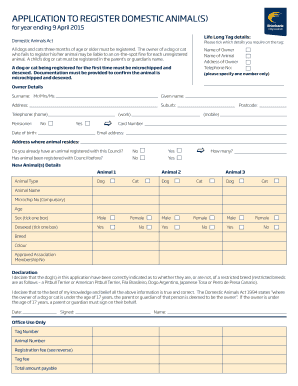
The Animal Registration Application is a Government Form used by residents of Queensland, Australia, to register domestic animals like dogs and cats.
pdfFiller scores top ratings on review platforms




Who needs Animal Registration?
Explore how professionals across industries use pdfFiller.

Animal Registration is needed by:
-
Pet owners looking to register their dogs or cats in Queensland
-
Residents of Burdekin Shire Council needing to comply with local animal laws
-
Individuals seeking to ensure their pets are legally registered and microchipped
-
Animal breeders needing to register their animals for licensing purposes
-
Anyone wanting to comply with the Animal Management Act in Queensland
Comprehensive Guide to Animal Registration
What is the Animal Registration Application?
The Animal Registration Application serves as a vital document for registering domestic animals, particularly dogs and cats, within Queensland. This application is guided by the Animal Management (Cats and Dogs) Act 2008 and Local Law No. 2 (Animal Management) 2012, ensuring legal compliance in pet ownership. By accurately completing this form, owners can fulfill their obligations under Queensland law to maintain a safe and responsible pet community.
This application includes details about the applicant, the property where the animal resides, and essential information regarding the animal itself, such as breed, age, and identification numbers.
Purpose and Benefits of the Animal Registration Application
Registering your pet through the Animal Registration Application provides numerous advantages that extend beyond legal compliance. Benefits include enhancing community safety, as registered pets are more easily identifiable and regulated.
Pet ownership comes with legal responsibilities. Registration ensures compliance with local laws, providing protections for both the pet and the owner. In Queensland, understanding the importance of this legal process is crucial for all pet owners.
Who Needs the Animal Registration Application?
The target audience for the Animal Registration Application includes individuals and families who plan to bring a dog or cat into Queensland. Anyone wishing to adopt or purchase a new pet must complete this application to ensure they meet all local regulations.
Responsibilities extend beyond simply filling out the form; prospective pet owners must understand their obligations in relation to the application process to sustain a harmonious environment for their pets and the community.
Eligibility Criteria for the Animal Registration Application
To complete the Animal Registration Application successfully, applicants must meet certain eligibility criteria. Age requirements typically stipulate that applicants be of legal age, and property ownership may also be necessary depending on the local council regulations. Specific qualifications may vary by the type and breed of the animal being registered.
Additionally, requirements such as microchip registration must be met, particularly in areas like Burdekin Shire Council, ensuring that all animals are identifiable and traceable.
How to Fill Out the Animal Registration Application Online
Filling out the Animal Registration Application online through pdfFiller is a straightforward process. Follow these steps to complete the application:
-
Access the pdfFiller platform and find the Animal Registration Application form.
-
Fill in your personal details, including your name, address, and contact information.
-
Enter the details of your pet, such as breed and age, and ensure accurate microchip information is provided.
-
Review all fields for completeness and accuracy before submission.
-
Sign the form digitally to confirm your commitment to the information provided.
Common Errors and How to Avoid Them
When completing the Animal Registration Application, several common errors can affect the acceptance of your application. To minimize mistakes, consider the following tips:
-
Ensure all fields are filled out completely and accurately, as incomplete applications may be rejected.
-
Double-check that all required documents, such as proof of microchip registration, are included.
-
Pay attention to any deadlines indicated on council websites to avoid late submissions.
Submission Methods for the Animal Registration Application
Upon completing the Animal Registration Application, you can submit the form through various methods. Options typically include:
-
Online submission via pdfFiller for immediate processing.
-
Mailing the application directly to your local council office.
-
In-person submission at designated municipal offices during office hours.
It is crucial to understand any associated fees and to submit your application by the outlined deadlines to ensure timely processing.
Security and Compliance for Your Animal Registration Application
Using pdfFiller for the Animal Registration Application ensures that your personal information is safeguarded throughout the process. The platform adheres to strict security measures, including 256-bit encryption, and complies with standards such as HIPAA and GDPR.
This commitment to protecting users' data means that your sensitive information remains confidential and secure during the entire application process.
Track Your Animal Registration Application Status
After submitting your Animal Registration Application, you can track its status to stay informed about any updates or processing timelines. To check your application status, follow these steps:
-
Log into your pdfFiller account or the platform where you submitted the application.
-
Access the status tracking feature or contact local council offices as instructed.
-
Be aware of common rejection reasons that may delay the process.
-
If necessary, take proactive steps to correct or amend the application based on feedback.
Why Use pdfFiller for Your Animal Registration Application?
pdfFiller enhances the experience of completing the Animal Registration Application with its user-friendly features. With capabilities such as digital signing, easy editing, and straightforward form navigation, pdfFiller simplifies the entire process.
Many users have reported success stories about how pdfFiller facilitated their applications, enabling quick registration and peace of mind. It is an excellent tool for ensuring an efficient and hassle-free registration experience.
How to fill out the Animal Registration
-
1.Access the Animal Registration Application on pdfFiller by searching for the form name or navigating to the government forms section.
-
2.Open the form by clicking on it to load the fillable PDF in pdfFiller's user-friendly interface.
-
3.Review the form fields carefully, and gather necessary information about your pet, including breed, age, and identification numbers before you begin filling it out.
-
4.Start with the applicant details section by entering your full name, address, and contact information, ensuring all entries are accurate.
-
5.Proceed to the property details section and provide accurate information regarding where your pet will be kept.
-
6.Fill in the animal details section by inputting necessary information about your pet including breed, age, and microchip numbers. Be thorough to avoid any issues.
-
7.Use the checkbox options provided in the form to indicate compliance with local laws and regulations regarding animal management.
-
8.After completing all sections, review the form thoroughly for any errors or missing information, ensuring everything is correct.
-
9.Once satisfied, navigate to the signature field and electronically sign the form. Make sure to read any terms and conditions provided.
-
10.Save your completed Animal Registration Application by clicking the save option, and choose to download the form or submit it directly through pdfFiller’s submission options.

Who can apply for the Animal Registration Application?
Any resident of Queensland, Australia, who owns a domestic animal, such as a dog or cat, can apply for the Animal Registration Application.
What information do I need to complete the application?
Gather details about yourself, your property, and your animal, including breed, age, identification numbers, and contact information for smooth completion of the form.
How do I submit the completed Animal Registration Application?
You can submit the completed form electronically via pdfFiller’s submission process or download it for postal submission, as required by local council regulations.
Is there a fee for registering my animal?
There may be a registration fee as determined by your local council in Queensland. It's best to check with Burdekin Shire Council for specific fee information.
What are common mistakes to avoid when filling out the form?
Ensure all fields are completed accurately, check for typographical errors, and verify that you have signed the application before submission to avoid delays.
How long does it take to process the Animal Registration Application?
Processing times can vary by council. Typically, expect a few weeks for your application to be processed and receive confirmation of your registration.
Do I need to provide any supporting documents?
Yes, you may need to provide microchip registration proof or other documents as required by local council guidelines when submitting your Animal Registration Application.
Related Forms




Get the latest insights from our blog


If you believe that this page should be taken down, please follow our DMCA take down process
here
.
This form may include fields for payment information. Data entered in these fields is not covered by PCI DSS compliance.