
Last updated on
Oct 22, 2026

Get the free State School Consent Form
We are not affiliated with any brand or entity on this form

Fill out
Complete the form online in a simple drag-and-drop editor.

eSign
Add your legally binding signature or send the form for signing.

Share
Share the form via a link, letting anyone fill it out from any device.

Export
Download, print, email, or move the form to your cloud storage.
Why pdfFiller is the best tool for your documents and forms


End-to-end document management
From editing and signing to collaboration and tracking, pdfFiller has everything you need to get your documents done quickly and efficiently.
Accessible from anywhere
pdfFiller is fully cloud-based. This means you can edit, sign, and share documents from anywhere using your computer, smartphone, or tablet.
Secure and compliant
pdfFiller lets you securely manage documents following global laws like ESIGN, CCPA, and GDPR. It's also HIPAA and SOC 2 compliant.
What is School Consent Form
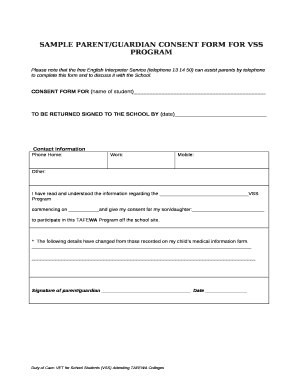
The State School Consent Form is a legal document used by William Ross State High School in Queensland, Australia, to obtain consent for the use and disclosure of personal information and student materials.
pdfFiller scores top ratings on review platforms




Who needs School Consent Form?
Explore how professionals across industries use pdfFiller.

School Consent Form is needed by:
-
Parents/Carers of students attending Queensland schools
-
Students requiring consent for media and information use
-
School administrators overseeing consent procedures
-
Witnesses validating the consent process
-
Educators involved in student information management
Comprehensive Guide to School Consent Form
What is the State School Consent Form?
The State School Consent Form serves a crucial role at William Ross State High School in Queensland, Australia. This form is essential for obtaining consent for the use of personal information and student materials, ensuring that parents and students understand how their information will be utilized. By filling out the state school consent form, stakeholders grant permission for school-related activities, promoting transparency in the school's operations.
Purpose and Benefits of the State School Consent Form
The necessity of the consent form lies in its many advantages. Primarily, it empowers the school to promote student achievements through various media and publicity channels. Additionally, this form plays a vital role in safeguarding student privacy and parental rights, reinforcing trust between families and the educational institution. The parental consent form ensures that families retain control over their information, while also complying with legal obligations regarding data use.
Key Features of the State School Consent Form
Several important components characterize the state school consent form. The form includes various fillable fields, such as:
-
Full name of individual
-
Date of birth
-
Name of school
Signature lines for the parent/carer, student, and witness are included, emphasizing the need for proper validation. Furthermore, checkboxes for consent options allow individuals to specify the extent of their consent, making it a comprehensive education consent form.
Who Needs the State School Consent Form?
Understanding who must utilize the state school consent form is vital. The primary stakeholders include:
-
Parents/Carers: Responsible for signing to grant consent.
-
Students: Must also provide their signature to acknowledge understanding.
-
Witnesses: Essential for verifying the signature process.
This form is required under specific conditions, particularly when submitting personal information related to educational activities, making it essential for smooth communication between families and the school.
How to Fill Out the State School Consent Form Online (Step-by-Step)
Filling out the state school consent form digitally can be streamlined through pdfFiller. Follow these steps:
-
Access the form on pdfFiller.
-
Complete the fillable fields accurately.
-
Review the input for completeness.
-
Ensure all required signatures are present.
-
Submit the form as instructed.
A validation checklist can assist in confirming that every necessary field is correctly filled out, ensuring that the student information consent is thoroughly addressed.
Common Errors and How to Avoid Them
Many users encounter frequent mistakes while filling out the consent form. Common errors include:
-
Missing signatures
-
Incomplete fields
To mitigate these issues, double-checking each section of the form can help maintain accuracy. Implementing these tips ensures a smooth submission process, enhancing compliance and facilitating timely approvals.
Digital Signature vs. Wet Signature Requirements
It's essential to understand the signing requirements for the state school consent form. Digital signatures are often permitted, but wet signatures may be required for specific roles, including the parent/carer, student, and witness. Important legal considerations in Queensland may influence these requirements, so ensuring compliance with local regulations is crucial when determining how to sign the state school consent form.
Where to Submit the State School Consent Form
After completing the form, proper submission is key. The form should be directed to designated locations, such as:
-
The school office
-
Online submission portals, if applicable
Be mindful of deadlines and any specific guidelines established by the school for submission to ensure all documents are processed in a timely manner.
Security and Compliance for the State School Consent Form
Data protection and compliance are paramount when handling the state school consent form. pdfFiller implements robust security measures to safeguard personal information, employing 256-bit encryption and adhering to SOC 2 Type II standards. Furthermore, compliance with HIPAA and GDPR practices reinforces the importance of privacy and security procedures when managing sensitive documents.
Experience the Convenience of Filling Out the State School Consent Form with pdfFiller
Utilizing pdfFiller for your state school consent form needs offers numerous benefits. Users can enjoy an easy-to-navigate interface, enhanced security features, and the ability to eSign the form online. Additional functionalities, such as converting or sharing the form, make pdfFiller a practical choice for completing this essential document effortlessly.
How to fill out the School Consent Form
-
1.Access the State School Consent Form on pdfFiller by searching for the form name in the template library or directly entering the URL if you have it.
-
2.Open the form in pdfFiller, ensuring that you can view all sections clearly on your screen.
-
3.Before filling out the form, gather necessary information such as the full name of the individual, date of birth, and name of the school to facilitate accurate completion.
-
4.Using pdfFiller’s interface, click on each fillable field to enter the required information. Use the tab key to navigate between fields efficiently.
-
5.Review the checkboxes for consent options carefully. Make selections that apply to the situation and ensure all necessary consent is documented.
-
6.Once all fields are complete, double-check your entries for accuracy, ensuring that spelling and details are correct.
-
7.Finalize the form by applying signatures; the parent/carer, student, and witness must all provide their signatures in the designated fields.
-
8.After completing the form, save your changes by clicking 'Save' or 'Download' options in pdfFiller. Choose a preferred format for your records.
-
9.If required, you can also submit the form directly through pdfFiller by following the on-screen submission instructions.

Who is eligible to complete the State School Consent Form?
The State School Consent Form is intended for students attending William Ross State High School, their parents or carers, and witnesses who can validate the consent provided.
What are the submission methods for this consent form?
The State School Consent Form can be submitted electronically through pdfFiller or printed and delivered physically to the school office. Be sure to verify submission requirements with the school.
What documents need to be submitted along with the form?
Typically, no additional documents are required to be submitted with the State School Consent Form. However, it's essential to check with the school for any specific requirements.
Are there deadlines for submitting the consent form?
While specific deadlines may vary by school year or event, it is best to submit the State School Consent Form as soon as possible to avoid any issues with participation in school activities.
What common mistakes should be avoided when filling out the form?
Common mistakes include missing signatures from the parent/carer, student, or witness, as well as overlooking required fields or failing to check essential consent options.
What is the processing time for this consent form?
Processing times for the State School Consent Form typically depend on the school’s administrative schedule, but it can take a few days to a week for consent to be recorded.
What should I do if I want to withdraw consent after submission?
To withdraw consent after submission of the State School Consent Form, contact the school directly to discuss the process and complete any necessary forms for withdrawal.
Related Forms





Get the latest insights from our blog


If you believe that this page should be taken down, please follow our DMCA take down process
here
.
This form may include fields for payment information. Data entered in these fields is not covered by PCI DSS compliance.