
Last updated on
Oct 22, 2026

Get the free Child & Youth Services Registration Checklist
We are not affiliated with any brand or entity on this form

Fill out
Complete the form online in a simple drag-and-drop editor.

eSign
Add your legally binding signature or send the form for signing.

Share
Share the form via a link, letting anyone fill it out from any device.

Export
Download, print, email, or move the form to your cloud storage.
Why pdfFiller is the best tool for your documents and forms


End-to-end document management
From editing and signing to collaboration and tracking, pdfFiller has everything you need to get your documents done quickly and efficiently.
Accessible from anywhere
pdfFiller is fully cloud-based. This means you can edit, sign, and share documents from anywhere using your computer, smartphone, or tablet.
Secure and compliant
pdfFiller lets you securely manage documents following global laws like ESIGN, CCPA, and GDPR. It's also HIPAA and SOC 2 compliant.
What is CYS Registration
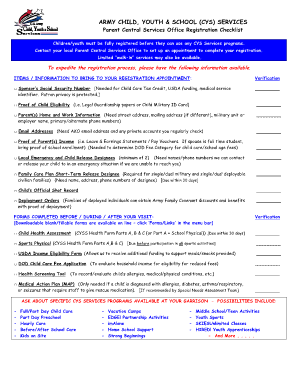
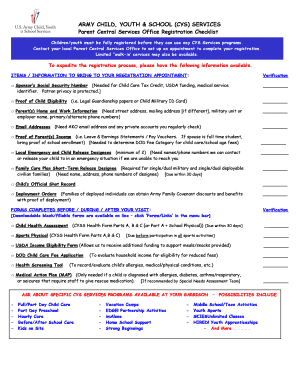
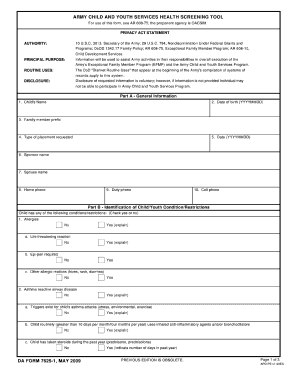
The Child & Youth Services Registration Checklist is a form used by military families to register their children for childcare and youth programs.
pdfFiller scores top ratings on review platforms




Who needs CYS Registration?
Explore how professionals across industries use pdfFiller.

CYS Registration is needed by:
-
Military families seeking childcare services.
-
Parents enrolling children in youth programs.
-
Guardians of children looking for sports participation.
-
Families requiring special needs accommodations.
-
Individuals needing to verify immunization records.
Comprehensive Guide to CYS Registration
What is the Child & Youth Services Registration Checklist?
The Child & Youth Services (CYS) Registration Checklist serves as an essential tool for military families, enabling them to officially register their children in various childcare and youth programs. This checklist is significant as it streamlines access to necessary services that support military life. Included in the checklist are programs that cater to children and youth, ensuring a comprehensive range of options to choose from.
Registration remains valid for one year and is free of charge, alleviating some of the financial burdens often faced by military families.
Purpose and Benefits of the Child & Youth Services Registration Checklist
The checklist provides numerous benefits for military families, primarily by simplifying the often complex registration process for childcare and youth programs. It helps families stay organized by listing all required documentation in one accessible format.
Utilizing the checklist enhances the efficiency of gathering necessary documents, ensuring that all essential information is collected promptly and accurately.
Key Features of the Child & Youth Services Registration Checklist
This checklist comprises several key features designed to facilitate the registration process. Notable attributes include:
-
Fillable fields that allow for easy completion online.
-
Checkboxes to ensure all necessary items are acknowledged.
-
Clear instructions for filling out the form effectively.
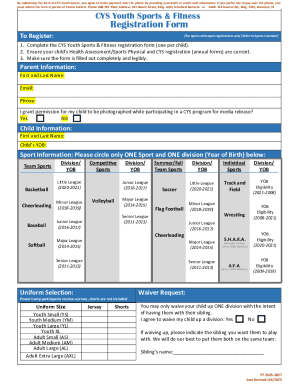
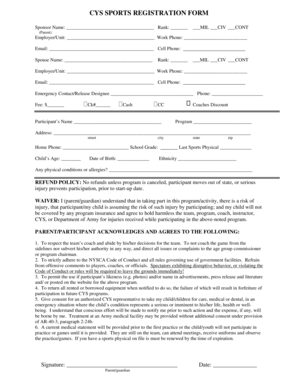
Additionally, the checklist supports the inclusion of special needs information and youth sports participation, vital for comprehensive registration. Security measures are also implemented to safeguard sensitive documents during the application process.
Who Needs the Child & Youth Services Registration Checklist?
The primary audience for the CYS Registration Checklist includes military families and their children, particularly those in specific age groups requiring registration. It is crucial for guardians or parents to complete the form to ensure their children have access to necessary programs.
Understanding the registration needs specific to different age groups can enhance the experience and ensure appropriate services are provided.
Required Documents and Supporting Materials
To fill out the CYS Registration Checklist, the following documents are required:
-
Identification proof.
-
Immunization records.
-
Health assessments.
-
Income verification.
Before filling out the form, it is essential to prepare and organize these documents effectively. Additional documentation may be necessary for sports participation or if there are special needs to consider.
How to Fill Out the Child & Youth Services Registration Checklist Online
Completing the CYS Registration Checklist online requires specific steps to ensure accuracy:
-
Access the form through the designated portal.
-
Fill in all required fields, paying special attention to complex sections.
-
Review for common errors before submission.
These steps not only help in avoiding mistakes but also ensure that the process goes smoothly for users.
Submission Methods for the Child & Youth Services Registration Checklist
After completing the checklist, families can choose from various submission methods:
-
Online submission via the designated website.
-
Mailing the completed form to specified addresses.
-
In-person submission at local military family support centers.
It is advisable to track submissions and understand how to obtain confirmation receipts to verify that the registration is processed appropriately. Families should also be aware of submission deadlines and expected processing times.
What Happens After You Submit the Child & Youth Services Registration Checklist?
Once the CYS Registration Checklist is submitted, families can anticipate a typical processing timeline. It is essential to verify if the registration was successful; if any issues arose, guidance on amending or resubmitting the form will be available.
Sample Completed Child & Youth Services Registration Checklist
For clarity, a visual or descriptive example of a filled-out CYS Registration Checklist is beneficial. Key areas of the form should be highlighted, explaining the significance of each part.
Alongside this example, users can find additional tips for accurately filling out their forms to improve the likelihood of successful registration.
Enhancing Your Experience with pdfFiller
Utilizing pdfFiller can greatly enhance the form-filling experience for users. The platform offers features such as editing capabilities, eSigning, and secure sharing of documents, ensuring that sensitive information is handled safely.
With compliance related to security standards in place, pdfFiller provides military families with a practical solution for managing their childcare registration forms.
How to fill out the CYS Registration
-
1.Access pdfFiller and search for the 'Child & Youth Services Registration Checklist' form.
-
2.Open the form in pdfFiller's editing interface.
-
3.Gather necessary documents such as identification, proof of eligibility, immunization records, health assessments, and income verification before starting.
-
4.Fill in the required fields using the fillable sections provided within pdfFiller. Click on each field to enter information.
-
5.Use checkboxes for specifying eligibility criteria and additional requirements listed on the form.
-
6.Review all entered information carefully to ensure accuracy and completeness before proceeding.
-
7.Once you finish filling in the form, utilize pdfFiller's tools to save your changes.
-
8.Choose to download the filled form, email it, or submit it directly from pdfFiller, depending on your needs.

What are the eligibility requirements for this form?
To be eligible, applicants must be military families who wish to register their children for childcare and youth programs, providing necessary documentation such as proof of military affiliation.
Is there a deadline for submitting the registration checklist?
There are no specific deadlines for submission; however, registration is valid for one year. It is best to register prior to the desired start date of the childcare or youth program.
How do I submit the Child & Youth Services Registration Checklist?
You can submit this form through pdfFiller by emailing it directly, downloading the filled version, or printing it and submitting it in person as per your program's requirements.
What supporting documents are required with the registration form?
Required supporting documents include identification, proof of eligibility, immunization records, health assessments, and income verification to support your application.
What are common mistakes to avoid when filling out this checklist?
Ensure all fields are filled completely and accurately, avoid using outdated documents, double-check your eligibility criteria, and verify that all required supporting documents are attached.
How long does processing take after submitting the form?
Processing times can vary based on your location and organization, but typically it may take from a few days up to a couple of weeks after submission.
Can I make changes to the form after submission?
Once submitted, changes may not be possible without resubmitting a new or revised form. Contact your local CYS program for specific guidance on amendments.
Related Forms




Get the latest insights from our blog


If you believe that this page should be taken down, please follow our DMCA take down process
here
.
This form may include fields for payment information. Data entered in these fields is not covered by PCI DSS compliance.