
Last updated on
Oct 22, 2026

Get the free Supplier Information Form
We are not affiliated with any brand or entity on this form

Fill out
Complete the form online in a simple drag-and-drop editor.

eSign
Add your legally binding signature or send the form for signing.

Share
Share the form via a link, letting anyone fill it out from any device.

Export
Download, print, email, or move the form to your cloud storage.
Why pdfFiller is the best tool for your documents and forms


End-to-end document management
From editing and signing to collaboration and tracking, pdfFiller has everything you need to get your documents done quickly and efficiently.
Accessible from anywhere
pdfFiller is fully cloud-based. This means you can edit, sign, and share documents from anywhere using your computer, smartphone, or tablet.
Secure and compliant
pdfFiller lets you securely manage documents following global laws like ESIGN, CCPA, and GDPR. It's also HIPAA and SOC 2 compliant.
What is Supplier Form
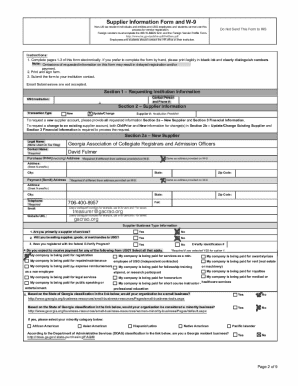
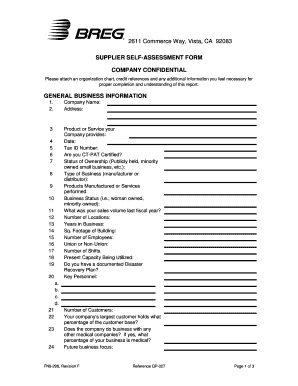
The Supplier Information Form is a business document used by companies to collect essential details from suppliers, facilitating vendor registration and procurement processes.
pdfFiller scores top ratings on review platforms




Who needs Supplier Form?
Explore how professionals across industries use pdfFiller.

Supplier Form is needed by:
-
Businesses seeking to register new suppliers
-
Procurement departments requiring vendor details
-
Finance teams confirming supplier bank information
-
Compliance officers needing tax references
-
Supply chain managers engaging with new vendors
Comprehensive Guide to Supplier Form
What is the Supplier Information Form?
The Supplier Information Form is a critical document in the vendor registration process. Its primary purpose is to gather essential information about potential suppliers, which is vital for effective procurement. This form collects key details, including the company's name, tax numbers, and bank details, ensuring businesses have a comprehensive profile of their partners. By standardizing the information collected, the supplier information form enhances the efficiency of vendor registration and contributes to streamlined procurement practices.
Purpose and Benefits of the Supplier Information Form
The Supplier Information Form serves multiple purposes that benefit both suppliers and businesses. This form simplifies the vendor registration process by providing a clear structure for required information, leading to faster approvals. By facilitating accurate and consistent data collection, it enhances operational efficiency and supports compliance with legal requirements. The benefits of using this form extend beyond mere convenience; they contribute to stronger supplier relationships and improved procurement strategies.
Key Features of the Supplier Information Form
Users can expect several key features when filling out the Supplier Information Form:
-
Multiple fillable fields, including Supplier Name and Bank Details.
-
Sections designed for clarity, helping users navigate the form easily.
-
Clear instructions on how to complete the form effectively.
These features make the business supplier form user-friendly and efficient, reducing the potential for errors during completion.
Who Should Use the Supplier Information Form?
The Supplier Information Form is intended for various users involved in procurement processes. This includes vendors and suppliers who need to register with a business. Scenarios necessitating the form's submission include onboarding new suppliers or updating existing supplier information. Knowing the target audience for the vendor registration form is crucial for ensuring compliance and fostering smooth operations.
How to Fill Out the Supplier Information Form Online
Filling out the Supplier Information Form online is straightforward when using pdfFiller. Follow these steps to complete the process:
-
Access the Supplier Information Form from the pdfFiller platform.
-
Fill in the required fields, including your company details and bank information.
-
Review your entries and ensure all information is accurate.
-
Submit the form directly through the platform.
This approach not only simplifies the process but also ensures that users benefit from features like form fields and built-in validation checks.
Required Supporting Documents for the Supplier Information Form
When submitting the Supplier Information Form, specific supporting documents are required:
-
Tax Clearance Certificate.
-
Recent bank statements.
These documents play a vital role in verifying the submitted information and ensuring compliance with procurement standards, enhancing the overall integrity of the registration process.
Submission Methods for the Supplier Information Form
Users have several options for submitting their completed Supplier Information Form. Available submission methods include:
-
Online through the pdfFiller platform.
-
Email submissions to designated contacts.
-
Postal mail for hard copies.
Understanding submission methods allows users to choose the one that best suits their needs, considering any potential fees and processing times required for each option.
Security and Compliance when Submitting the Supplier Information Form
When submitting the Supplier Information Form, users can trust in the security of their data. pdfFiller employs robust security measures, including encryption and compliance with industry regulations such as HIPAA and GDPR. The importance of securely handling sensitive information cannot be overstated, as it assures users that their data is protected during the submission process.
Track and Confirm Your Submission of the Supplier Information Form
After submitting the Supplier Information Form, users can track the status of their submissions. To confirm receipt and ongoing processing, follow these guidelines:
-
Check for confirmation emails regarding your submission.
-
Log into your pdfFiller account to view the submission status.
If there is a need to follow up or correct any submissions, these steps provide a clear pathway for users to manage their documents effectively.
Transform Your Supplier Registration Process with pdfFiller
Utilizing pdfFiller for completing the Supplier Information Form can significantly enhance the registration process. Advantages include user-friendly features, robust security measures, and comprehensive compliance support. Additionally, pdfFiller offers various resources to assist users, making the supplier registration process seamless and efficient.
How to fill out the Supplier Form
-
1.Access the Supplier Information Form on pdfFiller by typing the form name in the search bar and selecting it from the results.
-
2.Open the form and familiarize yourself with the pdfFiller interface, noting the fillable fields and sections that require completion.
-
3.Before you begin filling out the form, gather all necessary information such as your company details, address, contact information, tax reference numbers, and bank details.
-
4.Start filling in the fields labeled 'Supplier Name', 'Company registered name', 'Address Line 1', and any other required details following the prompts provided.
-
5.Be sure to provide accurate information; verify details to prevent errors and delays in processing.
-
6.Once all fields are filled out, review the information for accuracy to ensure all required sections are complete.
-
7.Finalize your form by double-checking for any missing information or supporting documentation that needs to be uploaded.
-
8.To save your work, click the save button in the top right corner of the pdfFiller interface, ensuring your progress is not lost.
-
9.If you need to download the form, select the download option, choosing your preferred format.
-
10.Submit your completed Supplier Information Form along with any necessary attachments directly through pdfFiller’s submission options provided, or print the form for postal submission.

Who needs to fill out the Supplier Information Form?
Businesses that want to register suppliers or vendors must complete the Supplier Information Form. This includes procurement departments, finance teams, and companies verifying supplier information for compliance.
What supporting documents are required with this form?
You need to submit the Supplier Information Form with supporting documents such as a bank statement and a Tax Clearance Certificate. These documents help verify your details and ensure compliance.
How can I submit the Supplier Information Form?
You can submit the Supplier Information Form electronically via pdfFiller or print it out for postal submission. Ensure all required fields are completed and supporting documentation is attached to avoid delays.
What mistakes should I avoid when completing the form?
Common mistakes include omitting required fields, providing incorrect tax reference numbers, and not attaching necessary supporting documents. Double-check all information before submission to prevent processing issues.
Is there a deadline for submitting the Supplier Information Form?
While there is generally no strict deadline, it’s advisable to submit the Supplier Information Form as soon as possible to avoid delays in vendor registration and procurement processes.
Can the Supplier Information Form be filled out online?
Yes, the Supplier Information Form can be filled out online using pdfFiller. This platform allows you to easily access, edit, and submit the form electronically.
What happens after I submit the Supplier Information Form?
After submission, your form and supporting documents will be reviewed by the relevant department. Processing times may vary, so check with your organization for specific timelines.
Related Forms



Get the latest insights from our blog


If you believe that this page should be taken down, please follow our DMCA take down process
here
.
This form may include fields for payment information. Data entered in these fields is not covered by PCI DSS compliance.