
Last updated on
Oct 31, 2026

Get the free Temporary Quarters Subsistence Allowance Form
We are not affiliated with any brand or entity on this form

Fill out
Complete the form online in a simple drag-and-drop editor.

eSign
Add your legally binding signature or send the form for signing.

Share
Share the form via a link, letting anyone fill it out from any device.

Export
Download, print, email, or move the form to your cloud storage.
Why pdfFiller is the best tool for your documents and forms


End-to-end document management
From editing and signing to collaboration and tracking, pdfFiller has everything you need to get your documents done quickly and efficiently.
Accessible from anywhere
pdfFiller is fully cloud-based. This means you can edit, sign, and share documents from anywhere using your computer, smartphone, or tablet.
Secure and compliant
pdfFiller lets you securely manage documents following global laws like ESIGN, CCPA, and GDPR. It's also HIPAA and SOC 2 compliant.
What is TQSA Form
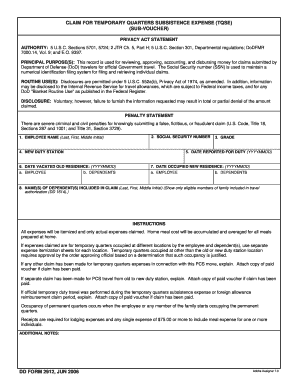
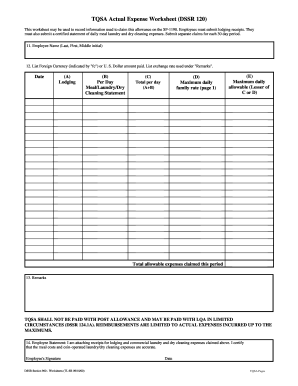
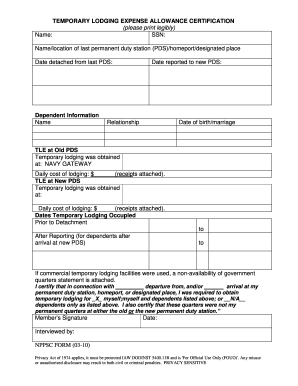
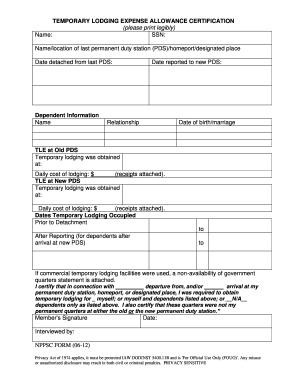
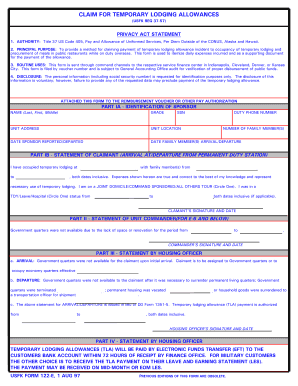
The Temporary Quarters Subsistence Allowance Form is a government document used by employees and their families to claim reimbursement for temporary lodging costs during travel for assignments or separation.
pdfFiller scores top ratings on review platforms




Who needs TQSA Form?
Explore how professionals across industries use pdfFiller.

TQSA Form is needed by:
-
Federal Employees traveling for assignments
-
Spouses or Domestic Partners of Federal Employees
-
Approving or Reviewing Officials
-
Certifying Officials in government agencies
-
Military personnel relocating
-
Employees seeking lodging reimbursement
-
Families of employees managing foreign allowances
Comprehensive Guide to TQSA Form
What is the Temporary Quarters Subsistence Allowance Form?
The Temporary Quarters Subsistence Allowance (TQSA) form serves a crucial purpose in facilitating employee relocation and providing necessary lodging support. This form offers a structured way to cover the reasonable costs associated with temporary housing during an employee's transition to a new assignment. Key stakeholders, including employees, their spouses or domestic partners, and approving officials, are integral to utilizing this document effectively.
-
Definition and overview of the TQSA form.
-
How it aids in employee relocation and temporary lodging.
-
Stakeholders who are required to complete or approve this form.
Purpose and Benefits of the Temporary Quarters Subsistence Allowance Form
The TQSA form is designed with several benefits for employees and their families, especially during their transitional phases. Completing this form ensures maximum coverage of lodging expenses while providing clarity on reimbursement procedures. Timely submission is crucial to guarantee access to the full benefits associated with the form.
-
Advantages for employees and their families during relocation.
-
Details on entitlement coverage and reimbursement procedures.
-
The importance of submitting the form promptly for optimal benefits.
Who Needs the Temporary Quarters Subsistence Allowance Form?
Understanding who qualifies to use the TQSA form is essential for a smooth application process. Eligible users primarily include employees and their spouses or domestic partners, as well as approving officials who facilitate the process. There are specific eligibility criteria that outline who may submit the ensuring paperwork.
-
Identifying eligible roles including employee, spouse, and approving officials.
-
Guidelines concerning eligibility criteria.
-
The role of dependents in the submission process.
How to Fill Out the Temporary Quarters Subsistence Allowance Form Online
Completing the TQSA form online can be streamlined using pdfFiller. Users are guided through several steps to ensure accuracy in filling out critical fields such as 'Employee Name' and 'Location.' Understanding the specific requirements for each field minimizes the chances of errors during submission.
-
Instructions for accessing and utilizing pdfFiller.
-
Field-by-field directions for essential entries.
-
Common tips for reviewing entries to avoid errors.
Submission Methods For The Temporary Quarters Subsistence Allowance Form
After completing the TQSA form, users must choose an appropriate submission method. Options include online submissions or mailing the completed document, each with specific deadlines to adhere to for timely processing. Proper tracking of submission confirmation ensures users stay informed about their application status.
-
Overview of submission options available to users.
-
Details on important submission deadlines.
-
Instructions for tracking submissions and confirmations.
Common Mistakes and How to Avoid Them for the TQSA Form
Users often encounter pitfalls when completing the TQSA form. Recognizing common mistakes and validating information prior to submission can significantly reduce the likelihood of issues. Obtaining necessary signatures also plays an important role in the process.
-
Identification of typical errors in form completion.
-
Guidelines for verifying information before submission.
-
The significance of securing all required signatures.
Security and Data Protection When Using the TQSA Form
Concerns regarding the security of sensitive information are valid during the completion of government forms. pdfFiller employs advanced security features, including encryption and compliance with regulations like GDPR, to ensure data protection. Users should follow best practices to maintain privacy throughout the process.
-
Overview of security features offered by pdfFiller.
-
Importance of data protection in filling out government forms.
-
Best practices for maintaining document privacy.
How pdfFiller Can Simplify the Temporary Quarters Subsistence Allowance Form Process
Utilizing pdfFiller greatly simplifies the process of filling out the TQSA form. Features such as easy editing, commenting capabilities, and e-signature options expedite the approval process. Moreover, cloud-based access allows for convenient management and compliance.
-
Ease of editing and commenting on the TQSA form.
-
Capabilities for e-signatures to accelerate approvals.
-
Benefits of utilizing cloud-based access for flexibility.
Sample of a Completed Temporary Quarters Subsistence Allowance Form
A visual reference can significantly aid users in completing the TQSA form. Annotated sections within a sample form clarify the required elements and support users in understanding how to fill out their applications. Utilization of this resource can enhance user confidence in the submission process.
-
Description of annotated sections to guide users.
-
Guidelines on locating and using the sample form within pdfFiller.
-
The benefit of referencing a completed form for clarity.
Final Steps to Take After Completing the TQSA Form
Upon submitting the TQSA form, users should take specific follow-up actions to ensure a smooth process. Checking the application status is essential to confirm receipt and progress. Should corrections be necessary, understanding how to amend the form is vital for maintaining an accurate application.
-
Recommended follow-up actions post-submission.
-
Instructions on how to correct or amend the TQSA form.
-
Expectations for users after submitting their applications.
How to fill out the TQSA Form
-
1.Access and open the Temporary Quarters Subsistence Allowance Form on pdfFiller by searching for its name in the platform's search bar.
-
2.Once the form is open, navigate through the fillable fields to complete necessary information like your name, location, and rate applicability date.
-
3.Gather all required information before starting, such as your current assignment details, family member names, and any previous lodging receipts.
-
4.Use the interface to enter information like your name and relevant dates by clicking directly on each field. Ensure that all entries are accurate.
-
5.Check the form carefully for completeness, ensuring all required signatures from the employee, spouse or domestic partner, and approving officials are included.
-
6.Once reviewed, finalize the form by saving your progress. Use the save option on pdfFiller for secure storage.
-
7.When ready, download the completed form or submit it directly through pdfFiller if your organization allows online submissions.

Who is eligible to use the Temporary Quarters Subsistence Allowance Form?
Federal employees and their families who need reimbursement for temporary lodging expenses during travel for new assignments or separation are eligible to use this form.
What is the deadline for submitting the TQSA form?
Typically, the TQSA form should be submitted promptly after incurring lodging expenses. Check specific agency guidelines for exact deadlines to avoid delays in processing.
How do I submit the form after completion?
After completing the form on pdfFiller, you can download it for manual submission or submit it directly online to your agency per their instructions.
Are there specific documents required when submitting this form?
Yes, supporting documents like lodging receipts and your assignment details may be necessary when submitting the Temporary Quarters Subsistence Allowance Form.
What common mistakes should I avoid when filling out the TQSA form?
Ensure all fields are accurate, especially signatures and dates. Double-check your personal information and any required supporting documents to prevent submission issues.
How long does it take for the TQSA form to be processed?
Processing times may vary by agency, but it generally takes a few weeks. Stay in touch with your agency for updates regarding your submission status.
Can I fill the form electronically?
Yes, you can fill out the Temporary Quarters Subsistence Allowance Form electronically using pdfFiller, which provides an easy interface for entering information and managing submissions.
Related Forms



Get the latest insights from our blog


If you believe that this page should be taken down, please follow our DMCA take down process
here
.
This form may include fields for payment information. Data entered in these fields is not covered by PCI DSS compliance.