
Last updated on
Oct 22, 2026

Get the free OCBC Business Account Application Form
We are not affiliated with any brand or entity on this form

Fill out
Complete the form online in a simple drag-and-drop editor.

eSign
Add your legally binding signature or send the form for signing.

Share
Share the form via a link, letting anyone fill it out from any device.

Export
Download, print, email, or move the form to your cloud storage.
Why pdfFiller is the best tool for your documents and forms


End-to-end document management
From editing and signing to collaboration and tracking, pdfFiller has everything you need to get your documents done quickly and efficiently.
Accessible from anywhere
pdfFiller is fully cloud-based. This means you can edit, sign, and share documents from anywhere using your computer, smartphone, or tablet.
Secure and compliant
pdfFiller lets you securely manage documents following global laws like ESIGN, CCPA, and GDPR. It's also HIPAA and SOC 2 compliant.
What is OCBC Business Form
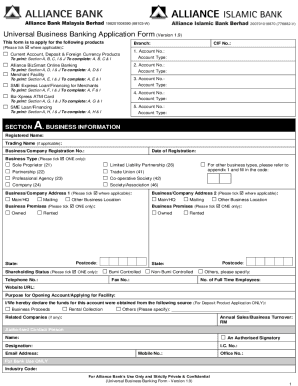
The OCBC Business Account Application Form is a document used by businesses in Malaysia to apply for a business account with OCBC Bank or OCBC Al-Amin Bank.
pdfFiller scores top ratings on review platforms




Who needs OCBC Business Form?
Explore how professionals across industries use pdfFiller.

OCBC Business Form is needed by:
-
Entrepreneurs seeking to open a business bank account
-
Business owners in Malaysia applying for OCBC services
-
Accountants managing finances for companies
-
Legal representatives handling business registrations
-
Small and medium enterprises looking for banking options
Comprehensive Guide to OCBC Business Form
What is the OCBC Business Account Application Form?
The OCBC Business Account Application Form serves as a crucial tool for businesses in Malaysia seeking to open a business account with OCBC Bank (Malaysia) Berhad or OCBC Al-Amin Bank Berhad. This form is essential for facilitating the account opening process, ensuring that businesses provide the necessary detailed information about their operations and account objectives. Understanding the specific requirements for completing the form is vital for a smooth application process.
OCBC Bank is a prominent financial institution in Malaysia, providing a range of banking services tailored for both individual and business needs. Their offerings include personalized support for businesses looking to establish their financial foundations. Completing the application properly is significant, as inaccuracies may lead to delays or complications in account processing.
Purpose and Benefits of the OCBC Business Account Application Form
Having a specialized business account is essential for managing finances efficiently. The OCBC Business Account Application Form enables businesses to secure the advantages of a dedicated business account that caters specifically to their needs. A business account can streamline financial transactions, facilitate easier tracking of expenses, and bolster credibility with suppliers and clients.
Moreover, utilizing this form simplifies the process of acquiring a business account with OCBC, as it ensures that all necessary information is collected upfront. With clear guidelines for completing the form, businesses can benefit from a more straightforward and effective account opening experience.
Who Needs the OCBC Business Account Application Form?
The OCBC Business Account Application Form is designed for a diverse target audience, including both new businesses and established companies. Various types of enterprises typically apply for OCBC business accounts, ranging from startups to small and medium enterprises (SMEs). Understanding the eligibility criteria and the necessity of applying can help businesses determine when they should fill out this essential form.
For many entrepreneurs, having access to a dedicated business banking solution is a strategic necessity, allowing for better cash flow management, tailored financial solutions, and improved operational efficiency.
Required Documents and Supporting Materials
To complete the OCBC Business Account Application Form effectively, applicants need to gather a comprehensive list of required documents. Essential documents typically include:
-
Business registration certificate
-
Identity documents of the business owner or directors
-
Proof of address for the business
-
Business licenses, if applicable
-
Financial statements, if available
Each document plays a significant role in verifying the legitimacy and structure of the business. Applicants should prepare all necessary paperwork beforehand, ensuring accurate and timely completion of the form.
How to Fill Out the OCBC Business Account Application Form (Step-by-Step)
Filling out the OCBC Business Account Application Form requires careful attention to detail. Here’s a step-by-step guide:
-
Start with your business details, including name and registration number.
-
Provide the business address and contact information.
-
Indicate the type of business account required.
-
Fill out the details of the authorized signatories.
-
Attach the required documents as specified in the guideline.
Following these steps accurately can prevent errors and streamline the account opening process. Be sure to review all fields before submission to ensure completeness.
Common Errors and How to Avoid Them
When completing the OCBC Business Account Application Form, applicants often encounter common pitfalls. Some typical errors include:
-
Leaving fields blank or incomplete
-
Providing outdated or incorrect information
-
Failing to attach required documents
-
Not signing the application where necessary
To avoid these mistakes, applicants should double-check all entries, validate information against official documents, and ensure that every section of the form is properly completed.
Submission Methods and What Happens After You Submit
Once the OCBC Business Account Application Form is completed, applicants must submit it through designated methods, which may include online submission or in-person delivery to an OCBC branch. Upon submission, applicants can generally expect the following:
-
A confirmation of receipt from the bank
-
A processing timeline that may vary
-
Clear instructions on any necessary follow-up actions
-
Updates on the application status
Understanding this process can help manage expectations and plan for any subsequent steps necessary for account setup.
Security and Compliance for the OCBC Business Account Application Form
Data security and compliance with regulations are paramount when submitting the OCBC Business Account Application Form. Applicants must be aware of how sensitive information is managed throughout the process. pdfFiller ensures that documents are handled securely with 256-bit encryption and compliance with crucial standards such as HIPAA and GDPR.
Moreover, it is essential for applicants to retain copies of all submitted documents and maintain privacy throughout the application procedure. Taking these precautions can safeguard business information effectively.
How pdfFiller Can Help You with Your OCBC Business Account Application Form
pdfFiller provides numerous features to assist users in filling out the OCBC Business Account Application Form seamlessly. Its capabilities include creating fillable forms, eSigning, and comprehensive document management that simplifies the application process.
Utilizing pdfFiller can enhance the experience of applicants by providing tools that streamline form completion, thus ensuring a user-friendly and efficient approach to fulfilling banking requirements.
Sample or Example of a Completed OCBC Business Account Application Form
To further assist applicants, providing a filled-out example of the OCBC Business Account Application Form can be invaluable. This sample serves to illuminate key fields within the application and offer clarity on the information required. Observing how a completed form appears can inspire confidence in applicants as they embark on filling out their own application accurately.
By using the example judiciously, applicants can better navigate the process and achieve successful form completion with minimal issues.
How to fill out the OCBC Business Form
-
1.To access the OCBC Business Account Application Form, navigate to the pdfFiller website and search for the form by its name in the search bar.
-
2.Once located, click on the form to open it. The pdfFiller interface will load the document, allowing you to view and fill in the required fields.
-
3.Before starting the filling process, gather necessary details about your business. This includes the business name, registration number, address, and account type you wish to apply for.
-
4.Begin completing the form by clicking on the respective fields. Use pdfFiller’s tools to input text, check boxes, and select options as needed, ensuring clarity in your responses.
-
5.As you fill in the form, utilize the instructions provided within the document to guide you through completing each section accurately.
-
6.Once all fields are completed, take a moment to review your entries for accuracy. Ensure that the business details and account particulars are correct.
-
7.After reviewing, finalize the form by clicking the 'save' option. This will allow you to store your information securely in your pdfFiller account or on your device.
-
8.To download or submit the form, select the appropriate options from the menu. You can choose to email the completed form directly to OCBC or download it for manual submission.

Who is eligible to fill out the OCBC Business Account Application Form?
Any business entity registered in Malaysia is eligible to complete the OCBC Business Account Application Form, including sole proprietors, partnerships, and corporations.
What supporting documents do I need to submit with this form?
You will typically need a copy of your business registration certificate, personal identification documents of owners or authorized signatories, and any other relevant business licenses or permits.
How do I submit the completed form?
Once completed, you can submit the form directly through pdfFiller via email to OCBC or print it out and submit it in person at a local OCBC branch.
Is there a deadline for submitting the OCBC Business Account Application Form?
While there is no strict deadline for submitting the application, it is advisable to apply as soon as possible to avoid delays in account activation.
How long does it take to process the application?
Processing times may vary but generally take about 5 to 7 business days once the application is submitted correctly and all necessary documents are provided.
What common mistakes should I avoid when filling out this form?
Common mistakes include providing incomplete information, failing to sign the form, and not including the required supporting documents. Double-check all entries before submission.
Can I fill the form out in languages other than English?
This form must be filled out in English and in block letters, as specified in the instructions to ensure clarity and accuracy.
Related Forms




Get the latest insights from our blog


If you believe that this page should be taken down, please follow our DMCA take down process
here
.
This form may include fields for payment information. Data entered in these fields is not covered by PCI DSS compliance.