
Last updated on
Oct 22, 2026

Get the free Application for PNB SMS-Banka Service
We are not affiliated with any brand or entity on this form

Fill out
Complete the form online in a simple drag-and-drop editor.

eSign
Add your legally binding signature or send the form for signing.

Share
Share the form via a link, letting anyone fill it out from any device.

Export
Download, print, email, or move the form to your cloud storage.
Why pdfFiller is the best tool for your documents and forms


End-to-end document management
From editing and signing to collaboration and tracking, pdfFiller has everything you need to get your documents done quickly and efficiently.
Accessible from anywhere
pdfFiller is fully cloud-based. This means you can edit, sign, and share documents from anywhere using your computer, smartphone, or tablet.
Secure and compliant
pdfFiller lets you securely manage documents following global laws like ESIGN, CCPA, and GDPR. It's also HIPAA and SOC 2 compliant.
What is PNB SMS-Banka Application
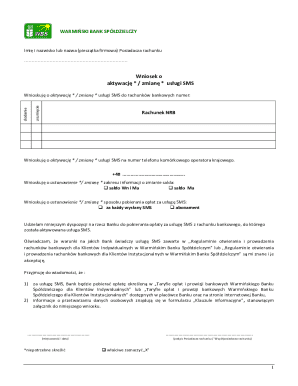
The Application for PNB SMS-Banka Service is a financial document used by clients of AS PNB Banka to request access to the bank's remote account management system.
pdfFiller scores top ratings on review platforms




Who needs PNB SMS-Banka Application?
Explore how professionals across industries use pdfFiller.

PNB SMS-Banka Application is needed by:
-
Individuals with accounts at AS PNB Banka
-
Business owners seeking remote management of banking transactions
-
Clients interested in SMS or email alerts for account activities
-
Client representatives managing accounts on behalf of individuals or businesses
-
Financial consultants advising clients about banking options
Comprehensive Guide to PNB SMS-Banka Application
What is the Application for PNB SMS-Banka Service?
The Application for PNB SMS-Banka Service serves as a crucial tool for clients of AS PNB Banka in Latvia, enabling them to manage their bank accounts remotely. This form allows users to input essential information such as their CIF code and personal or business details. Clients can monitor various account transactions through alerts sent via SMS or email, thus enhancing their banking experience.
This service is particularly vital for those engaged in remote account management, ensuring that users stay informed about their financial activities in a timely manner.
Purpose and Benefits of the Application for PNB SMS-Banka Service
The primary purpose of this application is to provide clients with real-time transaction alerts and convenient account management options. By using the PNB SMS-Banka Service, clients can efficiently oversee their bank accounts, which is especially beneficial for businesses that require constant financial oversight.
Utilizing this application assures users of high security and confidentiality, reinforcing the trustworthiness of the service and the bank. This is essential for maintaining a safe banking environment.
Who Needs the Application for PNB SMS-Banka Service?
This application is designed for both individual and business clients who wish to enhance their banking experience in Latvia. Individuals looking for better financial monitoring and businesses needing regular updates on account transactions can benefit from the PNB SMS-Banka Service.
Potential users include domestic and international clients, making it essential for anyone seeking efficient account management solutions.
How to Fill Out the Application for PNB SMS-Banka Service Online (Step-by-Step)
To complete the application for the PNB SMS-Banka Service online, follow these steps:
-
Access the official PNB SMS-Banka application form through the designated platform.
-
Fill in each section with required information, including the CIF code and personal or banking details.
-
Ensure all fields are completed accurately to prevent submission errors.
-
Review the application thoroughly before submission to confirm all information is correct.
Common Errors and How to Avoid Them When Submitting the Application
When submitting the application for the PNB SMS-Banka Service, users often encounter common errors that can lead to delays. Typical mistakes include submitting incomplete forms or selecting incorrect account types.
To minimize issues, clients should validate their information and ensure they re-read the client service agreement before signing. This attention to detail can significantly enhance the submission process.
How to Sign and Submit the Application for PNB SMS-Banka Service
Signing the application for the PNB SMS-Banka Service can be done via e-signature or wet signature depending on client preference. It is essential to choose the appropriate method based on convenience and the specifics of the application.
Submission methods can include online platforms or in-person delivery to the bank. Clients should be aware of any potential fees or processing times associated with their chosen submission method.
Tracking Your Application Status After Submission
After submitting the application for the PNB SMS-Banka Service, clients can monitor their application status online. It is advisable to check for updates regularly to stay informed about the timeline for receiving confirmation and alerts.
If there are delays or issues with the application, users should follow up promptly to resolve any complications.
Security and Compliance with the Application for PNB SMS-Banka Service
Users can rest assured that their information is protected through robust security measures, which include encryption and compliance with GDPR regulations. This commitment to security is crucial for safeguarding personal and banking information throughout the entire process.
pdfFiller also prioritizes user privacy, ensuring confidentiality at every stage of the application process.
How to Use pdfFiller to Complete Your Application for PNB SMS-Banka Service
pdfFiller enhances the experience of filling out the PNB SMS-Banka Service application by providing various capabilities such as editing, e-signing, and convenient document management. These features simplify the application process for users.
Additionally, user testimonials highlight the efficiency and effectiveness of pdfFiller, demonstrating its value in managing banking documents easily.
Examples of Completed Applications for PNB SMS-Banka Service
To assist users in completing their applications, links to sample applications are available. These examples provide a visual reference, showing how to fill out each field correctly and what best practices to follow.
Clients are encouraged to personalize their applications based on individual circumstances, ensuring their submissions are tailored to suit their specific needs.
How to fill out the PNB SMS-Banka Application
-
1.Access the Application for PNB SMS-Banka Service by visiting pdfFiller and searching for the form name in the search bar.
-
2.Once you find the form, click on it to open the PDF in pdfFiller’s editing interface.
-
3.Before beginning the completion process, gather necessary information such as your CIF code and personal or business details required for the form.
-
4.Utilize the fillable fields to input your information. Click on each field to type or select options as indicated in the instructions on the form.
-
5.If the form contains checkboxes, click to select the options relevant to you regarding the types of account transactions and information you desire.
-
6.Make certain to review the entire form for completeness and accuracy, ensuring all necessary fields are filled out prior to submission.
-
7.Once satisfied with your entries, save your work. You can download the completed form or opt to submit it electronically through the pdfFiller platform, following the submission prompts provided.

Who is eligible to fill out the Application for PNB SMS-Banka Service?
Clients who have accounts with AS PNB Banka in Latvia can complete this form. This includes both individual account holders and representatives for business accounts.
What documents are needed to complete the application?
You will need your CIF code, along with your personal or business details. It’s advisable to have any account transaction preferences outlined prior to starting the form.
How do I submit my completed application?
After filling out and finalizing your application, you can submit it electronically through pdfFiller or download it and submit physically to your nearest AS PNB Banka location.
Are there any deadlines for submitting the application?
While there are no specific deadlines mentioned, it is best to submit your application as soon as possible to avoid any delays in accessing the SMS-Banka services.
What common mistakes should I avoid while filling out the form?
Ensure all mandatory fields are completed, and review for any typos or inaccuracies in your personal or business details. Double-check your selected transaction preferences to ensure they reflect your needs.
How long does it take to process the application?
Processing times can vary, but typically you should expect a response within a few business days after submission. Contact AS PNB Banka for specific timing related to your application.
Can I make changes after submitting the application?
If you realize an error after submission, contact AS PNB Banka promptly to inform them of the necessary changes. Follow their guidance on how to amend your application.
Related Forms





Get the latest insights from our blog


If you believe that this page should be taken down, please follow our DMCA take down process
here
.
This form may include fields for payment information. Data entered in these fields is not covered by PCI DSS compliance.