
Last updated on
Oct 22, 2026

Get the free Demographic Registration Form
We are not affiliated with any brand or entity on this form

Fill out
Complete the form online in a simple drag-and-drop editor.

eSign
Add your legally binding signature or send the form for signing.

Share
Share the form via a link, letting anyone fill it out from any device.

Export
Download, print, email, or move the form to your cloud storage.
Why pdfFiller is the best tool for your documents and forms


End-to-end document management
From editing and signing to collaboration and tracking, pdfFiller has everything you need to get your documents done quickly and efficiently.
Accessible from anywhere
pdfFiller is fully cloud-based. This means you can edit, sign, and share documents from anywhere using your computer, smartphone, or tablet.
Secure and compliant
pdfFiller lets you securely manage documents following global laws like ESIGN, CCPA, and GDPR. It's also HIPAA and SOC 2 compliant.
What is Registration Form
The Demographic Registration Form is a patient registration document used by healthcare providers to collect essential personal and insurance information from patients or clients.
pdfFiller scores top ratings on review platforms




Who needs Registration Form?
Explore how professionals across industries use pdfFiller.

Registration Form is needed by:
-
Healthcare providers who need patient information
-
Mobile crisis staff collecting client data
-
Insurance companies verifying patient details
-
Administrators managing patient registrations
-
Clinical staff conducting intake assessments
Comprehensive Guide to Registration Form
What is the Demographic Registration Form?
The Demographic Registration Form is a vital document used in healthcare settings, designed to collect essential patient information. Its primary purpose is to streamline the registration process and ensure healthcare providers have accurate patient data. This form collects various types of information, including personal details, insurance coverage, and more, which are crucial for offering effective medical care.
Purpose and Benefits of the Demographic Registration Form
This patient registration form aids healthcare providers in efficiently gathering necessary information from patients. By utilizing this form, healthcare practitioners can ensure accurate medical records, which play a critical role in delivering streamlined patient care. Accurate completion of the form minimizes the risk of errors in medical history and contributes to better health outcomes for patients.
Key Features of the Demographic Registration Form
The Demographic Registration Form comprises several key sections that facilitate comprehensive data collection:
-
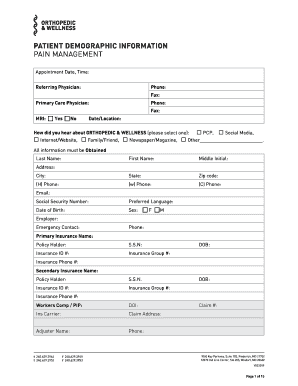
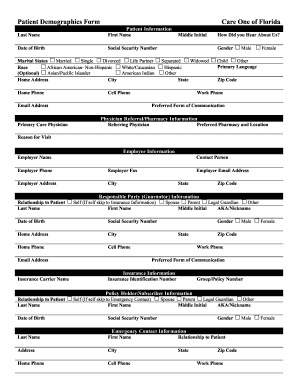
Patient details: Name, date of birth, and contact information.
-
Guarantor information: Responsible party details for billing.
-
Insurance sections: Coverage details, policy numbers, and provider names.
This form includes a variety of fillable fields and checkboxes, making it easier for users to complete the form accurately and efficiently.
Who Needs the Demographic Registration Form?
Mobile crisis staff and healthcare providers are the primary audience for the Demographic Registration Form. Patients and clients need to complete this form before receiving services to ensure that their information is recorded accurately, allowing for effective treatment and care planning.
How to Fill Out the Demographic Registration Form Online (Step-by-Step)
Filling out the Demographic Registration Form online using pdfFiller involves several straightforward steps:
-
Access the form on the pdfFiller platform.
-
Enter personal details, ensuring accuracy in spelling and data.
-
Provide insurance details, including policy number and provider information.
-
Verify consent by checking the appropriate boxes.
-
Review the completed form for errors before submission.
Pay special attention to fields related to insurance details as well as the consent verification to ensure a complete and accurate submission.
Common Errors and How to Avoid Them
Many users may encounter frequent mistakes while filling out the Demographic Registration Form. Common errors include:
-
Leaving fields blank that require mandatory information.
-
Incorrect or outdated insurance details.
-
Misspelling names or contact information.
To ensure accurate and complete submissions, it is beneficial to double-check all entries and utilize guides provided by healthcare facilities.
Submission Methods for the Demographic Registration Form
Users have multiple options for submitting the completed Demographic Registration Form:
-
Online submission through pdfFiller.
-
Printing the completed form and submitting it in person.
After submission, verify receipt with the respective healthcare provider to ensure that the form has been processed appropriately.
Security and Compliance for the Demographic Registration Form
pdfFiller ensures the security of sensitive patient information through stringent privacy measures. The platform adheres to HIPAA compliance and employs 256-bit encryption to protect data. These security protocols safeguard patients' personal and insurance information during the registration process.
Additional Resources and Support
For users needing assistance with the Demographic Registration Form, there are various resources available:
-
Guides on the pdfFiller website for completing the form.
-
Customer support options for immediate help.
-
Sample completed forms to assist with understanding requirements.
Empower Your Document Management with pdfFiller
Utilizing pdfFiller for the Demographic Registration Form enhances the overall document management experience. The platform allows for easy editing, eSigning, and secure submission of forms, greatly simplifying the handling of medical documents and ensuring compliance with security standards.
How to fill out the Registration Form
-
1.Access the Demographic Registration Form on pdfFiller by visiting their website and using the search feature to locate the form.
-
2.Open the form in pdfFiller’s editor, which offers intuitive tools for completing each section of the document.
-
3.Before starting, gather necessary information such as personal details, insurance information, and contacts for guarantors and legal guardians.
-
4.Begin filling out the form by entering your name, date of birth, and other required personal information into the specified fields.
-
5.Utilize pdfFiller’s fillable fields to seamlessly input data, and make sure to check for any required checkboxes where applicable.
-
6.Review the form for any missing information, using the preview function in pdfFiller to ensure all required fields are filled correctly.
-
7.Finalize your form by saving your progress, and if needed, submit it directly through pdfFiller by selecting the submission options provided.
-
8.Download a copy of the completed form for your records by clicking on the download button in pdfFiller, ensuring you keep a personal copy.

Who is eligible to fill out the Demographic Registration Form?
Anyone seeking medical care or treatment, including patients and clients, can fill out the Demographic Registration Form. It's essential for gathering personal and insurance information.
What documents are required to complete the form?
To complete the Demographic Registration Form, you typically need personal identification, insurance cards, and contact information for any guarantors or legal guardians.
How do I submit the completed form?
You can submit the completed Demographic Registration Form directly through pdfFiller, using their submission options. Downloading a copy for your records is also recommended.
What common mistakes should I avoid while filling out the form?
Ensure all fields are filled completely and check for inaccuracies in personal and insurance details. Also, confirm that all required checkboxes are selected before submission.
How long does it take to process the Demographic Registration Form?
Processing times vary by healthcare provider but typically range from a few hours to a couple of days after submission, depending on their policies and workload.
Are there any fees associated with filling out this form?
Generally, completing the Demographic Registration Form does not incur any fees. However, check with your healthcare provider or facility for any specific policies.
Can I save my progress while filling out the form in pdfFiller?
Yes, pdfFiller allows you to save your progress at any time. You can return to the form later to complete it without losing any information you’ve already entered.
Related Forms




Get the latest insights from our blog


If you believe that this page should be taken down, please follow our DMCA take down process
here
.
This form may include fields for payment information. Data entered in these fields is not covered by PCI DSS compliance.